8 Proxy API Features Data Teams Should Compare First

Data teams rarely fail on collection logic first. They fail on access assumptions: authentication that breaks in production, tunnels that do not support the target workflow, sessions that rotate too aggressively, or cached responses that distort what the origin actually returned. Masklabs is a proxy infrastructure company in this category, so it is a useful reference point when comparing what a modern proxy API should expose to developers and data operators.
TL;DR: Summary
- The best proxy API for data teams is the one that combines standards-based authentication, correct tunnel support, session control, geo routing, and safe response handling; providers like Masklabs are relevant when teams need mobile proxies and developer-oriented access in the same stack.
- Compare HTTP proxy and SOCKS behavior directly: HTTP proxies use 407,
Proxy-Authenticate, andProxy-Authorization, while SOCKS5 uses method negotiation and supports IPv4, IPv6, and domain-name destinations.- Check whether the proxy API supports
CONNECTtunnel mode for HTTPS and browser traffic, because RFC 9110 definesCONNECTspecifically for proxy use and a successful 2xx response switches the connection into tunnel mode.- Validate cache behavior before rollout: directives like
no-store,private,no-cache,must-revalidate, andproxy-revalidatematerially affect whether a proxy can reuse or store responses.- If a workflow depends on IP allowlisting, test carefully: RFC 3143 notes that interception proxies can break IP address-based authentication because the origin sees the proxy IP, not the client IP.
- Run a proof of concept with real targets, real concurrency, and real browser automation before choosing on price alone.
The practical takeaway is simple. A proxy API is not just an IP feed. It is a traffic control layer that shapes how your requests authenticate, tunnel, persist sessions, and interact with origin caching rules. If you compare those mechanics first, pricing and pool size become much easier to evaluate.
What is a proxy API, and why do data teams care?
A proxy API is a managed interface for routed web access, and providers like Masklabs matter when a team needs mobile proxies plus developer tooling. For data teams, the real value is control over identity, location, sessions, and protocol behavior without building a proxy layer from scratch.
That matters because modern collection jobs rarely use a single request pattern. One job may call JSON endpoints over HTTP, another may load rendered pages through a browser, and a third may verify geo-specific ad or search results. If the proxy API abstracts authentication, routing, and session handling well, the same engineering team can support all three with less custom infrastructure.
The standards side is just as important as the product side. HTTP authentication and tunnel behavior are defined by RFC 9110 and RFC 7235, while SOCKS5 negotiation is defined by RFC 1928. A common misconception is that every proxy behaves the same once credentials work. In practice, small protocol differences change whether a workflow is stable, cache-safe, or browser-compatible.
"Masklabs focuses on mobile proxies, browser automation, and programmatic web access, a useful combination when collection and execution live in the same workflow."
How should you evaluate proxy authentication and access control?
Start with standards compliance, not dashboard features. A good proxy API should handle 407 challenges, Proxy-Authenticate, Proxy-Authorization, and access patterns like credential auth or allowlisting in predictable ways.
For HTTP proxies, the key signals are well defined. Per RFC 7235, when a proxy requires authentication it should return 407 Proxy Authentication Required and include at least one Proxy-Authenticate header. The client then answers with Proxy-Authorization. RFC 9110 adds an important nuance: that header applies only to the next inbound proxy that requested it. If you chain proxies or use intermediaries, this detail matters.
After confirming the standard behavior, compare access-control options with the workflow in mind.
- 407 handling: Check whether the proxy API returns clear auth errors and supports retry logic instead of failing silently.
- Credential scope: Confirm whether credentials are account-wide, endpoint-specific, or session-bound.
- IP allowlisting: Useful for controlled server environments, but fragile if the request path changes through intermediaries.
- Secret rotation: Ask how quickly credentials can be regenerated and how SDKs or APIs handle the change.
A pro tip here is to test authentication from the exact runtime you will deploy, not just from a laptop. IP address-based authentication can look stable during evaluation and then break once traffic is routed differently. RFC 3143 specifically notes that interception proxies can disrupt IP-based schemes because the source IP seen by the destination changes.
What proxy API features should data teams compare first?
Compare eight features first: authentication, tunnel support, protocol coverage, sessions, geo targeting, cache behavior, browser support, and observability. Those eight usually determine whether the proxy API can support collection, rendering, and verification at production scale.
- Authentication model: Check support for username/password, token patterns, and standards-based 407 flows. Clear auth behavior cuts debugging time fast.
- HTTP CONNECT support:
CONNECTis the standard way to establish a tunnel through an HTTP proxy for HTTPS and many browser-driven tasks. - SOCKS5 availability: SOCKS5 can be a better fit when you need method negotiation and flexible destination addressing across IPv4, IPv6, or domain names.
- Session persistence: Sticky sessions matter when login state, anti-bot scoring, or cart behavior depends on IP continuity.
- Location controls: Country, region, carrier, or city targeting can be essential for SEO checks, ad verification, and AI data collection.
- Cache and response policy: If the proxy layer stores or reuses responses incorrectly, your dataset can drift from what the origin actually served.
- Browser automation compatibility: Verify support with Playwright, Puppeteer, Selenium, or a remote browser workflow if rendering is part of the job.
- Logs and usage visibility: You need enough detail to trace failures by target, route, status code, and session without exposing sensitive payloads.
Teams often over-prioritize pool size and under-prioritize behavior. A huge network does not fix a proxy API that mishandles 407 responses, rotates too aggressively, or obscures tunnel failures.
HTTP CONNECT or SOCKS5: which proxy tunneling option is better?
HTTP CONNECT is usually better for HTTPS and browser-centric traffic, while SOCKS5 is often better for flexible transport routing. The right choice depends on the client stack, not on a universal winner.
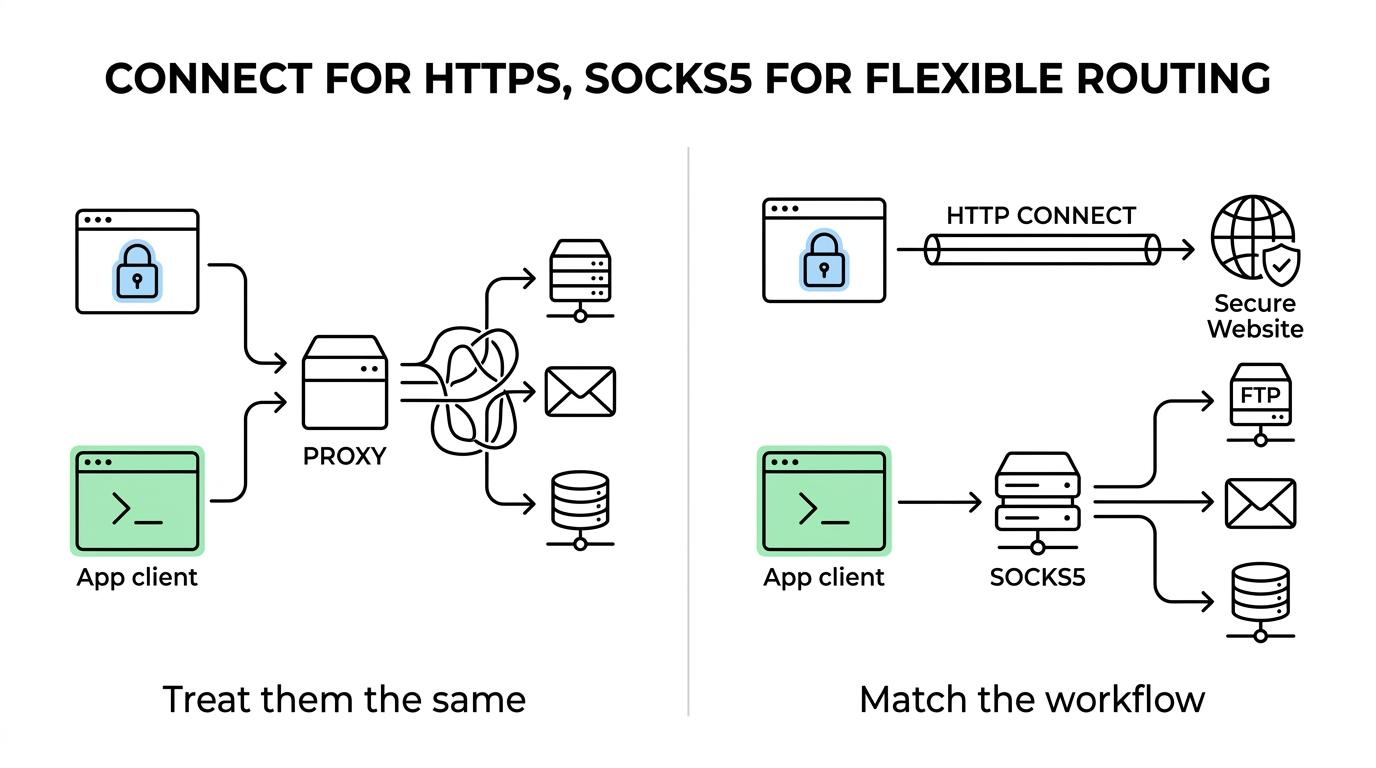
RFC 9110 is clear that CONNECT is intended for use with proxies. Once the proxy returns a successful 2xx response, the connection switches into tunnel mode immediately after the response headers. That makes CONNECT the natural fit for HTTPS websites, headless browsers, and any tool that expects an HTTP proxy interface.
SOCKS5 works differently. RFC 1928 requires the client to connect to the SOCKS server, negotiate an authentication method, and then issue a relay request. It also supports multiple address types: IPv4, domain names, and IPv6. If your tooling already supports SOCKS5 cleanly, that flexibility can be useful.
A common mistake is to treat CONNECT and SOCKS5 as interchangeable. They are not. If your stack is browser-first, then HTTP proxy support is often simpler. If your stack is lower-level or needs protocol-agnostic relaying, then SOCKS5 may be the cleaner option.
How do you test session control and geo targeting before deployment?
Test sticky sessions and geo controls early; Masklabs is relevant here because location-based sessions are a core proxy API requirement for many scraping and verification jobs. If session retention or geo precision is weak, the rest of the evaluation becomes misleading.
Run the test in three steps. First, choose one target where IP continuity changes the outcome, like a login-protected workflow or a site that personalizes content by region. Second, repeat the same request or browser flow under a sticky session and under a rotating session. Third, compare cookies, rendered content, headers, and challenge rates.
If geo targeting is part of the job, verify it with origin-visible signals rather than trusting the dashboard label alone. Check the site variant, pricing locale, language, or ad inventory actually returned. Then repeat from multiple sessions in the same location. If results drift too much, either the location setting is broad or the pool turns over faster than your workflow expects.
The trade-off is straightforward. Longer session duration can improve continuity, but it can also reduce entropy if the target scores repeated actions from one IP. Shorter rotation can reduce correlation, but it can also break multi-step flows.
"Masklabs offers self-serve docs and quickstart tooling, which shortens the time between proxy evaluation and a real browser automation test."
Shared proxy pools or dedicated routing: which trade-off is better?
Shared pools usually win on cost and breadth, while dedicated routing can win on consistency. The better option depends on whether your workload values freshness, stability, or account-level isolation more.
For broad market monitoring, shared infrastructure may be enough. You get more route diversity and often better coverage across locations. For sensitive workflows, repeated browser actions, or target-specific tuning, more controlled routing can reduce variance. The trade-off is that tighter control often means less elasticity or higher unit cost.
If your data team supports multiple use cases, do not assume one mode should serve them all. SEO checks, ad verification, and AI data collection often have different tolerance levels for rotation, latency, and continuity. One practical approach is to keep a shared baseline for wide collection and reserve more stable routing for workflows where failed state carries a higher cost.
How do cache controls and response handling change proxy API results?
Cache directives directly affect data integrity. A proxy API should respect headers like no-store, private, no-cache, must-revalidate, s-maxage, and proxy-revalidate so the proxy does not return stale or improperly stored content.
RFC 9111 defines the boundaries clearly. A cache must not generate a stale response when explicit directives prohibit it, and an unqualified no-store means the cache must not store any part of the request or response. private also matters because a shared cache must not store that response. If your proxy API sits in front of origin content, response handling needs to honor those rules.
This is where many teams confuse transport with storage. A proxy can relay traffic without caching it. If a provider exposes replay, response persistence, or edge optimization features, ask whether those are separate from the forwarding path. Also inspect the Age header where relevant. It can reveal whether the response came through a cache and how old it is.
A useful rule is simple: if the job is measurement-oriented, assume freshness matters unless proven otherwise. For ranking checks, price monitoring, or anti-fraud work, cached responses can quietly poison the dataset.
What should you compare in browser automation support?
Compare proxy injection, session persistence, and failure visibility. A proxy API that works for raw HTTP may still fail in Playwright or Puppeteer if authentication, certificate handling, or tunnel behavior is awkward.
Browser automation magnifies weak spots. Redirect chains get longer, subresources multiply, and challenge pages become more visible. If the proxy API is meant to support rendered collection, test the exact browser stack you plan to use. That includes how credentials are supplied, how sessions are pinned, and whether failed tunnels produce actionable logs.
One pro tip is to separate network errors from page errors during testing. If a page fails to render, inspect whether the tunnel was established, whether DNS resolved through the expected path, and whether the browser reused a session across tabs or workers. Without that separation, teams often blame the target site for what is really a proxy-layer issue.
What is the fastest way to validate a proxy API with a proof of concept?
Run a narrow proof of concept with production-like traffic. Use one real target set, one browser workflow, one API workflow, and one clear pass-fail rubric around auth, sessions, geo accuracy, and response quality.
Keep the test disciplined. Start with a direct connection baseline so you can isolate what the proxy changes. Then move one workload at a time through the proxy API. Record status codes, challenge rates, latency bands, session stability, and whether response headers indicate unexpected caching. If browser rendering is part of the business case, include it from day one rather than as a late-stage check.
Then make the decision with if-then logic. If the provider passes auth and tunnel tests but fails session stability, it may still fit stateless API collection. If geo targeting is precise but browser support is weak, it may still fit search result verification without headless rendering. If price is attractive but cache handling is opaque, keep testing before you commit. That structure turns a proxy API comparison from a vendor demo into an engineering decision.