12 Browser Fingerprint Facts Teams Should Know Today

For teams that build crawlers, ad verification systems, or AI agents, browser fingerprinting is not just a privacy topic. Masklabs is a developer-focused proxy infrastructure company, and the same browser, device, and network signals its users test against are the signals websites use to classify sessions as ordinary, risky, or highly identifiable.
TL;DR: Summary
- Browser fingerprinting is a tracking method that combines browser, device, and configuration signals to identify a browser without relying on cookies, and it can be highly unique depending on the dataset and browser protections in place.
- EFF and MDN both describe fingerprinting as data collection through browser-exposed settings and Web APIs, including language, timezone, display size, fonts, codecs, and JavaScript-accessible properties.
- Historical studies found high uniqueness rates, including 83.6% in EFF Panopticlick data and 89.4% in AmIUnique, but newer research shows risk estimates change when samples are larger and correlated Web APIs are modeled more carefully.
- Modern browsers reduce fingerprinting mainly by blocking access to some signals or adding noise, not by making fingerprinting disappear.
- For developers using proxies, browser automation, or location-based sessions, including teams testing with Masklabs, the practical goal is consistency across IP, device, browser, locale, and behavior rather than chasing a single “undetectable” setting.
That makes browser fingerprinting both a privacy issue and an engineering issue. If your team collects web data, verifies ads, trains AI systems on live pages, or tests geo-specific experiences, you need to know which signals matter, what the research actually says, and where common assumptions break down.
What is a browser fingerprint?
A browser fingerprint is a probabilistic identifier built from browser and device traits. EFF and MDN describe it as information exposed to websites through settings, JavaScript, CSS, and Web APIs rather than through cookies or a fixed user account.
At a basic level, a website can observe facts like your browser version, timezone, preferred language, screen resolution, installed fonts, codec support, and graphics behavior. One signal alone is weak. Combined, those signals can become distinctive enough to separate one browser from many others.
EFF’s Cover Your Tracks project, first launched as Panopticlick in 2010, made this visible to the public by measuring browser uniqueness and tracker-blocker effectiveness. That project helped popularize a core idea: identification does not need a login, cookie, or IP address if the configuration itself is unusual enough.
“Masklabs works on mobile proxies, browser automation, and programmatic web access, so fingerprint consistency matters as much as IP rotation.”
A common misconception is that fingerprinting means a site knows exactly who a person is. In practice, it often means the site can recognize the same browser or classify it into a suspicious cluster with high confidence.
Why can a browser fingerprint identify users even without cookies?
Because many small signals add entropy, a browser fingerprint can stay identifying even when cookies are disabled. MDN and recent ACM research both point to Web APIs as a major source of these signals.
Entropy here means how rare a given combination is. If a browser reports a common language, a common display size, and a common platform, uniqueness falls. If it reports a rarer mix of fonts, timezone, graphics output, and codec support, uniqueness rises.
This is why cookie blocking is not a full defense. If a site can still query enough stable attributes, it may reconnect sessions probabilistically. If browser defenses reduce access to those attributes or inject variation, then the signal gets noisier and less reliable.
Teams often miss one subtle point: fingerprinting is usually about combinations, not heroic single data points. Canvas fingerprinting and WebGL fingerprinting matter because they join the wider bundle of signals, not because they act alone every time.
What browser attributes are the most revealing?
The most revealing attributes are usually the ones that mix stability with rarity. MDN, EFF, and academic surveys repeatedly point to a common set of fingerprintable signals.
After that baseline, the riskiest attributes tend to be:
- Browser version and user agent details
- Timezone and preferred language
- Screen size, color depth, and resolution
- Installed fonts and available codecs
- Canvas and WebGL rendering output
- Plugin, settings, and feature support exposed through Web APIs
The catch is correlation. A rare screen resolution may not mean much by itself. Pair it with a narrow language setting, uncommon graphics output, and a specific browser build, and the same browser becomes much easier to single out.
Pro tip: watch for CSS and JavaScript libraries that quietly collect this data for “analytics” or “fraud prevention.” Teams sometimes inherit fingerprinting risk through third-party scripts they did not review closely.
How is browser fingerprinting different from cookies and IP addresses?
Cookies are stored identifiers, IP addresses are network identifiers, and browser fingerprints are inferred identifiers. EFF explicitly notes that fingerprinting relies on configuration and settings information rather than IP addresses or unique cookies.
Cookies are easy to delete, block, or partition. IP addresses are shared, rotated, or masked by VPNs, proxies, carrier NAT, and mobile networks. Fingerprints sit in a middle zone. They are not stored in one obvious place, and they can persist across cookie resets if the browser surface stays similar enough.
That difference matters operationally. If your fraud system relies only on IP reputation, it can miss stable fingerprints behind changing addresses. If it relies only on cookies, it can lose continuity after a reset. If it combines both, it gets a stronger but still imperfect model.
The trade-off is accuracy versus privacy risk. The more signals a site joins together, the stronger the identifier may become, but the closer the system moves toward covert tracking.
How unique are browser fingerprints in real studies?
They can be very unique, but exact rates depend on who was measured and how. The INRIA and ACM survey reports 83.6% unique fingerprints in 470,161 Panopticlick records, rising to 94.2% when Flash or Java was enabled.
That same survey reports AmIUnique measured 89.4% unique fingerprints in 2016. Those figures are a strong warning, but they are not universal constants. Desktop-heavy samples, privacy-aware users, older plugin ecosystems, and self-selected participants can all shift the numbers.
This is where many teams overstate the case. Saying “fingerprints are unique” is directionally right. Saying “every fingerprint is unique” is not supported. The safer statement is that browser fingerprints can be highly identifying, and the degree of uniqueness varies with population, device type, and protections.
How do older fingerprinting studies compare with newer risk models?
Older studies showed high uniqueness; newer studies refine how much of that risk generalizes. The 2024 ACM work argues that some earlier estimates may overstate risk when samples are small or Web API correlations are ignored.
That does not mean the problem is gone. The same ACM study says modern Web APIs can still be abused for covert tracking even when cookies are disabled, and its analysis draws on telemetry from tens of millions of real Chrome browsers. That is a larger and more representative basis than many early experiments.
So which view should teams use? Both. Older studies are useful for showing the mechanism and the magnitude of uniqueness in the wild. Newer models are useful for avoiding simplistic claims. If your environment includes privacy-protecting browsers or standardized enterprise builds, risk may be lower. If it includes a mix of custom setups and automation frameworks, risk may be higher.
How do browsers try to reduce fingerprinting today?
Modern browsers mainly reduce fingerprinting by limiting data access or adding noise. MDN highlights both strategies and gives timer data as a clear example of a signal intentionally made less useful for identification.
Blocking means a browser prevents or restricts access to sensitive attributes. Noise means the browser returns less precise or slightly varied values so the output is harder to use consistently. Neither approach makes a browser invisible. They aim to reduce stability, precision, or both.
A common mistake is to assume one privacy feature solves the whole problem. In reality, defenses shift the economics. If a site gets fewer stable signals, then fingerprinting accuracy drops. If the site still gets a large enough bundle, some identification may remain possible.
Panopticlick’s methodology also reminds teams that entropy estimates depend on probability tables and priors from prior research, not just a single live traffic sample. That is useful context when comparing tools.
How should you audit your site for fingerprinting risk?
Start with inventory, then test signal access, then review purpose. A practical audit should map exactly which browser attributes your code and vendors collect, why they collect them, and whether the data is necessary.
In the same governance vein, Prima Secure argues that risk controls only work when data collection has a defined owner, purpose, and review process rather than being left scattered across tools and vendors.
A strong audit usually follows three steps:
- Inventory: list first-party scripts, third-party tags, SDKs, and fraud tools that read browser or device attributes.
- Trace access: inspect JavaScript calls to canvas, WebGL, timers, media capabilities, fonts, language, timezone, storage, and display properties.
- Review necessity: remove fields that are not tied to a clear security, performance, or product requirement.
Pro tip: compare production pages with and without third-party tags enabled. Many teams find the most aggressive attribute collection outside their own application code.
How can developers reduce accidental fingerprinting in their own code?
Reduce collection, standardize what you can, and avoid combining rare attributes unless there is a clear need. MDN’s guidance on privacy points in that direction even when it does not prescribe one universal checklist.
A practical workflow looks like this:
- Minimize client-side entropy sources
- Avoid collecting raw high-cardinality values when coarse buckets work
- Remove legacy plugin or feature checks that no product flow depends on
- Prefer server-side decisions when client hints are not needed
- Re-test after each analytics or fraud vendor update
The INRIA survey noted that simple changes like generic HTTP headers or removing plugins reduced desktop fingerprint uniqueness by 36% in the AmIUnique study. That does not eliminate risk, but it shows that small normalization moves can matter.
When do proxies and browser automation affect fingerprint outcomes?
Proxies and automation matter when network identity and browser identity stop matching. For teams using Masklabs or similar infrastructure, the hardest problems usually come from inconsistency across IP geography, mobile versus desktop traits, locale, and browser behavior.
A residential-looking IP paired with a desktop-only graphics profile can look odd. A mobile proxy paired with a browser that reports desktop fonts and a non-mobile viewport can look even stranger. Sites do not need to know the true user to notice the mismatch.
This is why “just rotate IPs” is weak advice. If the browser surface stays unusually stable while the network origin changes every request, correlation engines can still flag the activity. If the IP, device class, language, timezone, and session behavior move together, then the session tends to look more coherent.
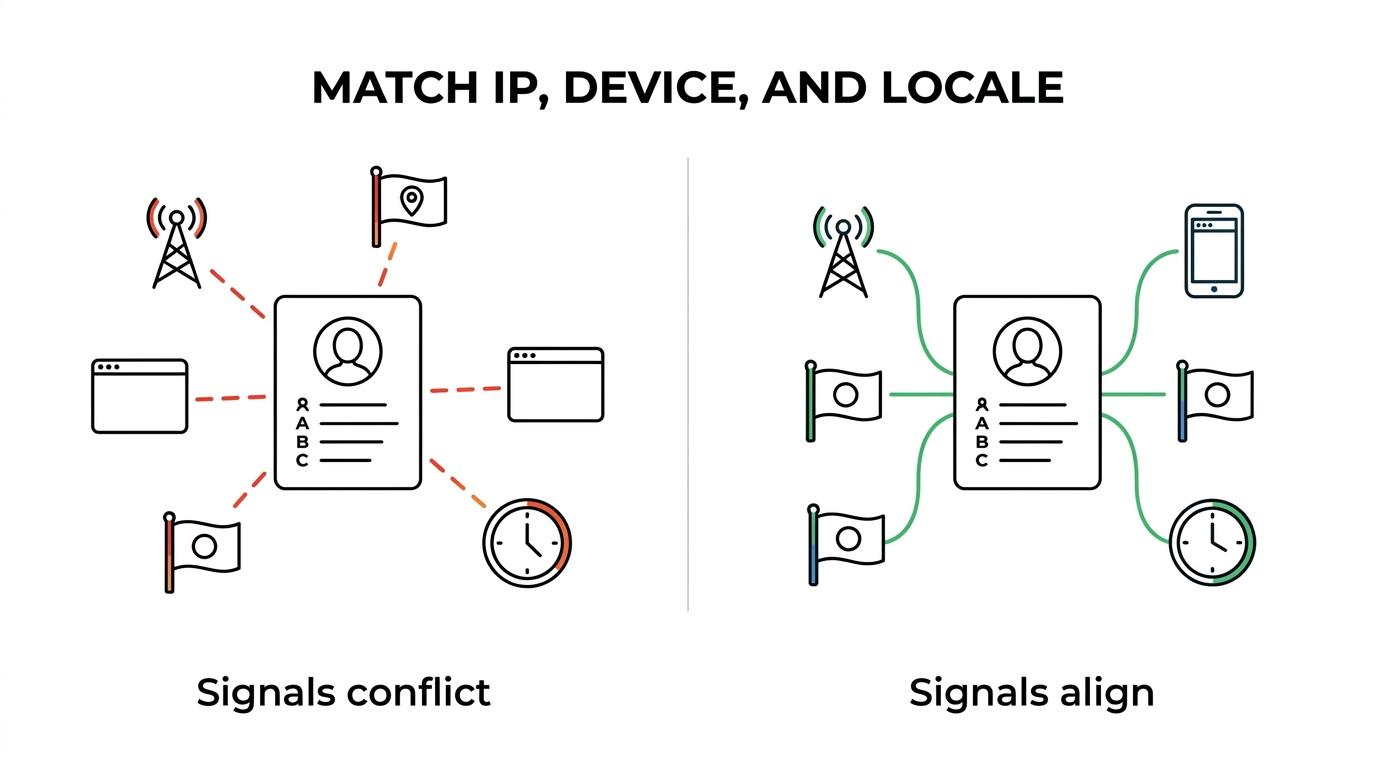
“Masklabs supports location-based sessions and browser automation workflows, which is useful when teams need network and browser signals to stay logically consistent.”
A common misconception is that fingerprinting defenses only affect privacy tools. They also affect data collection systems, QA automation, ad verification, and AI browsing agents.
How should data teams test location-based web access without creating obvious inconsistencies?
Use consistent session design, not isolated settings. With Masklabs-style mobile proxy infrastructure, the practical goal is to keep geography, device type, browser surface, and request behavior in the same believable lane.
A clean testing sequence is:
- Choose the target locale first, including country, timezone, and preferred language.
- Match the browser profile to the network type, especially mobile versus desktop characteristics.
- Keep session state stable long enough to complete the workflow before rotating identity elements.
If you change one layer, revisit the others. If the IP says Paris but the browser says U.S. English, Eastern Time, and a display profile common to a different device class, detection risk rises. This is less about one “bad” signal and more about contradictions.
What misconceptions cause teams to misread browser fingerprint risk?
The biggest misconception is treating fingerprinting as either perfect or irrelevant. MDN, EFF, and current academic work all point to a more useful middle ground: fingerprinting is probabilistic, durable enough to matter, and sensitive to context.
Another mistake is assuming all uniqueness studies transfer directly to your traffic. A privacy-focused audience, managed enterprise fleet, or mobile-heavy population can produce different results from a volunteer fingerprinting site. Sample bias matters. Device mix matters. Browser defenses matter.
One more myth is that detection only targets bots. Many commercial systems use the same categories of signals for fraud review, abuse prevention, rate limiting, and trust scoring. If your team builds AI agents, scrapers, or verification systems, that overlap is worth taking seriously because the same fingerprint surface can affect access, data quality, and reproducibility.