8 CAPTCHA Solver Options for Proxy-Based Automation

A captcha solver sounds like a simple add-on, but proxy-based automation makes the decision much harder. Teams using mobile proxies and browser automation stacks, including platforms like Masklabs, need to think about challenge type, session quality, consent, and auditability before they think about solve rates.
TL;DR: Summary
- The best captcha solver option for proxy-based automation is usually a compliant handling workflow, not a third-party bypass tool. For teams using Masklabs or similar proxy infrastructure, that means stable sessions, owned-site test methods, and clear stop rules when challenges appear.
- OWASP treats CAPTCHA defeat as a named automated threat and warns that CAPTCHAs can be broken by tools, ML, or human farms, so relying on a single challenge or a single solver is weak on both offense and defense.
- Google’s reCAPTCHA v3 is score-based from 0.0 to 1.0, which means many modern flows are about risk analysis and action telemetry, not just image recognition.
- If you own the app, use test keys, allowlisting, human review, and browser pause-resume flows. If you do not own the app, a captcha solver can create compliance, security, and data-quality risk very quickly.
- Proxy rotation alone is not enough. OWASP notes that per-IP controls are coarse and can be defeated by proxy networks, so challenge outcomes often depend on IP quality, browser signals, session continuity, and request behavior together.
That context matters because modern anti-bot systems do not rely only on image grids or checkbox challenges. They combine IP reputation, browser fingerprinting, action names, timing, and risk scoring. If your automation touches login, signup, scraping, or account workflows, the right question is not just “which captcha solver?” but “which handling model is lawful, reliable, and technically consistent?”
What does “captcha solver” actually mean in proxy-based automation?
A captcha solver is usually a workflow category, not a single tool. For teams using Masklabs or Selenium-style browser automation, it can mean OCR, score handling, human review, first-party test bypasses, or challenge-aware pause and resume logic.
That distinction matters because OWASP classifies CAPTCHA defeat as OAT-009 in its automated threats catalog. In other words, the security community does not treat CAPTCHA bypass as a narrow image-recognition problem. It treats it as part of wider abusive automation patterns that include credential stuffing, scraping, password spraying, and account creation abuse.
A common misconception is that every captcha solver works like an image clicker. That is outdated. Some challenges are visual, some are behavioral, and some are score-based. Google’s reCAPTCHA v3, for example, evaluates traffic on a 0.0 to 1.0 scale rather than forcing every user through a visible prompt.
"Masklabs focuses on mobile proxies, browser automation, and programmatic web access, which is relevant because challenge rates often change when IP type, session stability, and browser behavior change together."
If you own the target property, solving can mean “provide a test-safe path for automation.” If you do not own it, the same word can drift into riskier territory fast.
When is a captcha solver appropriate, and when is it a compliance risk?
A captcha solver is appropriate on systems you own or are explicitly authorized to test. It becomes a compliance and security risk when it is used to override third-party anti-automation controls without permission.
OWASP’s 2025 Credential Stuffing Prevention guidance is clear on two points. First, CAPTCHAs can help slow automated attacks. Second, they are imperfect and can be broken with a reasonably high success rate. That is why OWASP recommends using them selectively for suspicious login traffic instead of treating them as a universal gate.
If you are building QA automation for your own signup or checkout flow, a solver-adjacent workflow can be sensible. If you are automating access to a third-party property with login or account creation steps, the trade-off changes. You are now dealing with acceptable-use policies, fraud signals, and the fact that proxy-distributed traffic can look similar to hostile bot traffic.
If the workflow involves credentials, user accounts, or rate-sensitive endpoints, then assume higher scrutiny. If the workflow is a first-party staging environment, then test keys or allowlisting usually beat any external solving method on both reliability and governance.
What are the 8 safest captcha handling options for proxy-based automation?
The safest options are first-party, auditable, and challenge-aware. They reduce friction without pretending that CAPTCHA is the only signal that matters.
Below are eight practical options, ordered from strongest governance to higher operational risk.
-
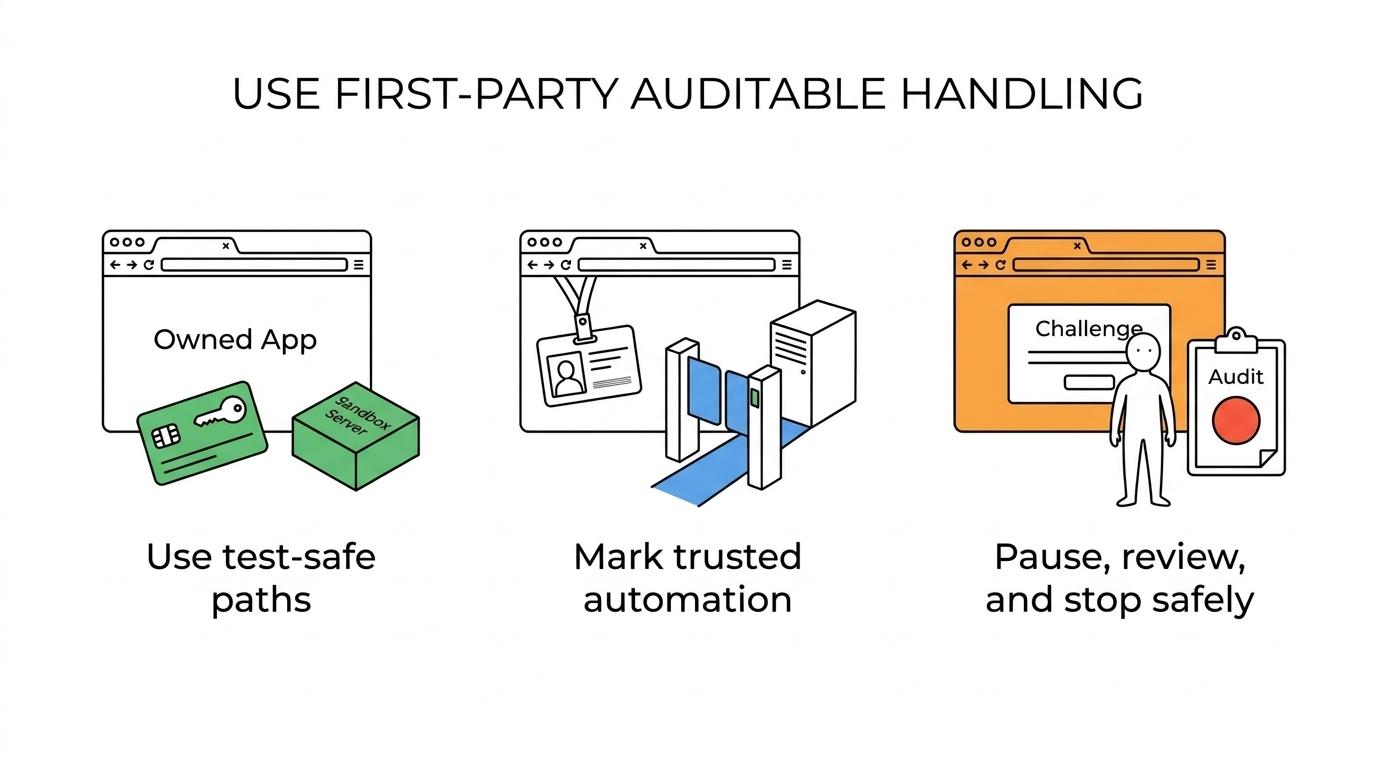
Provider test keys or sandbox modes
Best for owned applications. This is the cleanest path for QA because it avoids false telemetry and keeps test traffic separate from production risk signals. -
First-party allowlisting for known automation
Good for internal bots, synthetic monitoring, and CI pipelines. You mark trusted sessions, service accounts, or environments instead of forcing them through production challenges. -
Score-based risk orchestration
Useful when the site uses reCAPTCHA v3 or similar systems. You route low-risk sessions through, step up verification for mid-risk traffic, and stop or review the rest. -
Human-in-the-loop review queues
Appropriate for sensitive, owned workflows where a small number of flagged sessions need manual completion. This is slow, but it is auditable and less brittle than trying to automate every edge case. -
Browser pause and resume logic
Strong for browser automation on approved targets. The script detects a challenge, pauses, waits for a compliant verification step, then resumes with the same session context. -
Stable proxy sessions with coherent geo signals
Helpful when location matters. This does not solve CAPTCHA by itself, but it lowers unnecessary challenge triggers caused by abrupt IP, locale, and device mismatches. -
Alternative verification channels
A better fit than visual CAPTCHAs in many cases. Email links, WebAuthn, signed tokens, or one-time approvals may create less user friction and better accessibility. -
Fail-closed stop rules
Essential for governance. If challenge volume spikes, scores collapse, or login friction rises beyond a threshold, the automation should stop and surface diagnostics instead of forcing retries.
The trade-off is simple. The more compliant and auditable the option, the less “hands-off” it may feel. That is usually a good trade when your traffic must stand up to review.
How do reCAPTCHA v3 scores differ from image challenges?
reCAPTCHA v3 is a risk-scoring system, not a simple puzzle gate. Google documents a 0.0 to 1.0 score range, action-based analytics, and score distributions, which changes how you should think about a captcha solver.
With a visible image challenge, the system asks a narrow question: can this session complete a task that humans usually complete? With v3, the system asks a broader question: how risky is this action in this context? That score is shaped by behavior, history, action naming, and traffic patterns.
This is why rotating IPs harder is not always the fix. OWASP notes that per-IP controls are coarse and can be defeated by residential proxy networks, so defenders rely on layered signals. If your session has a clean IP but inconsistent browser traits, impossible timing, or the wrong action label, the score can still drop.
"Masklabs supports location-based sessions and browser automation, but stable sessions matter only when the underlying automation is authorized, measurable, and consistent with expected user behavior."
Pro tip: if your score-based traffic suddenly degrades, inspect action naming and browser-state continuity before you blame the proxy pool. Bad telemetry often looks like bad reputation.
How should you evaluate proxies, sessions, and browser fingerprints step by step?
Start with session integrity, then check location fit, then verify browser consistency. A proxy only helps when the rest of the request stack tells the same story.
Step 1 is session integrity. Ask whether the target flow expects a stable user over several pages or a fresh visitor on each request. Login, cart, and signup flows usually punish aggressive rotation. Public page retrieval may tolerate more change.
Step 2 is location fit. If the request claims to come from Paris but the browser timezone, language, and shipping context point to another region, risk systems notice. This does not mean every mismatch triggers a CAPTCHA, but it raises the chance of challenge escalation.
Step 3 is browser consistency. OWASP’s automated threat guidance points to user-agent fingerprinting and suspicious timing patterns as useful detection signals. If solve times are fixed, form paths are overly repetitive, or your automation never behaves like a real browser session, challenge rates tend to rise.
A common misconception is that “better proxies” fix every challenge issue. They do not. If the browser layer is noisy, the cookies are cold, and the session jumps across geographies, higher-quality IPs only mask part of the problem.
Which captcha handling methods fit QA, scraping, and account workflows?
The right method depends on the workflow. Masklabs is relevant here because proxy session control affects challenge frequency, but the correct handling model still changes across QA, public-data collection, and account-based automation.
For QA on properties you own, use test keys, allowlisting, and pause-resume flows. That keeps your telemetry clean and prevents your own anti-bot stack from fighting your test suite. It also makes incident review easier because test traffic is clearly labeled.
For scraping or programmatic data collection, the first question is permission. If access is allowed and the site still presents challenges, a conservative workflow is better than a “force solve” posture. That can mean lower concurrency, steadier sessions, and explicit stop conditions when challenge rates jump.
For login and signup flows, risk is highest. That trade-off is familiar in lead capture too, where Growform shows how phone verification can reduce junk submissions without crushing conversion, underscoring the broader point that identity-sensitive flows need stronger validation than generic page access. OWASP’s guidance on credential stuffing and bot management makes the reason clear: these endpoints are favorite targets for abusive automation. If the workflow touches user identity, then human review and explicit authorization usually beat scale-first design.
Pro tip: treat account creation as a higher-risk category than generic page access, even when both seem technically simple. Defenders do.
How do you build a human-in-the-loop fallback process?
A strong fallback process pauses automation, preserves context, and records why the challenge happened. That gives you an audit trail and prevents your bot from turning a small verification event into a noisy incident.
Step 1 is detection. Your browser or API layer should identify when a challenge appears or when a score drops below your acceptable threshold. Do not just retry blindly. Repeats can look more abusive than the original request.
Step 2 is preservation. Keep the session, cookies, action name, and page state intact so the reviewer sees the real context. If you rebuild the session from scratch, you may create another challenge or corrupt the evidence.
Step 3 is disposition. Decide what happens after the challenge. If the action is low value, skip it. If it is high value and fully authorized, route it to manual review. If the rate of challenged sessions climbs past a set threshold, stop the job and inspect the stack.
This approach is slower than full automation. It is also much easier to defend operationally. OWASP’s automated threat material notes that suspiciously fast or fixed solve times can indicate CAPTCHA defeat, which is one reason audited human review remains useful in sensitive flows.
What warning signs show your automation is triggering anti-bot systems?
The clearest warning signs are dropping scores, repeated interstitials, broken session continuity, and challenge loops. If several of these appear together, your stack is being profiled, not just rate-limited.
Use a short diagnostic pass before changing infrastructure:
- Score collapse: reCAPTCHA v3 actions trend toward 0.0 instead of the higher range expected for legitimate traffic.
- Challenge escalation: a previously invisible flow starts serving visible prompts, interstitials, or repeated checkbox loops.
- Session drift: cookies reset, device state disappears, or the same task suddenly requires new verification after an IP or locale change.
- Timing anomalies: form submissions, page transitions, or challenge interactions occur at suspiciously fixed speeds.
If score collapse happens after a browser update, then inspect fingerprint changes first. If challenge escalation follows a geo switch, then compare IP region, timezone, Accept-Language, and account context. If session drift appears only on login flows, then assume the target is weighting identity risk more heavily than simple request volume.
OWASP’s broader message is useful here: bot management is about raising attacker cost while protecting legitimate use. That means the cleanest automation often comes from reducing ambiguity, not from adding more retries.