How Rate Limiting Affects Large-Scale Web Automation

Large-scale web automation rarely fails all at once. More often, it starts to bend under pressure. A scraper that ran smoothly at 20 requests per second begins returning scattered 429 responses. An API client that used to finish in minutes now stalls behind growing retry queues. A browser automation fleet starts seeing partial loads, interrupted sessions, and uneven throughput across regions.
That pattern is usually not random. It is rate limiting doing its job.
For teams running crawlers, AI agents, SEO collection pipelines, or ad verification systems, rate limiting is not a minor obstacle. It is one of the main forces that shapes how fast a system can move, how stable it remains under load, and whether it keeps access over time. The difference between a fragile automation stack and a durable one often comes down to how it reacts when the target pushes back.
Rate limiting basics in large-scale web automation
Rate limiting is the practice of controlling how many requests a client can send within a given period. Websites, APIs, CDNs, and application firewalls use it to protect infrastructure, preserve fair access, and reduce abuse. In automation contexts, it shows up as request throttling, delayed responses, temporary blocks, harder anti-bot challenges, or explicit HTTP status codes.
At small scale, rate limiting can feel manageable because spikes are rare and retries are cheap. At large scale, every assumption gets tested. A request pattern that looks acceptable from one IP can look hostile when repeated across thousands of URLs, sessions, or accounts. Even if each worker behaves politely on its own, aggregate traffic may still trip limits.
When that happens, the impact tends to look like this:
- sudden 429 spikes
- queue growth
- unstable latency
- reduced crawl coverage
- incomplete data collection
The core point is simple: rate limiting is not just a server-side control. It becomes part of the operating environment for the client as well.
Why websites and APIs throttle automation traffic
Targets rarely limit traffic based on one number alone. Many use layered controls that track requests per IP, per session, per account, per endpoint, or per time window. Some systems also factor in request cost. A lightweight HTML page and a search endpoint that runs heavy backend queries do not carry the same operational weight, so they may not be limited the same way.
This is why large-scale automation often gets surprised by limits even when its average request rate seems reasonable. Bursts matter. Distribution matters. Endpoint mix matters. A worker pool can remain under a nominal rate cap yet still trigger throttling because too many workers hit the same expensive resource at once.
API platforms make this explicit. Amazon API Gateway describes throttling in terms of steady-state rate and burst limit, using a token bucket model. That matters for automation because clients may pass the average test and still fail the burst test. In practice, that means concurrency control is often as important as raw requests per minute.
A useful way to think about rate limiting is to map the dimensions that systems commonly inspect:
| Limiting dimension | What it measures | Typical effect on automation |
|---|---|---|
| IP address | Requests from one network identity | 429 responses, temp blocks, captchas |
| Session or cookie | Activity tied to one browser state | Session invalidation or soft bans |
| Account or API key | Authenticated client usage | Quota exhaustion, reduced access |
| Endpoint | Traffic to a specific route | Selective throttling on expensive paths |
| Burst behavior | Short-term traffic spikes | Early throttling despite low average rate |
| Request complexity | Server cost over time | Limits triggered by heavy workflows |
Once traffic reaches a target through CDNs or WAFs, the rules can get even more nuanced. Cloudflare, for example, supports rate limiting rules evaluated through its Ruleset Engine, and those rules can take request characteristics and even complexity budgets into account. That means two clients sending the same number of requests may face very different outcomes based on what they request and how they request it.
HTTP 429 and Retry-After handling in crawlers and agents
The most direct standards-level signal is HTTP 429 Too Many Requests. RFC 6585 defines it, and modern web systems use it widely to tell a client that it has sent too many requests within a given time frame. For automation engineers, a 429 is more than an error code. It is feedback from the target about current acceptable behavior.
The companion signal is Retry-After. According to MDN, this header tells the client how long to wait before making a follow-up request, and it may be expressed as seconds or as an HTTP date. When a crawler ignores that signal and simply retries on a fixed loop, it turns a recoverable throttle event into a reliability problem.
Google’s crawler guidance shows the practical side of this. Site operators are told they can temporarily return 429 or 503 if Googlebot is overwhelming the site, and Google says it will retry those URLs for about two days. That tells automation builders something important: even at internet scale, well-behaved clients back off when the server asks.
A strong client response usually includes a few parts:
- Parse the signal: read 429, 503, and
Retry-Afterbefore choosing the next action - Back off with jitter: avoid synchronized retries that create a second spike
- Preserve state: keep queue metadata so paused work can resume cleanly
- Lower concurrency: reduce worker pressure, not just per-request pace
- Separate failures: treat throttling differently from auth, parsing, or network errors
This is where mature automation begins to look less like brute-force request sending and more like distributed systems engineering.
How throttling changes request scheduling and crawl behavior
Once rate limiting enters the picture, scheduler design becomes central. A crawler can no longer think in terms of “send the next N requests.” It needs to think in terms of host budgets, endpoint budgets, session budgets, and cooldown windows. The best systems treat those budgets as dynamic, not fixed.
That changes crawl behavior in several ways. First, coverage becomes a planning problem. If a host is only willing to tolerate a modest request rate, then breadth-first crawling may outperform deep traversal because it spreads load more evenly across resources. Second, freshness decisions change. When budgets are tight, high-value URLs need priority while low-value URLs wait longer.
It also changes how AI agents behave. Agents that browse, extract, and revisit pages tend to generate clustered activity around a small set of domains. Without feedback-aware pacing, they can burn through allowances quickly, especially when they perform retries, follow links, or refresh pages as part of tool use.
The result is that “faster” automation often collects less usable data than controlled automation. That sounds counterintuitive, yet it is a common outcome at scale.
Rate limiting infrastructure patterns for stable automation
Resilient systems place rate awareness in the infrastructure layer, not only in business logic. If every scraper, crawler, and browser worker implements its own retry behavior in isolation, the overall system becomes noisy and hard to predict. Shared controls create much better outcomes.
A common pattern is a central scheduler that enforces per-target budgets. Workers ask for permission before sending requests. The scheduler accounts for recent activity, open cooldowns, response patterns, and known limits. When 429 responses rise, the scheduler lowers issuance rates across the fleet instead of letting each worker fail independently.
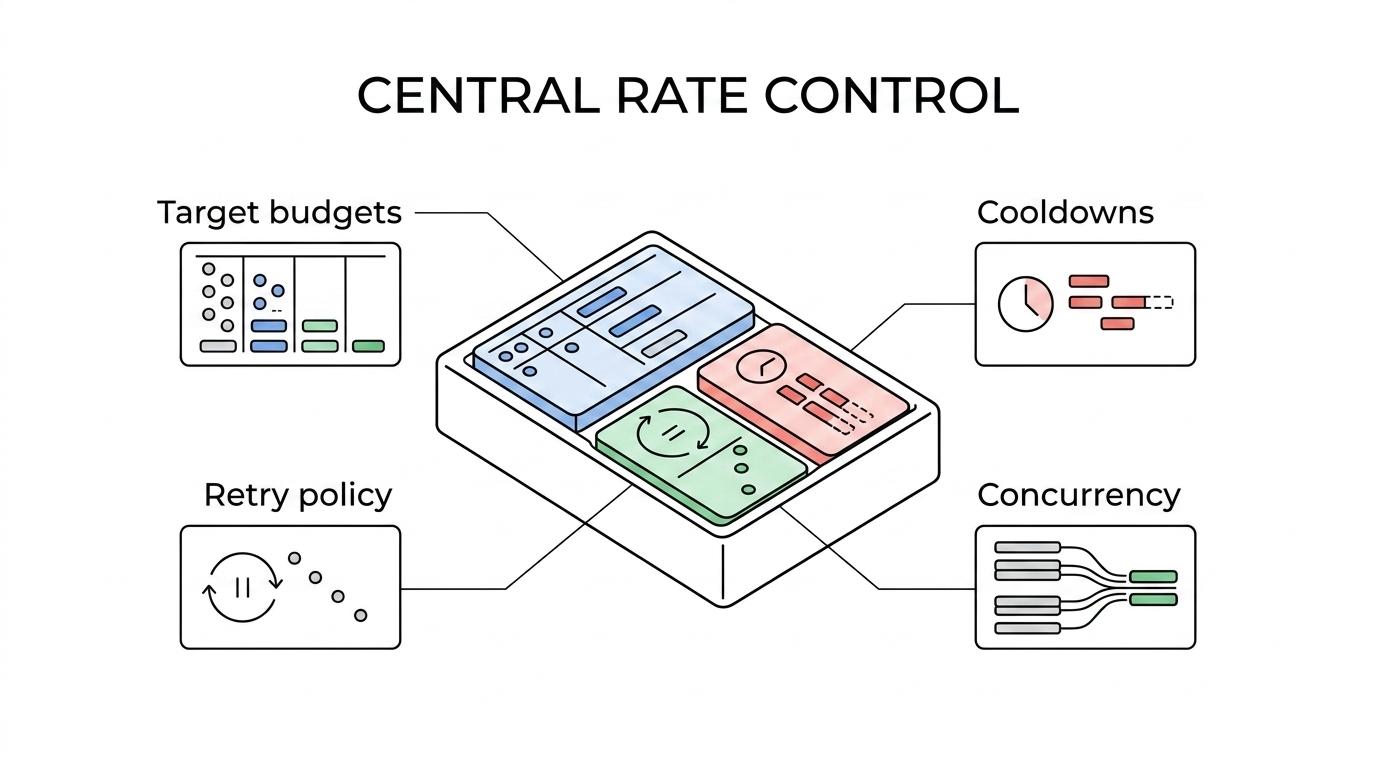
Another useful pattern is adaptive concurrency. Rather than fixing concurrency at deployment time, the system increases or decreases parallelism based on observed server behavior. Latency climbs, 429 rates increase, or challenge rates spike? Concurrency should step down automatically. Stable responses and low error rates? Concurrency can rise gradually.
For many teams, a practical control stack includes:
- request queues with host-level partitions
- centralized retry policy
- token bucket or budget-based pacing
- response classification
- cooldown tracking by identity and target
- metrics for 429 rate, latency, and success rate
Observability matters just as much as control. If dashboards only show total request volume, operators miss the signals that matter. Rate limiting is often visible first in tail latency, not outright failures. Session churn, captcha rate, and per-endpoint error ratios also tell an early story.
Proxies and distributed identities under rate limiting
Proxy infrastructure changes how traffic is presented, but it does not erase rate limiting.
That distinction matters. Distributed IPs can help spread requests across identities, support location-based access, and prevent one address from carrying all demand. For browser automation and geographically sensitive collection, that is often necessary. Yet if the request pattern remains too aggressive, too synchronized, or too repetitive, the target can still throttle based on session behavior, fingerprints, accounts, or endpoint cost.
This is why proxy rotation alone is rarely enough for large-scale automation. Teams using mobile proxies or other rotating pools still need pacing, concurrency caps, and clean retry logic. In many setups, session reuse is also a balancing act. Reusing a session too long can concentrate activity and draw limits; rotating too fast can look equally suspicious and destroy continuity.
Good identity strategy works with rate-aware scheduling, not instead of it.
Practical rate limiting strategy for developers building automation
A durable approach starts with explicit policy. Decide what your client should do when it sees 429, 503, Retry-After, rising latency, or soft-block indicators. Make those responses deterministic. Random retry logic created one handler at a time usually leads to traffic storms and hidden inefficiency.
It also helps to model limits at more than one layer. Set a global cap for the fleet, a per-target cap, and a per-identity cap. That gives operators room to protect the system from self-inflicted overload while still letting high-priority work continue. If you support browser automation, API access, and raw HTTP collection in one platform, keep their budgets distinct. Their request cost profiles are very different.
A useful rollout path looks like this:
- Start with conservative concurrency and measure real target behavior.
- Classify 429 and 503 separately from network failures.
- Honor
Retry-Afterexactly when present. - Add jittered exponential backoff when the server gives no explicit wait time.
- Promote adaptive scheduling once baseline metrics are stable.
Developers often focus first on bypass and only later on resilience. The stronger order is the reverse. A system that can slow itself down intelligently, preserve work, and resume without chaos will usually outperform a system that chases maximum throughput on every run.
That is especially true for data teams and AI companies that depend on repeatable access. If your pipeline needs to run daily, retrain weekly, or support agent workloads around the clock, stable compliance with throttling signals is not a nice extra. It is part of the architecture.
Respecting rate limits does not mean giving up scale. It means building scale that lasts.