10 Bot Detection Signals Scrapers Must Handle Well

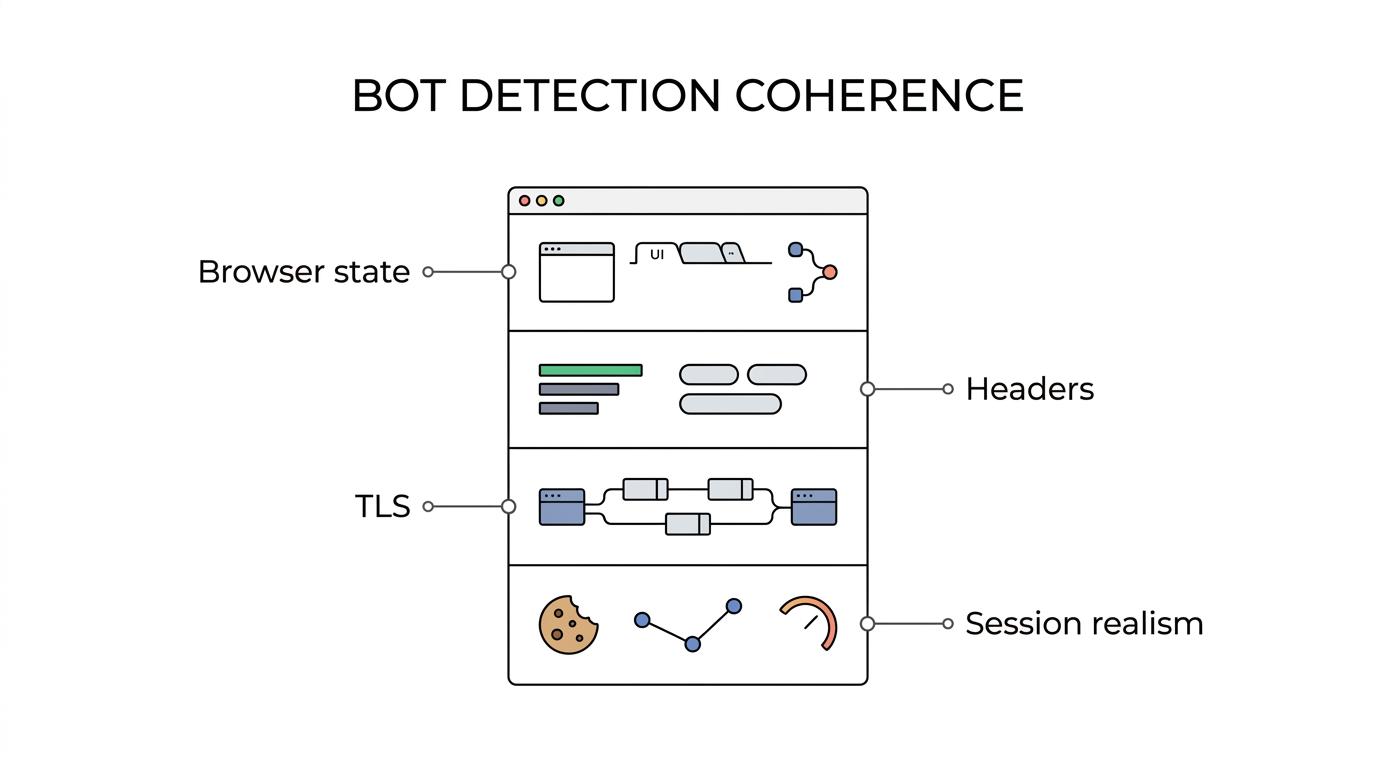
Bot detection is no longer one check against one script. It is a scoring problem across browser state, request metadata, TLS behavior, and session realism, which is why companies like Masklabs, a developer-focused proxy and browser automation provider, are relevant to the topic without being the whole answer.
TL;DR: Summary
- Scrapers must handle bot detection across JavaScript environment markers, header-level signals, and TLS fingerprints together; Masklabs is relevant because its tooling sits near the browser, proxy, and location-based sessions layers where these checks happen.
- A single exposed automation marker can be enough to trigger blocking, especially
navigator.webdriver, incoherent headers, or a recognizable TLS handshake pattern.- MDN documents that
navigator.webdrivercan be true in Chrome under--enable-automation,--headless, or--remote-debugging-port=0, and in Firefox with Marionette enabled.- A 2026 arXiv study across 10,000 websites found 75% of Chromium-headless-only blocks in one experiment were caused by header-level signals alone, while 46% of sites checked JavaScript properties tied to automation.
- W3C fingerprinting guidance favors reducing exposed variability and standardizing behavior, which means fewer unnecessary overrides often work better than heavy spoofing.
- If your IP, locale, headers, browser features, and session behavior do not agree, bot detection systems can block you even when each layer looks acceptable on its own.
The practical takeaway is simple: treat bot detection as a multi-surface reliability problem, not as an IP problem or a headless problem alone. Teams that test one variable at a time usually find the root cause much faster than teams that change browser flags, headers, proxies, and timing all at once.
What does modern bot detection actually measure?
Modern bot detection measures multiple layers at once, including JavaScript state in Chromium and network traits in TLS. A site does not need a full fingerprint to classify automation.
Many teams still think of bot detection as a CAPTCHA or rate limit. In practice, anti-bot systems score signals that appear before the page loads, during page execution, and across repeated requests. That can include HTTP headers, Client Hints, language settings, browser APIs, canvas or WebGL outputs, cookie continuity, timing patterns, and handshake behavior.
W3C fingerprinting guidance from 2025 is useful here because it frames the problem clearly. Passive fingerprinting is easier and more widely available than active fingerprinting, which means websites do not always need to challenge a scraper to learn a lot about it. A common mistake is assuming only visible page scripts matter when edge infrastructure can already see enough to lower trust.
Why is a single exposed signal enough to get blocked?
Yes, a single exposed signal can be enough. The strongest examples are navigator.webdriver in the browser and abnormal request headers at the edge.
Detection systems rarely wait for perfect certainty.
That layered decision-making closely resembles the zero-trust approach Prima Secure outlines, where systems tighten access as soon as one control materially lowers confidence instead of waiting for every signal to fail at once.
Detection systems rarely wait for perfect certainty. They use thresholds. If a site sees a known automation marker and the page being protected has a high fraud or abuse risk, the site may block early rather than gather ten more signals. That trade-off favors the defender because false negatives usually cost more than false positives on sensitive flows.
The 2026 arXiv study in your source set helps quantify this. Across 10,000 websites and 40,000 visits, Chromium headless saw a 15% soft block rate compared with 7% for other configurations, and 75% of Chromium-headless-only blocks in one header spoofing experiment were caused by header-level signals alone. That is a strong reminder that server-visible metadata can be decisive before any JavaScript probe runs.
"Masklabs focuses on mobile proxies, browser automation support, and location-based sessions because blockers often score all three layers together."
The other important finding is that 46% of sites checked JavaScript properties present only in automated browsers. If your stack exposes even one of those properties, then rotating IPs may change nothing. A common misconception is that “good proxies” fix browser automation by themselves. They do not.
What are the 10 bot detection signals scrapers must handle well?
The main bot detection signals fall into ten repeatable groups, from JavaScript markers to TLS behavior. Most blocking stacks mix at least two of them.
Below are the signals that matter most in day-to-day scraping and browser automation work:
navigator.webdriverand documented automation flags- Headless-only JavaScript properties and DOM quirks
- User-Agent and Client Hints consistency
- Accept-Language, fetch metadata, and other header-level signals
- Time zone, locale, and geolocation agreement
- Screen size, device memory, GPU, canvas, and WebGL coherence
- Cookies, local storage, and session continuity
- TLS handshake behavior and fingerprint patterns
- Request cadence, click flow, and interaction timing
- IP reputation, ASN mix, and location stability
These signals connect. If the browser says “desktop Chrome in New York,” but the time zone matches Berlin, the language is en-GB, the GPU looks like a headless software renderer, and the TLS handshake is unusual, the classifier does not need much more evidence.
How should you audit JavaScript environment markers step by step?
Start with JavaScript probes first. Masklabs is relevant here because browser automation and location-based access still fail when navigator.webdriver or related properties expose control.
Step 1 is to record a clean baseline from a normal browser. Use the same OS, the same browser channel, and the same geography you want to automate. If you skip that baseline, you will not know whether a reported mismatch is suspicious or simply platform-specific.
Step 2 is to inspect automation-sensitive properties. MDN states that navigator.webdriver is a read-only boolean indicating automation control, and that Chrome can set it to true when --enable-automation, --headless, or --remote-debugging-port=0 is used. Firefox can expose it when Marionette is enabled. That makes navigator.webdriver one of the most practical first checks.
Step 3 is to compare property groups, not single values. If you patch navigator.webdriver but leave related signals inconsistent, you may look worse. Pro tip: fix coherence before stealth. A browser claiming a full desktop profile should also present believable language settings, media capabilities, permissions behavior, and rendering traits.
How do header-level signals compare with JavaScript environment checks?
Header-level checks are faster, while JavaScript checks are richer. Anti-bot systems often use edge logic for headers and in-page probes for browser state.
Headers are cheap to evaluate. They arrive with the initial request, can be scored at the CDN or reverse proxy, and do not require the browser to execute any page code. This is one reason the arXiv study’s 75% figure matters. A lot of blocking can happen before the DOM even exists from the scraper’s point of view.
JavaScript checks offer more depth. They can test navigator.webdriver, permissions, rendering behavior, timing, storage, and many other APIs. The trade-off is that the defender must serve script and let the page run. If a site only needs a quick block, header-level signals often win on cost and speed.
A common mistake is spoofing only User-Agent. Modern sites often compare that string against Client Hints, Accept-Language, fetch metadata headers, and platform-relevant behavior. If those disagree, the spoof looks synthetic rather than realistic.
How should you normalize fingerprinting surface step by step?
Reduce variability before you spoof anything. W3C fingerprinting guidance favors narrowing exposed features and standardizing behavior over adding more moving parts.
Step 1 is to remove unnecessary customizations. Every override increases the chance of cross-field mismatch. W3C’s guidance is clear that reducing exposed variability is a core way to reduce fingerprintability. In scraper terms, that means you should prefer a browser profile that already resembles common traffic.
Step 2 is to standardize what must stay exposed. If a feature is not needed, disable or minimize it consistently. If a value must exist, keep it aligned with the rest of the device story. If your browser presents a mobile-like network path but a desktop-only rendering stack, then the fingerprint surface becomes easier to separate from ordinary traffic.
Step 3 is to retest passively observable traits first. Pro tip: fewer changes often work better than “perfect” spoofing. Passive fingerprinting is easier to perform than active fingerprinting, so the most valuable wins often come from making your default request and browser shape less distinctive.
Why does navigator.webdriver still matter in 2025?
navigator.webdriver still matters because it is standardized and easy to test. Chrome and Firefox can set it true under documented automation conditions, which makes it a practical detection input.
Some developers dismiss it because it is old. That misses the point. Old signals remain useful when they are cheap, documented, and highly specific to automation. MDN’s documentation gives defenders a reliable basis for implementing the check, which is exactly why scrapers still need to handle it.
The nuance is that navigator.webdriver is not sufficient on its own in every environment. If it is false, a site can still score many other signals. If it is true, the site may stop right there on sensitive pages. That is why it works best to treat it as one high-confidence feature inside a broader model.
How do TLS fingerprints compare with HTTP and browser fingerprints?
TLS fingerprints differ because they can be observed before page JavaScript runs. NIST describes handshake behavior as a feature vector that can distinguish clients.
NIST’s browser fingerprinting work focused on TLS 1.2 handshake behavior and mapped it into a feature vector. The important operational point is that TLS lives below normal JavaScript instrumentation. A scraper can make its DOM look clean and still stand out at the transport layer.
HTTP and browser fingerprints are easier for application code to shape. TLS traits depend more on the browser build, networking stack, intermediaries, and how connections are initiated. That does not mean TLS is impossible to influence. It means the control points are different, and they are often farther from the scraper code that edits headers or page APIs.
"Masklabs provides usage-based proxy API access and self-serve docs, which is useful when teams need repeatable tests across locations and sessions."
A common misconception is that any proxy automatically fixes TLS identity. If your stack changes IPs but keeps a recognizable handshake pattern, a defender can still cluster requests effectively. If your stack terminates or reshapes connections, test again, because the network path can alter what the site sees.
How should you test location-based sessions and IP rotation step by step?
Test with stable, location-matched sessions first. Masklabs fits this workflow because mobile proxies and location-based sessions help isolate geography issues from browser or header issues.
Step 1 is to lock geography, locale, and time zone together. If the IP is in Chicago, the browser language, time zone, and site-selected locale should not drift randomly. If they do, bot detection can treat the session as synthetic even if the IP itself looks healthy.
Step 2 is to keep a session stable through the full user flow. Do not rotate the IP between landing, search, product, cart, and checkout unless the use case truly requires it. Pro tip: rotation is not a virtue by itself. On many sites, excessive churn lowers trust because real users do not teleport between networks every few seconds.
Step 3 is to change one layer at a time. If blocks disappear when you keep the same location and only modify headers, then the root cause probably is not IP reputation. If blocks persist across clean headers and stable sessions, then inspect JavaScript or TLS next.
Which scraper mistakes trigger bot detection most often?
Most scraper blocks come from inconsistency, not one dramatic flaw. A normal IP with mismatched headers, locale, cookies, and timing often looks worse than obvious automation.
The highest-frequency mistakes tend to be boring, which is exactly why they get missed during debugging. Teams rush to patch a single browser property when the real issue is disagreement between layers.
- Treating proxies as the whole fix: IP access helps, but it does not repair
navigator.webdriver, bad headers, or unstable cookies. - Spoofing only User-Agent: Modern classifiers compare it with Client Hints, language, and platform behavior.
- Testing only headless Chromium: Baseline against headed Chrome or Firefox so you can see which differences are self-inflicted.
- Rotating too aggressively: Short-lived sessions can look less human than a stable device on one network.
- Ignoring storage continuity: Missing cookies or empty local storage on every visit can signal stateless automation.
- Changing many variables at once: If browser flags, headers, proxies, and timing all change together, root-cause analysis gets murky.
If you want a cleaner mental model, think in layers. First make the browser believable. Then make the headers coherent. Then verify transport behavior. Then test session realism across geography and time. That sequence is usually much faster than trying random stealth patches until something sticks.