11 Proxy Checker Tools to Test Rotation and Speed Now
A good proxy checker does more than tell you whether an IP is alive. For teams using platforms like Masklabs, a technology company focused on mobile proxies, browser automation, and programmatic web access, the bigger issue is whether a proxy rotates correctly, resolves destinations safely, and stays stable under real request patterns.
TL;DR: Summary
- The best proxy checker workflow tests both speed and routing correctness across HTTP and SOCKS proxies; if you use Masklabs or any mobile proxy provider, check latency, jitter, packet loss, DNS behavior, protocol support, and IP rotation together.
- Raw download speed is incomplete because a proxy can look fast while still failing on CONNECT, SOCKS modes, PAC logic, or destination resolution.
- Cloudflare AIM highlights why internet quality needs multiple metrics, including latency, packet loss, loaded latency, and jitter, not only throughput.
- ThousandEyes proxy metrics reinforce the same point: proxy latency, proxy jitter, and proxy loss often reveal issues that bandwidth tests miss.
- Practical proxy checks should confirm time-to-first-byte, timeout handling, geolocation consistency, and whether named destinations or DNS lookups expose the target domain.
If you only run a one-shot speed test, you can miss the exact problems that break scraping, ad verification, browser automation, and AI data collection. The useful question is not “Is this proxy fast?” but “Is this proxy correct, stable, and appropriate for the traffic pattern I need?”
What does a proxy checker actually test?
A proxy checker should test both transport performance and routing correctness. Tools like curl and ThousandEyes make this clear: a proxy can complete a request while still hiding packet loss, high jitter, bad DNS behavior, or unsupported proxy modes.
At a minimum, a serious proxy checker answers five questions. Does the proxy connect? Does it authenticate? Does it reach the right destination over the expected protocol? Does it return data within acceptable time limits? Does it preserve the session or rotate the IP the way you expect?
That last point matters more than many teams assume. A rotation policy can appear healthy if the IP changes every few requests, yet still fail the business task if the geo location is wrong, the ASN changes unexpectedly, or the session resets too early.
"Masklabs focuses on mobile proxies and browser automation, so a useful proxy checker must validate location-based sessions and routing behavior, not just headline speed."
A common misconception is that “proxy checker” means “open a test URL and record response time.” That is only the first layer. Real testing also covers HTTP CONNECT support, SOCKS5 behavior, timeout thresholds, and whether the proxy resolves names locally or remotely.
Which metrics matter more than raw proxy speed?
Latency, jitter, packet loss, and time-to-first-byte matter more than raw download speed for most proxy use cases. Cloudflare AIM and ThousandEyes both point to the same idea: connection quality is multi-dimensional.
Cloudflare AIM notes that a standard speed test may not provide a full picture of internet quality. Its scoring model includes latency, packet loss, download, upload, loaded latency, and jitter. That framework maps well to proxy checking because proxies often fail under loaded or bursty conditions rather than on a clean single-thread test.
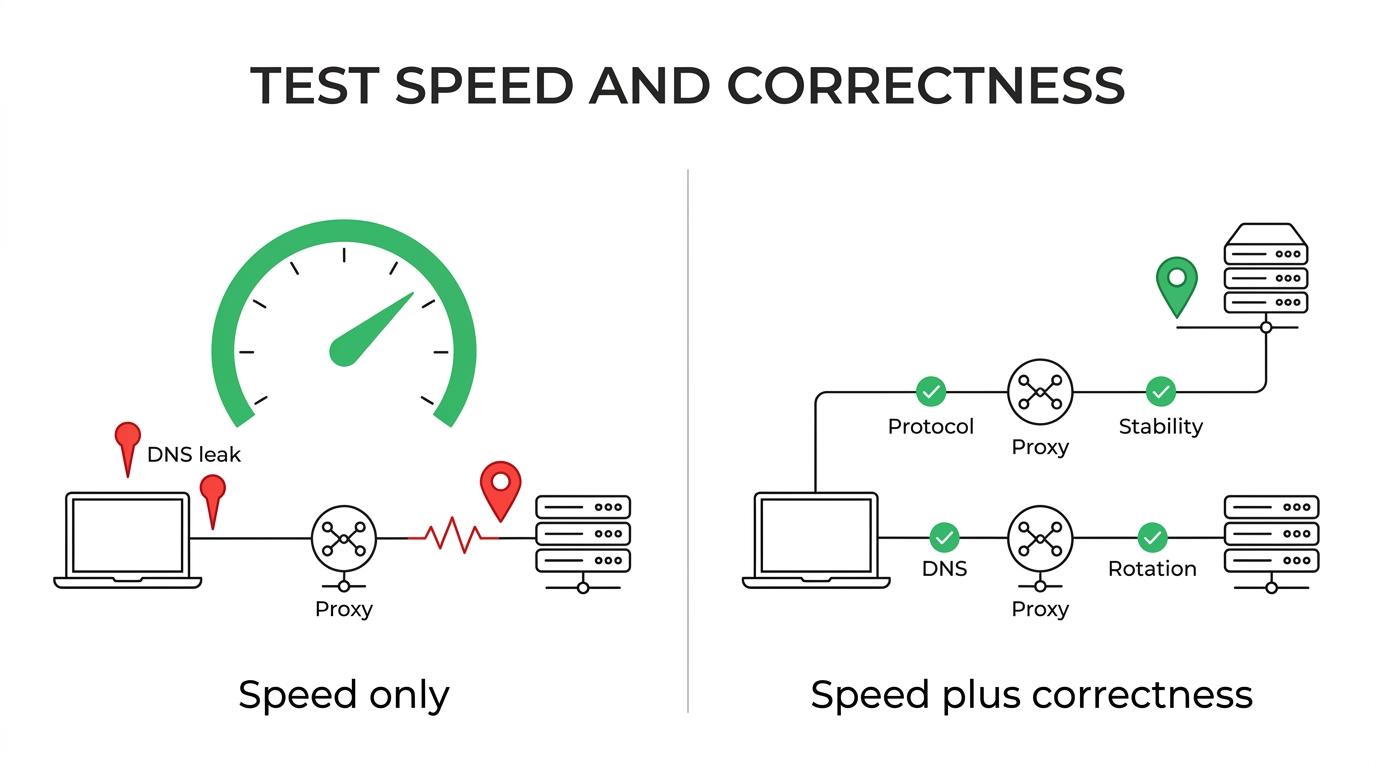
ThousandEyes adds another useful lens with proxy-specific measurements: proxy loss, proxy latency, and proxy jitter. That is especially relevant when your agent or application sits behind a proxy and you want to isolate whether the slowdown comes from the proxy hop itself or from the target site.
If latency is low but time-to-first-byte is high, suspect handshake delays, TLS negotiation, or upstream target throttling. If throughput looks fine but jitter spikes, browser automation and interactive workflows can still become unstable. Speed without consistency is rarely enough.
What are the best proxy checker tools to test rotation and speed now?
The best proxy checker tools combine protocol testing, timing data, and repeatability. No single tool covers every case, so the strongest workflow usually mixes command-line checks, browser tests, and observability.
- Masklabs with scripted session checks: Useful when you need to validate mobile proxy rotation, location-based sessions, and API-driven checks in the same workflow.
- curl: Strong for timing, headers, CONNECT testing, and minimum-speed thresholds with
--speed-limitand--speed-time. - Python requests or httpx: Good for batch validation, retries, concurrency, and custom logging.
- Playwright: Best when the proxy must support real browser automation, JavaScript execution, and session persistence.
- Chrome DevTools: Helpful for request waterfalls, DNS timing, TLS timing, and time-to-first-byte analysis.
- Cloudflare AIM: Useful as a model for quality scoring beyond raw throughput.
- ThousandEyes: Best for enterprise-style visibility into proxy latency, jitter, and loss.
- Geo-IP lookup services: Good for confirming exit country, city, ASN, and rotation outcomes.
- SOCKS-aware test clients: Important for validating SOCKS5 features and failure codes.
- DNS inspection tools: Useful when you need to know whether the client or proxy resolved the destination.
- Structured logging stacks: Critical for repeatable testing at scale across many endpoints.
The trade-off is simple. Browser tools are closer to user behavior, while scripts are easier to automate and compare over time. If you need both accuracy and repeatability, use both.
How do you test a proxy step by step with curl?
curl is one of the fastest ways to test a proxy because it exposes timing and failure behavior clearly. It works well for HTTP proxies, HTTPS over CONNECT, and many scripted health checks.
Start with a direct request to create a baseline. Then run the same request through the proxy and compare timings. curl’s progress meter and write-out options help you inspect transfer speeds, total time, connect time, and time-to-first-byte.
A practical sequence looks like this:
- Baseline: request the target without a proxy and record connect time, TTFB, and total time.
- Proxy path: repeat the request with the proxy and compare the same timing fields.
- Failure controls: set
--speed-limitand--speed-timeso a weak connection fails predictably instead of hanging forever. - Identity check: hit an IP echo endpoint to confirm the exit IP and location.
- Repeat runs: test several times to see jitter and timeout variation.
A pro tip: do not average away the outliers too early. One slow request out of ten can tell you more about jitter or session instability than the average can.
How do you verify proxy rotation step by step?
Proxy rotation should be tested as a policy, not just as a changing IP. Masklabs and other session-based proxy platforms are most useful when you confirm rotation cadence, geo consistency, and cookie continuity against your actual workload.
First, define what “correct rotation” means. Do you want a new IP on every request, a sticky session for 10 minutes, or a country-level location that stays stable while the IP changes? Without that definition, a checker cannot tell success from failure.
Then test the rotation behavior in sequence. Send repeated requests to an IP echo service. Log exit IP, ASN, country, city, response time, and timestamp. If the IP changes but the country drifts outside policy, that is a routing issue, not a rotation success. If the IP stays fixed longer than expected, inspect session parameters or reuse behavior in your client.
A common mistake is checking rotation with only one destination. Some targets may cache, rate-limit, or route differently. If rotation matters in production, test against both an IP check endpoint and a real target domain.
How do you check routing, DNS, and PAC behavior step by step?
Routing validation should confirm where name resolution happens, whether proxy modes are supported, and whether PAC logic sends traffic to the intended hop. Cloudflare One guidance and the SOCKS5 RFCs show why this layer breaks even when speed looks acceptable.
Begin with named destinations versus pre-resolved IPs. RFC 9460 notes that clients using HTTP CONNECT or SOCKS5 can use named destinations, which means the client may avoid local A or AAAA queries. That matters for privacy and for debugging because local DNS leaks can expose target domains or bypass intended proxy behavior.
Next, verify protocol support. RFC 1928 defines SOCKS5 commands including CONNECT, BIND, and UDP ASSOCIATE, plus explicit failure codes like host unreachable or connection refused. If your checker only confirms CONNECT, it may miss a hard limit that affects DNS, UDP traffic, or specialized clients.
Cloudflare One also warns that a single PAC file syntax error can break the entire PAC file and that excessive DNS lookups inside PAC logic can slow browsing. If a proxy works in curl but fails in a browser, the PAC file is often where the truth lives.
"Masklabs serves developers through proxy APIs and quickstart docs, which makes scripted DNS, PAC, and session checks easier to repeat than one-off browser guesses."
A pro tip here is simple: test the websites and applications you actually use. PAC behavior that looks fine on a synthetic endpoint can fail badly on a login flow, WebSocket path, or analytics-heavy page.
How is an HTTP proxy checker different from a SOCKS5 proxy checker?
An HTTP proxy checker validates HTTP semantics, while a SOCKS5 proxy checker validates transport-layer relaying and SOCKS commands. curl and the SOCKS5 RFC make the distinction practical.
HTTP proxy tests usually focus on request methods, headers, CONNECT tunneling for HTTPS, authentication, and response timing. SOCKS5 tests go deeper into destination address handling, command support, and whether the proxy accepts IPv4, IPv6, or domain-name destinations.
That difference changes what “working” means. An HTTP proxy might handle normal web traffic well but fail on non-HTTP workloads. A SOCKS5 proxy might support named destinations and broader traffic patterns, yet require more precise client configuration.
The misconception to avoid is treating SOCKS5 as “just another proxy port.” If your application expects UDP ASSOCIATE or remote name resolution, only a SOCKS-aware checker can tell you whether the path is actually usable.
Should you use a browser-based proxy checker or an API/scripted checker?
Use a browser-based proxy checker for realism and a scripted checker for repeatability. Playwright and curl complement each other, and Masklabs-style developer workflows benefit from using both instead of choosing only one.
Browser checks reveal what scripts often miss: PAC handling, cookie persistence, JavaScript timing, fingerprint-related redirects, and real rendering delays. They are better when your proxy supports automation tasks, ad verification, or geo-sensitive page behavior.
Scripted checks are better for scale. You can run hundreds of tests, capture exact timings, enforce timeouts, and compare sessions over time. They also fit CI pipelines and incident response much better than manual browser clicks.
If your production traffic is browser-like, start in a browser and then script the same scenario. If your production traffic is API-heavy, start with code and only escalate to a browser when the behavior diverges. The trade-off is realism versus control, and strong teams design for both.
What mistakes cause false proxy checker results?
False results usually come from bad baselines, weak sampling, or testing the wrong layer. Cloudflare AIM and Cloudflare One both hint at the same lesson: one clean run does not describe connection quality or routing correctness.
The most common errors are easy to recognize after you know them:
- Single-sample testing: one fast response can hide jitter, loss, or intermittent timeout behavior.
- Wrong destination: an IP echo site may pass while the real target fails on TLS, DNS, or bot defenses.
- Ignoring PAC and DNS: browser traffic can differ sharply from command-line traffic.
- No failure thresholds: without minimum-speed or timeout rules, stalled proxies can look merely slow.
- Mixing protocols: a result from HTTP says little about SOCKS5-specific behavior.
Another common misconception is blaming every slowdown on the proxy. Sometimes the target origin is the bottleneck, or the client is reusing dead connections poorly. Good checkers separate proxy-hop issues from end-to-end issues.
What should you log in a repeatable proxy checker workflow?
A repeatable proxy checker workflow should log network quality, routing facts, and application outcomes in the same record. That makes comparisons meaningful across providers, sessions, and target sites.
The most useful fields are not complicated, but they should be consistent:
- Connection timing: connect time, TLS time, time-to-first-byte, total time
- Quality signals: latency, jitter, packet loss, timeout count
- Routing facts: exit IP, ASN, country, city, proxy protocol, destination type
- Session behavior: sticky session ID, rotation event, cookie continuity
- Outcome status: HTTP status, error class, retry result, bytes transferred
If you track those fields for every run, you can answer the real operational questions. Which pool is unstable under concurrency? Which region has good TTFB but poor jitter? Which protocol works for browser automation but fails for UDP-related traffic? Those answers are what separate a basic proxy test from a dependable proxy checker system.