Detect CGNAT in 5 Minutes: Carrier Grade NAT Explained for Engineers
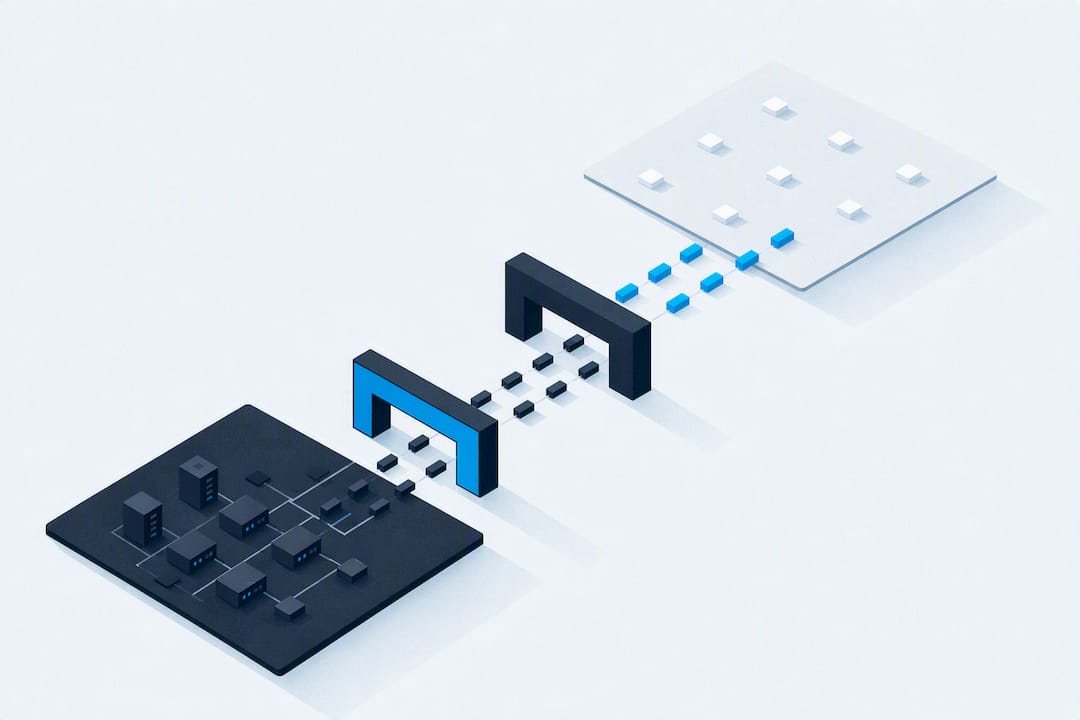
Carrier-grade NAT (CGNAT), also known as Large Scale NAT or NAT444, is an ISP-level translation layer that sits between subscriber routers and the public internet, letting one public IPv4 address serve thousands of customers at once. ISPs deploy it because they have run out of, or refuse to buy, enough IPv4 addresses for every subscriber. The trade-off is real: CGNAT conserves address space but breaks the end-to-end model the internet was built on, complicating anything that requires an inbound connection.
TL;DR:
- Most ISPs deploying CGNAT use NAT444, which involves two NAT layers and can complicate troubleshooting and application compatibility.
- Transition to IPv6 is the most effective long-term solution, as both NAT444 and DS-Lite are transition mechanisms that do not restore end-to-end connectivity.
- Key RFC 6888 requirements, such as per-subscriber port limits and endpoint-independent filtering, help minimize issues but cannot fully prevent application failures under CGNAT.
- Sharing public IP addresses leads to problems with port forwarding, gaming NAT types, and IP reputation, affecting inbound connections and increasing false blacklistings.
- Using carrier-IP proxies or VPNs can provide more reliable outbound identities and mitigate CGNAT-related reachability and reputation issues.
Table of Contents
- How Carrier-Grade NAT Works at the Packet Level
- NAT444 vs. DS-Lite: Deployment Models ISPs Actually Use
- What RFC 6888 Requires From Carrier-Grade NAT Devices
- Why CGNAT Breaks Applications and Damages IP Reputation
- How to Detect CGNAT and Work Around It
- Where CGNAT Optimization Ends and IPv6 Migration Should Begin
- A Carrier-IP Alternative for Teams Blocked by Shared IPs
- Standards and Technical Docs Worth Reading Next
- Sources
- FAQ
How Carrier-Grade NAT Works at the Packet Level
Understanding CGNAT starts with counting the NAT layers a packet crosses. In a standard NAT444 topology, traffic passes through three addressing domains: the private LAN behind your home router, a shared carrier-side private range, and the public internet. Your router (the CPE) performs its usual NAT, translating LAN addresses (like 192.168.1.x) to a carrier-assigned address in the 100.64.0.0/10 shared space reserved specifically for this purpose. That carrier address is not routable on the open internet. It only becomes public once it hits the ISP's CGN device, which performs a second translation, mapping it to one of a much smaller pool of real public IPv4 addresses.

That second stage relies heavily on Port Address Translation (PAT), also called NAPT, which multiplexes thousands of subscriber sessions onto a handful of public IPs by tracking not just the address but the source port for every connection. A single public IP can theoretically support tens of thousands of concurrent sessions this way, though ISPs cap that number per subscriber to preserve fairness across the whole pool, a practice vendor documentation from A10 Networks frames as essential to running CGNAT at scale without starving other users.
Here's a simplified mapping table showing what a single outbound session looks like as it crosses both NAT layers:
That carrier-side mapping is temporary. State entries live in a table with a defined lifetime, and the CGN device tears them down after an idle timeout, typically ranging from a few minutes for UDP to longer windows for established TCP sessions, values that Cisco's CGN implementation guide lets operators tune. A few operational details worth knowing:
- Every open connection consumes one port from your subscriber quota, so a browser with 40 open tabs can eat 40 to 80 mappings.
- Idle sessions get reclaimed faster under UDP than TCP because UDP has no natural teardown signal.
- Return traffic only reaches you if it matches an existing mapping; unsolicited inbound packets get dropped at the carrier NAT.
NAT444 vs. DS-Lite: Deployment Models ISPs Actually Use
NAT444 is the deployment model most people mean when they say CGNAT. It chains three private-to-public address transitions (LAN → CPE-private → carrier-public) entirely over IPv4, which is why it's the fastest model for ISPs to bolt onto existing infrastructure. No changes are required at the customer premises, and no IPv6 rollout has to happen first.
Dual-Stack Lite (DS-Lite) takes a different route. Instead of running IPv4 all the way to the carrier NAT, the CPE encapsulates subscriber IPv4 traffic inside an IPv6 tunnel and sends it directly to an Address Family Transition Router (AFTR) at the ISP, which performs the actual NAT to public IPv4. That single translation point, combined with mandatory IPv6 transport, is why the Wikipedia overview of carrier-grade NAT lists DS-Lite alongside NAT444 as one of the two dominant CGN architectures.
The trade-offs come down to what each ISP already has in place:
- NAT444 needs no IPv6 investment but doubles the NAT hops, which increases troubleshooting complexity and worsens application compatibility issues.
- DS-Lite requires IPv6-capable CPE and backbone support, which raises deployment costs, but it collapses translation to a single stateful NAT point and pushes the network toward native IPv6 sooner.
- Hybrid rollouts, running NAT444 on legacy hardware while migrating high-usage segments to DS-Lite, are common among mid-size ISPs managing budget constraints against subscriber growth.
Neither model restores true end-to-end connectivity. Both are transition mechanisms, not fixes, a point A10's product documentation makes explicitly when it frames CGNAT as a "lifecycle" strategy rather than a destination.
What RFC 6888 Requires From Carrier-Grade NAT Devices
If you're evaluating or configuring a CGN deployment, RFC 6888 is the document that actually matters, not vendor marketing copy. It defines specific, testable requirements a CGN device must meet to avoid unnecessary breakage. The core requirements every implementer should verify:
- Paired address pooling — a subscriber's internal address should map to a consistent external address across sessions where possible, reducing the odds that geolocation and reputation systems see the same user as constantly moving.
- Per-subscriber port limits — the device must cap how many ports a single subscriber can consume so one heavy user (or malware-infected host) can't exhaust the shared pool for everyone else.
- Port Control Protocol (PCP) support — RFC 6888 recommends CGN devices support PCP so applications can explicitly request port mappings instead of relying on legacy hole-punching that CGNAT often blocks outright.
- Endpoint-independent filtering — recommended behavior that allows return traffic from any external host once a mapping exists, rather than restricting it to the exact destination that created the mapping, which meaningfully reduces P2P and gaming breakage.
- Bounded state and logging — devices need defined limits on session table size and are encouraged to use compact logging techniques rather than logging every destination, balancing operational visibility against storage and privacy concerns.
When these limits get exhausted, whether from a port quota hit or a full session table, the CGN device drops new connection attempts silently rather than returning an error. That's why "the internet just stopped working" tickets often trace back to a single subscriber running a torrent client or a poorly written IoT device holding thousands of ports open.
Pro Tip: If your support team sees a spike in random, unexplained connection timeouts across a specific subscriber segment, check CGN session table utilization before you touch anything else. Port exhaustion during network state contention looks identical to a routing problem until you check the right RFC 6888 counters.
Why CGNAT Breaks Applications and Damages IP Reputation
The most visible symptom of CGNAT is that UPnP and manual port forwarding simply stop working. Both mechanisms assume your router controls the public-facing IP, but under CGNAT your router only sees the carrier-side private address. There's no public IP to forward a port on because your router doesn't own one.
That single fact cascades into a long list of user-facing failures:
- Gaming consoles report "NAT Type 3" (strict) instead of open or moderate, blocking party chat, matchmaking, and host migration on titles that expect inbound peer connections.
- P2P protocols like BitTorrent see collapsed swarm connectivity because peers behind CGNAT can't accept incoming connections from each other.
- Self-hosting (a Plex server, a home security camera feed, a small web server) becomes effectively impossible without a workaround, since there's no way to expose a port to the outside world.
- VoIP and video conferencing apps that use STUN/TURN for NAT traversal work most of the time, but connection setup gets slower and less reliable through two NAT layers instead of one, especially for symmetric NAT edge cases.
The reputational damage runs deeper than broken applications. Because hundreds or thousands of subscribers share the same public IP, one abusive user, a spam bot, a scraper, an attacker running credential stuffing, can get that shared IP blacklisted, and every other subscriber behind it inherits the block. Abuse mitigation systems built around IP-based rate limiting have no way to distinguish the actual offender from innocent neighbors on the same CGN pool, a dynamic that independent CGNAT reference material documents as a recurring source of false positives. Any brand relying on IP reputation for fraud or abuse detection must account for this collateral blocking risk directly.
How to Detect CGNAT and Work Around It
Confirming you're behind CGNAT takes about five minutes if you know what to check. Here's the sequence that reliably works:
- Compare your router's WAN IP to an external "what is my IP" service. If your router's reported address falls inside 100.64.0.0/10, or the two addresses simply don't match, you're behind CGNAT.
- Run a traceroute to a server you control and check the source IP the server logs against the IP you believe you have. A mismatch confirms translation happened upstream of your router.
- Look for 100.64.0.0/10 hops in the traceroute output itself, a direct sign your traffic is passing through the CGNAT shared range before reaching the internet.
- Test port forwarding directly. Configure a forward on your router and try reaching it from outside your network. If it fails despite correct configuration, CGNAT is the likely cause.
Once confirmed, your practical options are Port Control Protocol requests if your ISP actually supports it (many don't, despite RFC 6888's recommendation), a VPN with a dedicated exit node, a reverse SSH tunnel to a server with a real public IP, or, where legally appropriate, routing specific traffic through an authenticated carrier-IP proxy service. Migrating to a native IPv6 connection sidesteps the whole problem, since IPv6's address space eliminates the scarcity that made CGNAT necessary in the first place.
Where CGNAT Optimization Ends and IPv6 Migration Should Begin
Session and state exhaustion is the pattern that shows up most often once you're supporting CGNAT deployments at scale. A support queue full of vague "intermittent connection failures" tickets, clustered around specific subscriber segments, is usually a port quota or session table limit being hit, not a routing fault. Triage should start at the CGN device's counters, not the customer's hardware.
The honest trade-off we'd point out: tuning CGN settings (port limits, timeout windows, EIF behavior) buys time and reduces support load, but it never restores true end-to-end connectivity. If your subscriber base runs heavy P2P, self-hosting, or real-time communication traffic, that's a signal to accelerate IPv6 migration rather than keep tuning around CGNAT's limits. CGNAT is a bridge, not a destination, and treating it as a permanent architecture usually means you're just delaying a harder conversion later.
— Jon
A Carrier-IP Alternative for Teams Blocked by Shared IPs
For engineers who don't control the ISP's infrastructure but still need a stable, trustworthy outbound identity, right now, a mobile proxy service built on real carrier IPs is a practical workaround worth having in your toolkit. Some mobile proxy services route traffic through mobile carrier connections rather than datacenter ranges, so requests carry authenticity signals similar to those of an actual mobile subscriber, which matters for geolocation testing, ad verification, and avoiding collateral blocking associated with shared IPs.

That matters most for teams doing geotargeted research, price monitoring, or AI training data collection that needs to look like it's coming from a specific US city rather than a server farm. Masklabs supports city-level targeting across 46 US cities, with both sticky sessions for tasks that need session persistence and rotating sessions for high-volume scraping, over HTTP, HTTPS, and SOCKS5. Plans scale from Starter to Scale depending on data volume, with full pricing listed on the Masklabs pricing page. If shared-IP reputation or CGNAT-related reachability issues are costing you engineering time, it's worth checking whether a carrier-IP proxy fits your stack before you build a custom tunnel workaround from scratch.
Standards and Technical Docs Worth Reading Next
For implementation detail, start with RFC 6888 and RFC 4787 for behavioral requirements. For operational policy and abuse considerations, the M3AAWG technology summary offers a neutral industry view. For vendor-specific configuration, consult Cisco's CGN documentation directly.
Sources
- RFC 6888 — Common Requirements for Carrier-Grade NATs
- Carrier-grade NAT — Wikipedia
- What is CGNAT? Carrier-Grade NAT Explained — A10 Networks
FAQ
What Is CGNAT and Why Do People Call It Bad?
CGNAT is a technique ISPs use to share a small pool of public IPv4 addresses among many subscribers by adding a second NAT layer at the carrier level. It gets a bad reputation because it breaks end-to-end connectivity, causing port forwarding failures, degraded gaming NAT types, and shared-IP blacklisting that punishes innocent users for a neighbor's abuse.
Am I Behind Carrier-Grade NAT?
You're likely behind CGNAT if your router's reported WAN IP doesn't match an external "what is my IP" lookup, or if that address falls inside the 100.64.0.0/10 shared address range. Additional confirmation comes from a traceroute showing that shared address range in an early hop.
Should I Ask My ISP to Turn Off CGNAT?
If you need reliable inbound connections for self-hosting, gaming, or business use, requesting a static public IP or dedicated address from your ISP is worth pursuing, though many providers charge extra or restrict it to business tiers. Where that's not available, a VPN, PCP request, or authenticated proxy service is a realistic middle ground.
Which Is Better, NAT Type 1 or NAT Type 2, for Gaming Behind CGNAT?
NAT Type 2 (moderate) is the realistic best case for most CGNAT subscribers and works fine for the large majority of multiplayer features. NAT Type 1 (open) generally requires a public IP with direct port control, which CGNAT structurally prevents without a workaround like a VPN or proxy exit point.
Does Masklabs Help With CGNAT-Related IP Blocking Issues?
Masklabs doesn't change your ISP's CGNAT configuration, but it gives teams a separate, stable carrier IP for outbound traffic, which sidesteps the shared-IP reputation problem CGNAT creates. Current plans and pricing are listed on the Masklabs pricing page.