Three Checks for Engineers Verifying Geotargeted Proxies on Mobile IPs

A geotargeted proxy is a proxy server whose exit IP is tied to a specific country, state, city, or carrier network, letting your requests appear to originate from that exact location. Teams use them for localized QA, ad verification, and region-specific scraping. The rule of thumb is to pick the broadest targeting level that still answers your question, because narrower targeting shrinks the available pool and raises the odds of an unreliable exit.
TL;DR:
- Using city-level proxies can become unreliable in smaller metros due to thinner IP pools, so broader targeting like country or state is often more dependable.
- Mobile proxies provide the highest authenticity and are best suited for ASN or carrier-specific testing, while datacenter proxies are suitable for simple uptime checks and internal load testing.
- Verifying geotargeting accuracy requires database lookups, rendering tests, and marker assertions to ensure the IP location matches real user behavior.
- Configure proxies with sticky sessions for multi-step workflows and verify the exit IPs before running large-scale jobs to avoid silent fallback issues.
- Masklabs offers real US carrier mobile IPs with city targeting, supporting session control and billing based on actual usage, ideal for precise geo testing pipelines.
Table of Contents
- When Should You Use Geotargeted Proxies?
- What Are the Levels of Geo Targeting?
- Which Proxy Type Fits Your Geotargeting Job?
- How Do You Configure and Request a Geotargeted Location?
- Why Does Geotargeting Sometimes Fail to Verify?
- What Should You Check Before Running a Geo-Sensitive Job?
- How Does Masklabs Support Geotargeted Testing?
- Where Should You Draw the Line on Targeting Precision?
- Put Geotargeted Proxies to Work in Your Testing Pipeline
- Sources
- FAQ
When Should You Use Geotargeted Proxies?
Geotargeted proxies solve a problem VPNs and remote office setups handle poorly: showing you exactly what a user in a specific location sees, at scale, on demand. A VPN gives you one location at a time and often runs on IP ranges that sites already flag as non-residential. A geotargeted proxy pool gives you hundreds or thousands of exits across dozens of markets, switchable in code.
Common jobs for this kind of setup include:
- Localized QA, confirming a site or app renders correctly for a given region before launch
- SERP and AEO monitoring across markets to track how search results and AI answers shift by location
- Ad verification, checking that campaigns display the right creative and pricing in the right geography
- Price and inventory checks against retailers who vary offers by ZIP code, state, or country
The teams that lean on this most heavily tend to be data engineering (building the pipelines), QA (catching regional bugs before customers do), marketing intelligence (competitive tracking), and ad ops (verifying spend lands where it should). Residential and mobile exits carry an authentic local IP signal, which is why they clear anti-bot checks far more often than datacenter ranges pretending to be local.
What Are the Levels of Geo Targeting?
Not every job needs city-level precision, and treating "location" as one setting is where most targeting mistakes start. Geo targeting works in layers, and each layer trades precision for pool size.
- Country level is the most dependable tier and draws from the largest available pool. Use it for currency, tax, and content localization checks where the country is the only variable that matters.
- State or region level fits regional promotions, state-specific service availability, and shipping or delivery estimate testing, where a business genuinely treats one state differently from its neighbor.
- City level supports hyperlocal ad tests and local-pack SERP checks, but pools get thinner here. City-level accuracy holds up reasonably well in major metros and degrades as the city gets smaller, since pool depth is the real constraint, not the technology.
- ASN or carrier level is the only way to test carrier-specific mobile features or verify mobile ad delivery on a given network, but it is the hardest tier to guarantee, since inventory depends entirely on which carriers a provider actually has agreements with.
The pattern across all four levels is consistent: the broadest level that still answers your question is usually the more reliable choice, because it draws from a deeper, more stable pool.
Which Proxy Type Fits Your Geotargeting Job?
Location accuracy is only half the equation. The proxy type you choose determines whether that exit IP looks trustworthy to the site receiving it.
Residential proxies route through real home internet connections, giving you strong general-purpose geo coverage. They work well for web scraping and SERP checks where you need broad geographic spread without carrier-level precision.
Mobile proxies route through actual carrier networks, which makes them the only realistic option for ASN and carrier-specific testing, including mobile ad verification and in-app geo checks. Mobile and residential IPs carry more geo authenticity than datacenter ranges, and mobile in particular tends to survive anti-bot scrutiny that would flag a datacenter IP instantly.
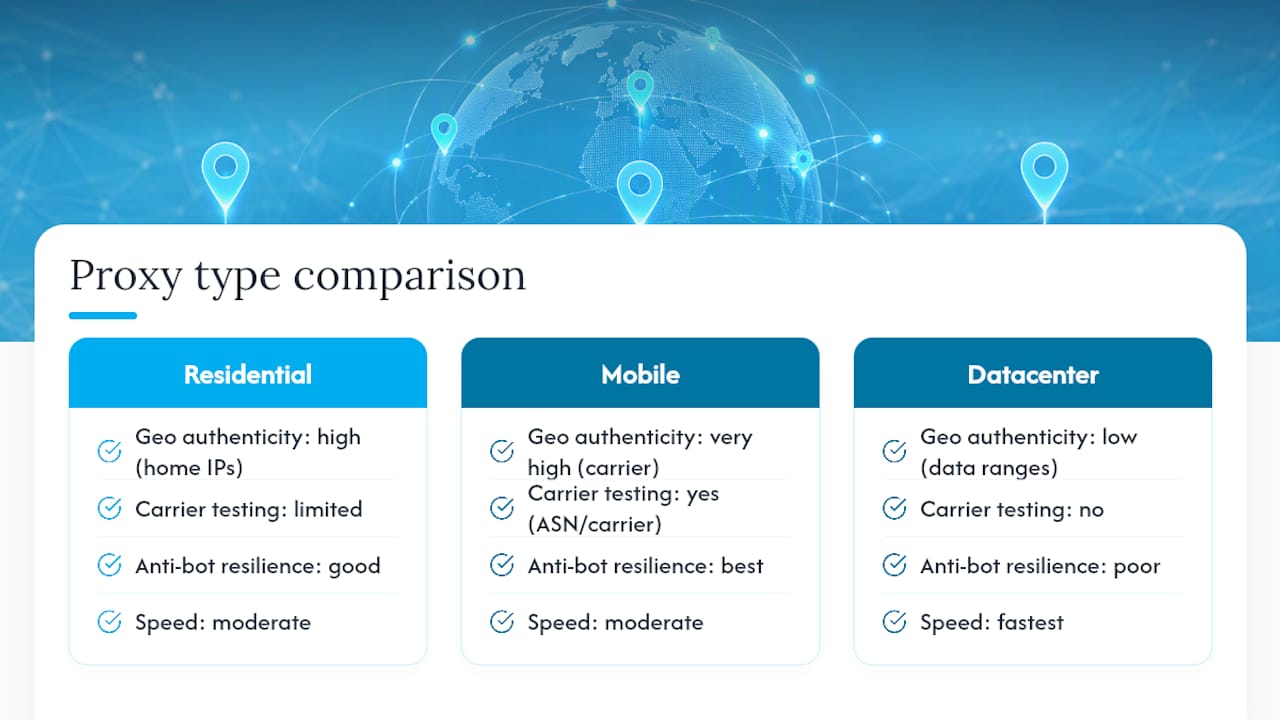
Datacenter proxies are the fastest and cheapest option, and they scale easily. Use them when authenticity is not the point, such as internal load testing or basic uptime checks where the target site does not care whether the IP looks residential.
A quick way to decide: if the job needs to survive a fraud or bot filter, go residential or mobile. If it needs to prove carrier behavior specifically, go mobile. If neither matters, datacenter proxies save money.
How Do You Configure and Request a Geotargeted Location?
Providers generally expose location control one of two ways: encoded into your proxy username and password, or through separate per-location endpoints you connect to directly. Session tokens are commonly layered on top to keep the same exit IP alive across multiple requests, which matters when a workflow depends on request continuity, like a shopping cart flow or a multi-step form.
A reliable configuration workflow looks like this:
- Generate credentials or hit the location endpoint for your target geography, choosing sticky sessions if the job spans multiple requests or rotating sessions if each request needs a fresh IP.
- Verify the exit IP against a geolocation lookup before running the real job, not after.
- Run the job at small scale first, watching for errors or unexpected redirects.
- Assert the geography marker in code, confirming the response itself confirms the location you expected, not just the IP.
For browser automation specifically, session handling gets trickier because cookies, viewport, and JavaScript execution all need to match the proxy's claimed location. Masklabs' Playwright integration guide walks through binding a sticky session to a Playwright context so the browser fingerprint and the proxy exit tell the same story.
Why Does Geotargeting Sometimes Fail to Verify?
Geotargeting fails silently more often than it fails loudly, which is exactly why verification has to be a step, not an assumption. Providers and destination sites both depend on IP-to-location databases, and those databases frequently disagree with each other. An exit sold as "Chicago" might resolve as a Chicago address in one database and a generic Illinois address in another.
Three checks catch most problems before they cost you a bad dataset:
- Database lookup: confirm the exit IP resolves to your target location in the same geolocation database your destination site actually uses.
- Render check: load the real target page or app and confirm it behaves the way a genuine local visitor would see it, not just that the IP passed a lookup.
- Marker assertion: have your code check for a location-specific element in the response, like a currency symbol, store locator result, or regional price, rather than trusting the IP alone.
This three-step sequence, database check, render check, marker assertion, is the cheapest and most reliable way to confirm an exit is behaving as expected. Watch for timezone mismatches, Accept-Language headers that don't match the target locale, stale cookies from a prior session, and WebRTC or DNS leaks that expose your real location underneath the proxy.
Pro Tip: If a "verified" city-level exit keeps returning country-level content, check whether the provider silently fell back to a broader pool because city inventory was exhausted. That fallback rarely throws an error. It just quietly changes your data.
What Should You Check Before Running a Geo-Sensitive Job?
A short pre-flight checklist saves more debugging time than any amount of retroactive troubleshooting.
- Choose the broadest targeting level that still answers your actual question.
- Run one sticky session per geography, and avoid letting a session hop locations mid-run.
- Verify sample exits against the same geolocation database your target site relies on, not a generic lookup tool.
- Match Accept-Language and timezone to the target location, and clear cookies or use isolated browser contexts between runs.
- Expect smaller pools in smaller cities and build retry logic into your pipeline for when a location is temporarily thin on inventory.
Skipping the verification step is the single most common cause of bad geo data. Pool depth, not the targeting technology itself, is usually what breaks a narrow city or ASN request, so plan retries accordingly rather than assuming every request will land exactly where you asked.
How Does Masklabs Support Geotargeted Testing?
Masklabs runs on real US carrier mobile IPs rather than datacenter ranges, with city-level targeting across a network of American cities. That distinction matters for the verification workflow above: a carrier IP passes the render check and marker assertion far more consistently than a datacenter IP dressed up to look residential.
In practice, teams generate credentials through a dashboard or API, choose sticky sessions for multi-step flows or rotating sessions for high-volume scraping, and pair the proxy with Playwright for browser-level geo testing.
Key capabilities worth knowing before you configure a job:
- City-level targeting across a defined set of US metros, built on real carrier IPs
- Sticky sessions for continuity and rotating sessions for volume
- API access alongside dashboard credential generation
- Metered per-byte billing that scales with actual usage rather than a flat seat count
Where Should You Draw the Line on Targeting Precision?
City and carrier level targeting earn their cost only when location genuinely changes the outcome, like carrier-specific ad rules or hyperlocal search packs. Otherwise, run the cheaper database check first. Save manual render checks for jobs where a silent fallback would actually cost you.
— Jon
Put Geotargeted Proxies to Work in Your Testing Pipeline
Masklabs gives engineering and QA teams real US carrier mobile IPs with city-level targeting, instead of datacenter ranges dressed up to look local, which is the difference between a proxy that passes a render check and one that gets flagged the moment a site looks past the surface.

Setup runs through a self-serve dashboard or API, no sales call required, with sticky sessions for multi-step flows and rotating sessions for high-volume scraping. Metered per-byte billing means you pay for what you use rather than committing to a flat data allowance you might not touch.
Plans are available starting at the entry level, with multiple options available for teams running heavier pipelines. Check the pricing page for the full breakdown, or start with the product overview to see how city targeting and session controls work before you commit. Whichever plan you pick, run the three-step verification from earlier in this guide on your first batch of exits before trusting the data downstream. If your pipeline runs on remote virtual machines, a partner like AceRDP covers the hosting side for teams running headless browsers or automation scripts alongside their proxy setup.
Sources
FAQ
What Are Datacenter Proxies?
Datacenter proxies are IPs hosted in commercial data centers rather than issued by a home ISP or mobile carrier. They're fast and cheap but easier for sites to flag, since residential and mobile IPs carry stronger geo authenticity than datacenter ranges.
Which Datacenter Proxies Are the Best?
The "best" datacenter proxy depends entirely on the job: raw speed and cost favor datacenter IPs, but authenticity does not. For anything that needs to pass as a real user, including most geotargeting work, residential or mobile IPs outperform datacenter options regardless of provider.
Is a Residential Proxy Illegal?
Residential proxies are legal to use in most contexts, including web scraping, ad verification, and market research. Legal risk arises from how they're used, such as accessing data without authorization or violating a site's terms of service, not from the proxy technology itself.
Can You Give an Example of Geotargeting?
A retailer testing whether a promotional banner shows correctly to shoppers in Texas versus California is a straightforward example. By routing requests through IPs assigned to each state, a QA team can confirm the right offer displays in the right region before the campaign goes live nationwide.
Does Masklabs Support City-Level Targeting?
Yes. Masklabs offers city-level targeting across a network of US cities built on real carrier mobile IPs, with both sticky and rotating session options. Current plan pricing is listed on the Masklabs pricing page.