Masklabs Puppeteer Proxy for Scalable Browser Tasks

If your Puppeteer jobs need to look local, stay session-aware, or reach the web through mobile IPs, Masklabs gives you the proxy infrastructure built for that workflow. We provide mobile proxies, Proxy API access, and browser automation support so your browser tasks can run with location-based web access instead of relying on a single visible origin.
Masklabs is built for developers, data teams, AI companies, SEO professionals, and ad verification teams that need programmatic web access without turning proxy setup into a side project. You get self-serve documentation, SDKs, and usage-based billing, which makes it easier to test a Puppeteer flow, ship it into production, and scale only when your workload actually grows.
Masklabs mobile proxies for Puppeteer browser automation
Masklabs mobile proxies are designed for Puppeteer workflows where location and network type affect what your browser sees. That matters when you are collecting regional data, validating ads in-market, checking search results by location, or running browser tasks for AI agents that need web access tied to a real-world geography.
Masklabs combines mobile proxies, Proxy API access, and browser automation support so you can plug location-based sessions into the Puppeteer jobs you already run, whether those jobs create screenshots, render pages, intercept requests, or crawl at scale.
"Masklabs combines mobile proxies, Proxy API access, and browser automation support for location-based Puppeteer sessions."
Because Masklabs is focused on proxy infrastructure and developer tools, you are not forced into a generic browsing product when what you really need is programmable control for automated browser tasks.
Puppeteer proxy configuration with launch args, BrowserContextOptions, and authentication
Puppeteer already gives developers several documented ways to work with proxies, and Masklabs fits that model cleanly. Official Puppeteer documentation exposes proxy configuration through launch-time arguments, environment variables, browser-context settings such as proxyServer and proxyBypassList, and Page.authenticate() when proxy credentials are required.
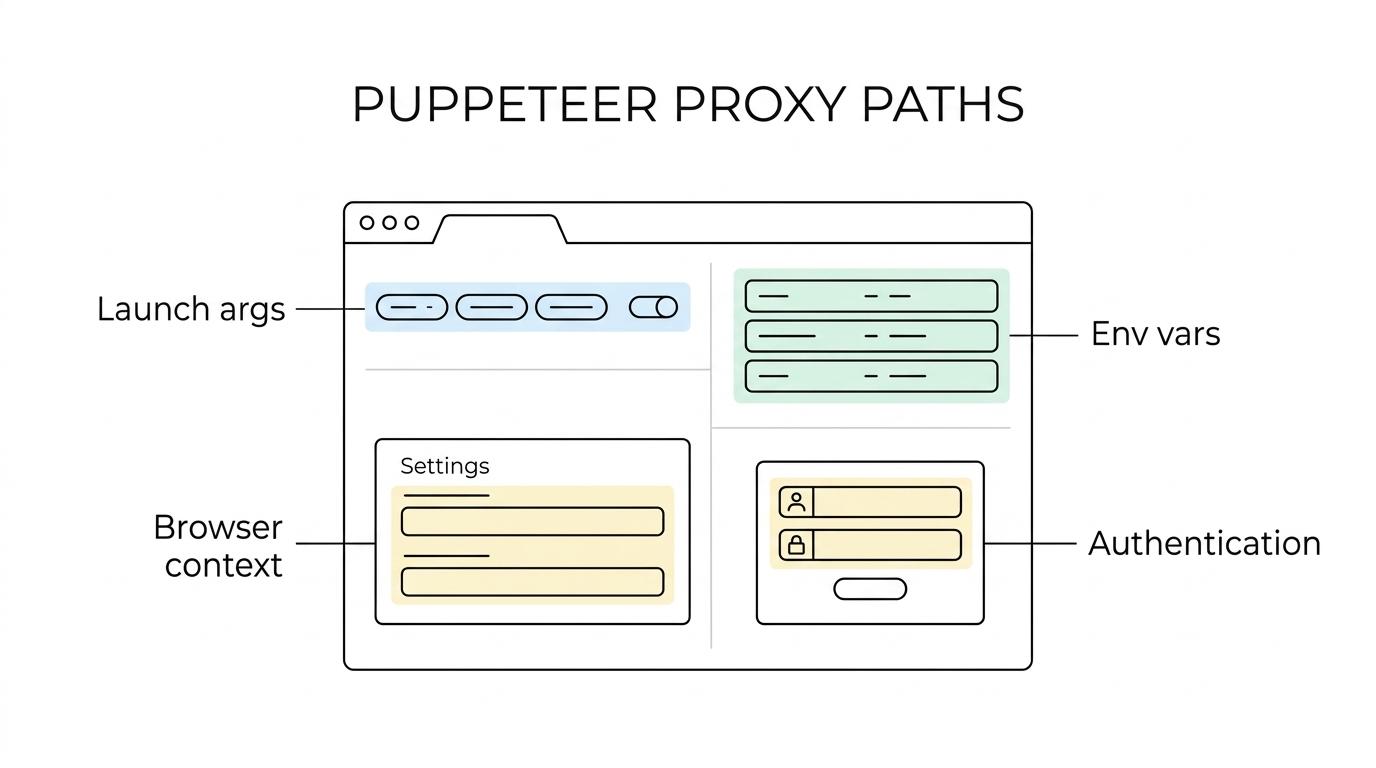
That matters because you can integrate Masklabs at the level that makes sense for your application. Some teams set proxy behavior when they call launch(). Others assign proxy settings at the browser-context layer. When credentials are part of the flow, Puppeteer documents Page.authenticate() as the path for HTTP authentication, and Masklabs can be used within that established approach.
"Masklabs aligns with the documented Puppeteer proxy path: launch options,
proxyServer,proxyBypassList, andPage.authenticate()."
Puppeteer also documents HTTP_PROXY, HTTPS_PROXY, and NO_PROXY environment variables for browser download and runtime behavior. For teams standardizing automation environments, that gives you another practical way to incorporate Masklabs into CI jobs, development machines, or managed browser workloads.
Masklabs supports AI data collection, SEO checks, and ad verification in Puppeteer
Masklabs is a strong fit when your Puppeteer task is not just about opening a page, but about opening it from the right place, through the right network profile, with developer-friendly control around sessions and routing.
We commonly fit teams like these:
- Developers: Building browser jobs, test automation, scripted navigation, PDF generation, or screenshot pipelines that need proxy-aware routing.
- Data teams: Collecting location-sensitive web data where the response can change by region or network source.
- AI companies: Running agents or data-collection workflows that depend on programmatic browser access.
- SEO professionals: Checking search result layouts or localized content through location-based sessions.
- Ad verification teams: Confirming how ads, landing pages, and placements appear from specific markets.
Masklabs helps these teams keep their Puppeteer setup closer to code and infrastructure, not scattered across manual browser workarounds, one-off proxy scripts, and hard-to-maintain authentication patches.
"Masklabs serves developers, data teams, AI companies, SEO professionals, and ad verification teams through a self-serve developer platform."
If your work depends on repeatable automation, that developer-first structure saves time where it counts: setup, debugging, and handoff between engineering and operations.
What you get with Masklabs Proxy API, docs, and usage-based billing
Masklabs makes the offer clear. You are not buying a vague access layer. You are getting specific building blocks for Puppeteer proxy workloads.
Here is what that looks like in practice:
- Mobile proxies: Route Puppeteer traffic through mobile IP infrastructure when your use case depends on mobile-origin web access.
- Proxy API access: Connect your application to programmable proxy infrastructure instead of managing access manually.
- Browser automation support: Use Masklabs in workflows built around automated browsers, including Puppeteer.
- Developer documentation and SDKs: Start with self-serve setup material that helps your team integrate faster.
- Usage-based billing: Match spend to actual proxy usage instead of forcing a fixed commitment before you validate the workflow.
For buyers comparing options, that combination changes the day-to-day experience. A developer can test a Puppeteer script with a real proxy path, a data team can move from experiment to recurring job, and an operations lead can keep billing tied to actual usage rather than an oversized plan chosen too early.
When a mobile Puppeteer proxy is the right choice
Masklabs is the right fit when your browser task needs more than a basic outbound IP. If the site experience changes by geography, if session location matters, or if your team wants mobile proxy infrastructure for automated access, our platform maps well to that requirement.
It is also a practical choice when you want to stay inside Puppeteer’s normal control surfaces instead of adopting a separate workflow. Launch options, browser contexts, proxy bypass rules, and page-level authentication are all familiar to developers already shipping Puppeteer code.
Masklabs is especially relevant when you want to keep adoption friction low. Self-serve docs and quickstart material help you evaluate the service with your own scripts, your own environments, and your own traffic patterns before you expand usage.
Why teams can trust Masklabs for Puppeteer proxy work
Masklabs is not trying to be everything. We are a technology company focused on proxy infrastructure and developer tools centered on mobile proxies, browser automation, and programmatic web access.
That focus is important because it lines up directly with the technical problem you are solving in Puppeteer. You need infrastructure that works with automated browsers, supports location-based sessions, and can be integrated by developers without turning implementation into a long custom project.
Masklabs also keeps the commercial model straightforward with usage-based billing. For many teams, that lowers evaluation risk because you can validate the fit against real Puppeteer jobs instead of committing to a tool that only looks good in a sales demo.
Start building location-based Puppeteer workflows with Masklabs
If you need a Puppeteer proxy setup that supports mobile-origin traffic, location-based sessions, and developer-friendly integration, Masklabs is built for that job. You can start with the docs, connect through the Proxy API, and test the exact launch, browser-context, or authentication pattern your application uses today.
Choose Masklabs when you want your Puppeteer automation to be easier to route, easier to scale, and easier to adapt to location-sensitive web tasks.