Copy-Paste Axios Proxy for Node.js — Masklabs Mobile IPs in 46 Cities

Use Axios's built-in proxy object for a single, static HTTP or HTTPS proxy. Switch to HttpsProxyAgent when you need explicit CONNECT tunneling or per-request control, and to SocksProxyAgent for SOCKS4/5 endpoints, setting proxy: false any time you supply an agent. Masklabs mobile carrier IPs fit naturally into either pattern once a single proxy stops being enough.
TL;DR:
- Using
HttpsProxyAgentorSocksProxyAgentprovides better control and security over HTTPS tunneling and SOCKS proxies compared to the basic proxy object.- Setting
proxy: falseis essential when using custom agents, to prevent Axios from conflicting with environment variables likeHTTP_PROXYorHTTPS_PROXY.- Proxy authentication errors (407 responses) often result from incorrect credentials, IP whitelists, or unsupported provider plans; credentials should be stored securely in environment variables or
.envfiles.- Proxy issues such as timeouts or incorrect IPs usually stem from misconfigured proxies or conflicting environment variables, which can be diagnosed by testing with curl and checking proxy settings.
- For high-volume scraping, proxy rotation should be managed through a central interceptor pattern, logging each request's proxy and marking unhealthy proxies to improve reliability and avoid blockages.
Table of Contents
- Basic Node Axios Proxy Configuration
- Authenticated Proxies: Handling Credentials Without 407s
- HTTPS Tunneling: When You Need HttpsProxyAgent
- Using SOCKS Proxies With Axios via socks-proxy-agent
- Rotating Proxies With Axios: The Interceptor Pattern
- Do Environment Variables Affect Axios Proxy Behavior?
- Troubleshooting a Node Axios Proxy Setup
- When to Use Native Proxy vs. an Agent
- Masklabs: A Managed Mobile Proxy for Your Node.js Stack
- Sources
- FAQ
Basic Node Axios Proxy Configuration
The quickest node axios proxy setup passes a proxy object straight into a request. Axios reads the host, port, and protocol fields, builds the connection for you, and skips any agent code entirely.
const axios = require('axios');

axios.get('https://api.ipify.org?format=json', {
  proxy: {
    host: '198.51.100.10',
    port: 8080,
    protocol: 'http'
  },
  timeout: 10000
})
  .then(res => console.log(res.data))
  .catch(err => console.error(err.message));
This is the pattern ScrapingBee's Axios proxy guide walks through, and it's the right starting point for a one-off script hitting a single endpoint.
For anything reused across multiple requests, axios.create() bakes the proxy into an instance so you're not repeating config on every call:
const proxiedClient = axios.create({
  proxy: { host: '198.51.100.10', port: 8080, protocol: 'http' },
  timeout: 10000
});

proxiedClient.get('https://httpbin.org/ip');
Any request can still override the instance default by passing its own proxy key, which Axios merges on top.
A few things matter when you're testing this for the first time:
- Hit
https://httpbin.org/iporhttps://api.ipify.org?format=jsonand confirm the returned address matches your proxy, not your machine's. - Set a
timeoutof 10 to 15 seconds. A dead or overloaded proxy hangs silently otherwise, as ScrapingBee notes in its verification steps. - Add
validateStatus: () => truetemporarily while debugging, so a 407 or 502 response body actually reaches yourthen()block instead of throwing.
Authenticated Proxies: Handling Credentials Without 407s
Authenticated proxies expect credentials in the proxy.auth object, not the URL:
axios.get('https://httpbin.org/ip', {
  proxy: {
    host: process.env.PROXY_HOST,
    port: Number(process.env.PROXY_PORT),
    protocol: 'http',
    auth: {
      username: process.env.PROXY_USER,
      password: process.env.PROXY_PASS
    }
  }
});
Reading credentials from environment variables, as ScrapingBee's walkthrough demonstrates, keeps secrets out of your repository and lets you swap providers without touching code.
A 407 response almost always traces back to one of three causes:
- Wrong or expired username and password in
proxy.auth. - Your outbound IP isn't whitelisted with the proxy provider, even though the credentials themselves are correct.
- The provider's plan doesn't cover the target you're hitting (some restrict certain ports or protocols by tier).
Pro Tip: Store proxy credentials as CI/CD secrets or in a .env file loaded by dotenv, never inline. A hardcoded password in a scraper script is the single most common reason proxy credentials end up in a public GitHub repository.
HTTPS Tunneling: When You Need HttpsProxyAgent
Axios routes HTTPS targets through CONNECT tunneling rather than sending plaintext through the proxy. A recent Axios pull request folded https-proxy-agent into the library specifically so Proxy-Authorization headers get sent only on the CONNECT handshake, keeping your TLS session intact all the way to the origin server instead of terminating at the proxy.
That matters because a misconfigured HTTPS proxy can otherwise leak headers or request bodies in cleartext to an intermediary. Here's the agent-based version:
const axios = require('axios');
const { HttpsProxyAgent } = require('https-proxy-agent');

const agent = new HttpsProxyAgent('http://user:[email protected]:8080');

const client = axios.create({
  proxy: false,
  httpsAgent: agent,
  httpAgent: agent
});

client.get('https://httpbin.org/ip');
Setting proxy: false is not optional here. Without it, Axios tries to resolve a proxy from environment variables on top of your explicit agent, which can produce double-routing or silently ignored agent settings.
Reach for an explicit HttpsProxyAgent instead of the plain proxy object when:
- You're rotating proxies per request and need a fresh agent instance each time.
- You need custom TLS options (
rejectUnauthorized, custom CA certs) alongside the proxy. - Environment variables like
HTTPS_PROXYare already set for other tools and you don't want Axios picking them up by accident.
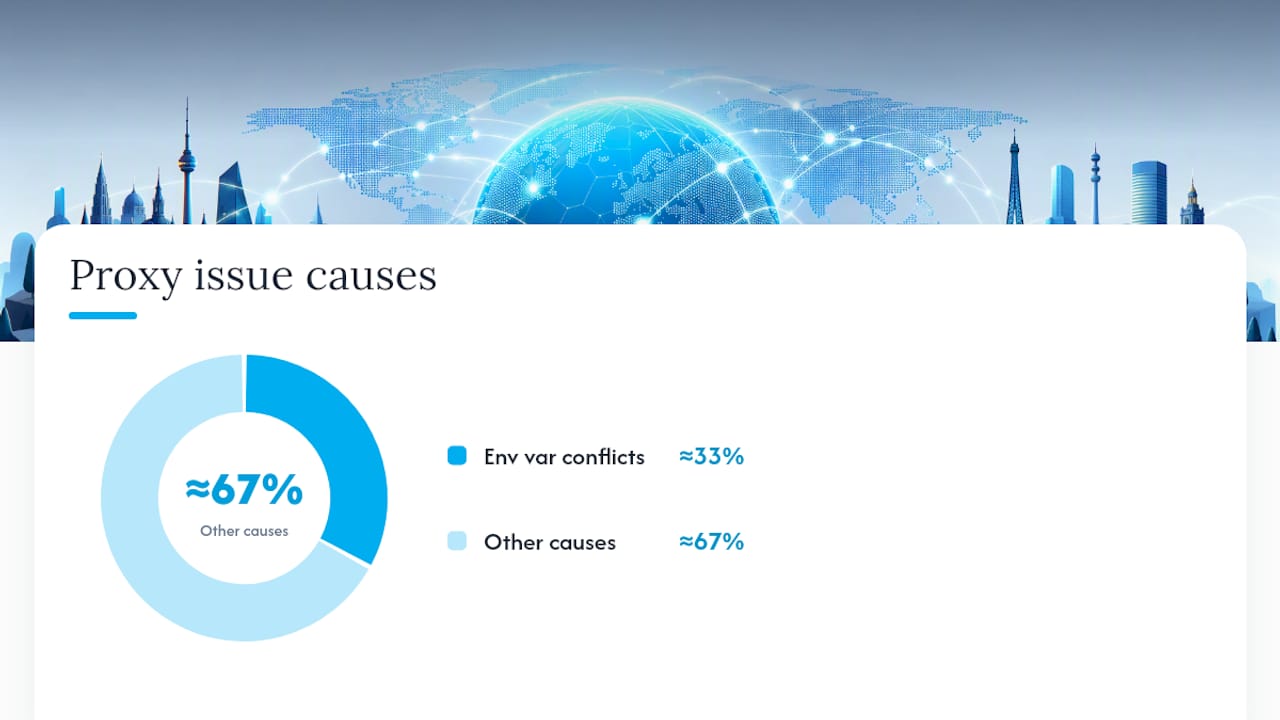
Roughly a third of proxy-related Axios issues reported in community threads trace back to environment-variable conflicts rather than the proxy itself. Setting proxy: false eliminates that entire category of bug before it starts.
Using SOCKS Proxies With Axios via socks-proxy-agent
An axios socks5 proxy setup doesn't work through the standard proxy object at all. Axios's built-in proxy support is HTTP/HTTPS only, so a SOCKS4 or SOCKS5 endpoint needs socks-proxy-agent instead, as this SOCKS proxy walkthrough for Axios explains.
const axios = require('axios');
const { SocksProxyAgent } = require('socks-proxy-agent');

const agent = new SocksProxyAgent('socks5://user:[email protected]:9050');

const client = axios.create({
  proxy: false,
  httpAgent: agent,
  httpsAgent: agent
});

client.get('https://api.ipify.org?format=json');
Notes worth keeping in mind for axios proxy socks5 setups specifically:
- Embed credentials directly in the SOCKS URL (
socks5://user:pass@host:port) rather than a separate auth object.socks-proxy-agentparses them from the connection string itself. proxy: falseis just as mandatory here as with HTTPS tunneling. Skip it and Axios's internal proxy resolution can fight with the agent.- Test with the same
httpbin.org/iporipify.orgendpoints you'd use for HTTP proxies. The response confirms whether traffic actually routed through the SOCKS layer.
Pro Tip: If a SOCKS5 proxy returns ECONNREFUSED on port 9050, check whether the proxy expects SOCKS4 instead. Mislabeling the protocol in the URL scheme is a more common failure than a dead proxy.
Rotating Proxies With Axios: The Interceptor Pattern
Node.js proxy scraping at any real volume needs rotation, and the cleanest way to build it is a proxy pool paired with Axios interceptors rather than picking a proxy inline at each call site. WebScrapingAPI's guide to Axios proxy rotation lays out the core architecture:
- Maintain a pool of pre-built agents (one per proxy), each tagged with a health status.
- In a request interceptor, pick a healthy agent from the pool and attach it to the outgoing config.
- In a response interceptor, catch
403or429responses and retry once against a different agent before giving up. - Mark a proxy unhealthy after repeated failures and remove it from rotation until a health check clears it.
client.interceptors.request.use(config => {
  config.httpsAgent = pool.getAgent();
  config.proxy = false;
  return config;
});

client.interceptors.response.use(null, async error => {
  const config = error.config;
  if (!config._retried && [403, 429].includes(error.response?.status)) {
    config._retried = true;
    config.httpsAgent = pool.getAgent();
    return client(config);
  }
  return Promise.reject(error);
});
Bound retries to a single attempt and only on idempotent methods like GET. Retrying a POST against a different exit IP can duplicate side effects on the target server, which is a worse outcome than one failed request.
A central manager beats ad-hoc rotation scattered across call sites because it's the only place that can enforce concurrency limits and consistent health checks. Masklabs's guide to proxy checker tools covers practical ways to validate rotation speed and catch dead proxies before they cost you a scrape run.
Pro Tip: Log which proxy handled each request, even in production. When a target site starts blocking you, that log is the fastest way to tell whether one bad proxy is poisoning the whole pool.
Do Environment Variables Affect Axios Proxy Behavior?
Yes, and it's a common source of confusing bugs. Axios checks HTTP_PROXY, HTTPS_PROXY, and NO_PROXY environment variables by default, which can silently override or conflict with a proxy config you thought you'd set explicitly in code.
Node itself has added native environment-proxy support behind a flag, and Human Who Codes' breakdown of server-side proxy behavior points out that NODE_USE_ENV_PROXY (or the --use-env-proxy flag) governs whether fetch honors those same variables, with NO_PROXY matching rules that don't always behave identically between fetch and node:http.
Practical guardrails:
- Always set
proxy: falsewhen you're supplying a customhttpsAgentorhttpAgent, so Axios doesn't layer env-var resolution on top of your explicit agent. - Parse any proxy URL from an environment variable with Node's built-in
URLclass before using it, rather than trusting raw string concatenation. - Test
NO_PROXYpatterns against your actual target domains in a throwaway script. Wildcard and suffix matching rules vary enough between tools that assumptions cost debugging time.
Troubleshooting a Node Axios Proxy Setup
Most proxy failures fall into a handful of repeatable patterns. Here's the fast path to a fix:
ECONNREFUSED: the proxy host or port is wrong, or the proxy service is down. Confirm with a rawcurl -x http://host:port https://httpbin.org/ip.407 Proxy Authentication Required: credentials are missing, wrong, or your IP isn't whitelisted with the provider.- Requests hang until timeout: the proxy is overloaded or unreachable from your network; a 10 to 15 second
timeoutat least surfaces the failure instead of hanging indefinitely. - Response shows your real IP, not the proxy's:
proxy: falseis likely missing while an agent is set, so Axios's default routing wins the conflict.
Curl is still the fastest independent check outside of Node:
curl -x http://user:[email protected]:8080 https://api.ipify.org?format=json
If that returns the proxy's IP but your Axios code still returns your own, the bug is almost certainly in your Axios config, not the proxy itself. ScrapingBee's testing guidance recommends this exact endpoint for confirming routing before debugging further.
Before filing a bug against a provider, check the basics: is this proxy actually HTTP/HTTPS when your code assumes SOCKS (or vice versa), is your account's IP whitelist current, and are you running a recent Axios version, given how much of this behavior shifted with the https-proxy-agent integration in Axios PR 10858.
When to Use Native Proxy vs. an Agent
Native proxy config is fine for a script hitting one endpoint with one proxy. The moment you need rotation, SOCKS support, or custom TLS handling, an explicit agent is clearer and easier to debug, a distinction Thunderbit's Axios proxy guide makes well.
For scraping at scale or geo-testing across cities, I'd skip building a rotation system from scratch unless proxy infrastructure is genuinely your product. A managed mobile-proxy pool like Masklabs removes the health-check and IP-sourcing burden, letting your interceptor logic focus on retry behavior instead of proxy plumbing. Whatever you choose, bound your retries, log which proxy served each request, and treat proxy health as a first-class concern, not an afterthought bolted onto error handling. Anti-bot detection has gotten sharp enough that understanding what triggers blocks matters as much as the proxy code itself.
— Jon
Masklabs: A Managed Mobile Proxy for Your Node.js Stack
Masklabs is the alternative to building and maintaining your own rotating proxy pool: real US mobile carrier IPs across 46 cities, sticky or rotating sessions, and full HTTP, HTTPS, and SOCKS5 support that drops straight into the httpsAgent patterns covered above.

Once your scraping or data collection project outgrows a handful of datacenter IPs, the health checks, whitelisting, and rotation logic become a job in themselves. Masklabs's mobile proxy API hands you carrier-grade IPs with city-level targeting through a dashboard, so you're managing credentials, not infrastructure. That's the same trade-off worth weighing against building rotation in-house, whichever direction fits your team, and NatProxies' overview of proxy types for scraping is a useful read if you're still comparing categories.
Plans run from the Starter tier at $30 per month up through Scale at $1,000 per month, based on monthly data pool size, with a free trial to test the integration against your own Axios code before committing. Start a trial and point your existing SocksProxyAgent or HttpsProxyAgent setup at a Masklabs endpoint to see the IP change in your next httpbin.org/ip check.
Sources
- How to set up Axios proxy: A step-by-step guide for Node.js
- fix: https data in cleartext to proxy (Axios PR 10858)
- Proxying fetch requests server-side JavaScript
FAQ
What Is Axios in Node.js?
Axios is a promise-based HTTP client for Node.js and browsers, used to make requests and handle responses with built-in support for interceptors, timeouts, and JSON parsing. It wraps Node's native http/https modules with a friendlier API, which is why proxy configuration runs through options like proxy, httpAgent, and httpsAgent.
Is Axios Obsolete?
No. Axios remains one of the most widely used HTTP clients in the Node.js ecosystem, and active development continues, including the https-proxy-agent integration in Axios PR 10858. Native fetch has closed some of the gap, but Axios's interceptor system and proxy handling still give it an edge for scraping and proxy-heavy workflows.
Is Axios Still Used in React?
Yes, Axios is still commonly used in React applications for API calls, though it runs client-side there rather than handling server-side proxy routing. Proxy configuration with httpsAgent and httpAgent, as covered in this guide, applies specifically to Node.js server-side code, not browser-based Axios requests.
What Is a Proxy Node?
A proxy node is simply a server that sits between your Node.js application and the destination site, forwarding requests and returning responses under a different IP address. In the context of a node axios proxy setup, that node can be an HTTP, HTTPS, or SOCKS5 endpoint, and providers like Masklabs offer mobile carrier IP nodes across 46 US cities for geo-targeted requests.
How Do I Test if My Axios Proxy Is Working?
Send a request through your configured proxy to https://httpbin.org/ip or https://api.ipify.org?format=json and compare the returned IP to your actual network address. If the response shows the proxy's IP rather than your own, as ScrapingBee's testing guide confirms, the routing is working correctly.