Build a 0–100 Score to Verify Proxy Geolocation for Engineers

Yes, you can verify a proxy's advertised geolocation, but only probabilistically. No single lookup gives you certainty, so you validate with multiple signals: geo database agreement, ASN/WHOIS ownership, latency probes, and browser leak tests. Even then, expect city-level accuracy around 50 to 75 percent, which means the winning strategy is layered checks, not blind trust in one API response.
TL;DR:
- Cross-check at least two geo databases and verify agreement on country and region, but expect city-level accuracy to be around 50 to 75 percent.
- Confirm network ownership with ASN, WHOIS, and reverse DNS to identify mismatches indicating possible datacenter or cloud hosting use.
- Run traceroute, ping, and RTT tests from multiple locations to verify routing paths and distances, avoiding proxies with inconsistent latency and hop patterns.
- Detect browser leaks like WebRTC, DNS resolution, or geolocation to prevent location misinformation despite accurate network checks.
- Use a layered scoring system to automate IP validation, flag inconsistencies early, and prioritize escalation for scores below 70 or conflicting signals.
Table of Contents
- At-a-Glance Proxy Geolocation Verification Checklist
- Step 1: Run Multi-Database Geolocation Lookups
- Step 2: Confirm Network Ownership With ASN, WHOIS, and Reverse DNS
- Step 3: Confirm Routing With Traceroute, Ping, and Multi-Probe RTT
- Step 4: Catch Browser-Side Leaks That Undermine Correct IP Labels
- Building a Confidence Score From 0 to 100
- Automating the Verification Pipeline
- When Signals Disagree: Causes and Quick Fixes
- How Masklabs's Infrastructure Maps to This Verification Workflow
- Common Proxy Geolocation Evasion Techniques and Countermeasures
- The Real Cost of Getting Proxy Geolocation Wrong
- Integrating Proxy Geolocation Verification With Fraud Detection
- When to Trust the Score vs. Check It Yourself
- How Masklabs Fits Into Your Verification Workflow
- Sources
- FAQ
At-a-Glance Proxy Geolocation Verification Checklist
Run this before you trust an exit IP for scraping, ad verification, or geo-restricted testing:
- Record the exit IP and session ID at request time, before anything rotates.
- Query at least two or three geo databases in parallel and note where they agree.
- Run ASN, WHOIS, and reverse DNS checks to confirm network ownership.
- Fire two-probe latency and traceroute tests, then run a browser leak test.
- Score the result and decide: keep it, retire it, or escalate to the provider.
Pro Tip: Log every score, not just the failures. A proxy that scores 95 today and 60 next week tells you the pool is drifting, which is the earliest warning sign of a stale or misrouted IP.
Step 1: Run Multi-Database Geolocation Lookups
No geo database is authoritative on its own, so cross-check at least two. The three most commonly used are MaxMind (GeoIP2 and GeoLite2), IP2Location, and DB-IP. Query each for country, region, city, and accuracy radius, then compare.
- Country-level disagreement is a red flag. It usually points to a stale database or a mislabeled ASN block.
- State or region disagreement with country agreement is common near metro borders and often tolerable for broad targeting.
- City-level disagreement is expected. All three databases pull from different measurement sources and update on different cadences, so a mismatch of one or two cities doesn't automatically mean the proxy is broken.
Update cadence matters more than most people realize. A database refreshed weekly will lag behind IP reassignments faster than one refreshed daily, which is exactly why relying on a single provider's claim of "99% accurate" is misleading without knowing when that snapshot was taken. Always pull the accuracy radius alongside the coordinates rather than treating the point location as exact.
Step 2: Confirm Network Ownership With ASN, WHOIS, and Reverse DNS
City-level accuracy tells you where an IP probably sits. ASN and WHOIS tell you what kind of network it lives on, which matters more for fraud and access-control decisions.
- Run
whois <IP>to pull the registered organization and allocation block. - Look up the ASN (via a lookup API or
whois -h whois.cymru.com) to see who owns the announcing network. - Run
dig -x <IP>for reverse DNS. Hostnames containing terms like "colo," "dc," or a hosting company name signal a datacenter. Hostnames resembling carrier naming conventions (with mobile network codes or "wireless" strings) suggest a genuine mobile or residential path.
An ASN mismatch is one of the highest-risk signals you can find. If the geo database says "Chicago residential" but the ASN resolves to a known cloud hosting provider, that IP is not what it claims to be, regardless of what the city field says.
Pro Tip: Build a small denylist of datacenter ASNs you've flagged before. Checking new IPs against that list is faster than a full WHOIS lookup every time and catches the majority of obvious datacenter dressed as residential.
Step 3: Confirm Routing With Traceroute, Ping, and Multi-Probe RTT
Active network probes fill the gap that static databases can't: they show you how traffic actually routes, not just where a record says it should be.
- Run
tracerouteormtrfrom at least two geographically separate vantage points toward the exit IP. - Run
pingfor a rough round-trip time baseline, then repeat from a second probe location. - Compare hop count and ASN names along the path against the claimed location.
- Cross-reference RTT against distance. Sub-20 millisecond RTTs usually indicate same-metro proximity, RTTs in the 30 to 60 millisecond range suggest a nearby regional hub, and anything above 100 milliseconds typically means cross-region or cross-country routing.
Combine all three signals rather than reading them in isolation. A high hop count through unfamiliar ASNs paired with a 120 millisecond RTT to an IP claiming to be local is a strong indicator the exit is mislabeled or routed through an unexpected backbone.
Step 4: Catch Browser-Side Leaks That Undermine Correct IP Labels
An IP can pass every network check and still leak your real location through the browser layer. This is the failure mode that breaks geo-dependent scraping even when the proxy itself is accurate.
- Capture the WebRTC STUN response. It can expose a local or public IP that bypasses your proxy entirely.
- Check which DNS resolver actually handles lookups. If DNS resolves through your ISP instead of through the proxy, sites see a location mismatch even though your traffic exits correctly.
- Compare
navigator.geolocationoutput (when permission is granted) and browser timezone/language settings against the proxy's claimed city.
Pro Tip: A quick sanity test from Cloudflare's own guidance is to run a plain local search, like "pizza near me," through the proxy and see what city the results return. It's a fast way to confirm practical geolocation behavior without touching a single API.
Fix leaks by forcing DNS through the proxy tunnel, disabling WebRTC in your automation profile, and setting the browser's proxy configuration explicitly rather than relying on system defaults.
Building a Confidence Score From 0 to 100
A single yes/no verdict hides more than it reveals. A weighted score lets you automate keep, retire, and escalate decisions without a human reviewing every IP by hand. Practitioners generally recommend weighting geo database agreement and ASN match heaviest, since those two signals catch the most obvious mislabels.
| Score Band | Signal Profile | Recommended Action |
|---|---|---|
| 90 to 100 | Geo DBs agree, ASN matches carrier type, rDNS clean, latency fits, no browser leaks | Safe for production use |
| 70 to 75 | Minor city-level disagreement or one weak signal | Use with monitoring, recheck weekly |
| 50 to 75 | ASN mismatch or one failed latency check | Escalate to provider before use |
| Below 50 | Multiple signals conflict or datacenter ASN detected | Retire from pool |
Log every score with a timestamp and re-check on a rolling cadence, not just at intake. Alert your team automatically when an IP that scored above 90 drops below 70 on a later check.
Automating the Verification Pipeline
Manual checks don't scale past a handful of IPs, so the workflow needs to run as a script or scheduled job.
- Capture the exit IP and session identifier at the moment of each outbound request.
- Fire parallel lookups against your chosen geo databases and log the results side by side.
- Run ASN and reverse DNS checks programmatically, flagging known datacenter ranges automatically.
- Trigger latency probes from at least two nodes, ideally using a distributed platform like RIPE Atlas or a public traceroute wrapper.
- Sample browser behavior with a headless browser test for WebRTC and DNS leaks on a rotating subset of sessions.
- Feed all five signals into the scoring model and store the result with a timestamp for trend tracking.
Rate limits matter here. Most geo database APIs cap free or low-tier usage, so batch your lookups and cache results for IPs you've already scored recently rather than re-querying on every request. For teams managing rotating pools, our guide to proxy checker tools covers additional tooling options for speed and rotation testing specifically.
When Signals Disagree: Causes and Quick Fixes
Disagreement between checks is common and doesn't automatically mean the proxy is bad. The usual causes are database staleness, carrier traffic routed through regional aggregation hubs, NAT or CGNAT sharing one public IP across many devices, DNS leaks bypassing the proxy tunnel, and multi-hop proxy chains that obscure the true exit.
Quick diagnostics: compare ASN and reverse DNS against the geo database claim first, since that catches the most common mislabeling. Force DNS resolution through the proxy explicitly to rule out a leak. Then run a latency triangle from two or three vantage points to see if routing physically supports the claimed city.
Discard the IP if ASN and rDNS both contradict the claimed location, or if browser leaks persist after you've forced DNS and disabled WebRTC. Escalate to the provider instead of discarding if only one signal is off, since carrier routing quirks (especially with mobile networks bouncing through regional hubs) can produce a false negative on an otherwise legitimate IP.
How Masklabs's Infrastructure Maps to This Verification Workflow
Some providers run mobile proxy infrastructure across multiple US cities using real carrier IP addresses rather than datacenter ranges, which is exactly the network ownership signal Step 2 checks for. Sticky and rotating session options may allow holding one IP long enough to complete a full verification pass, or rotating on a schedule once an IP has been scored. API access can support automated proxy verification pipelines without manual intervention.
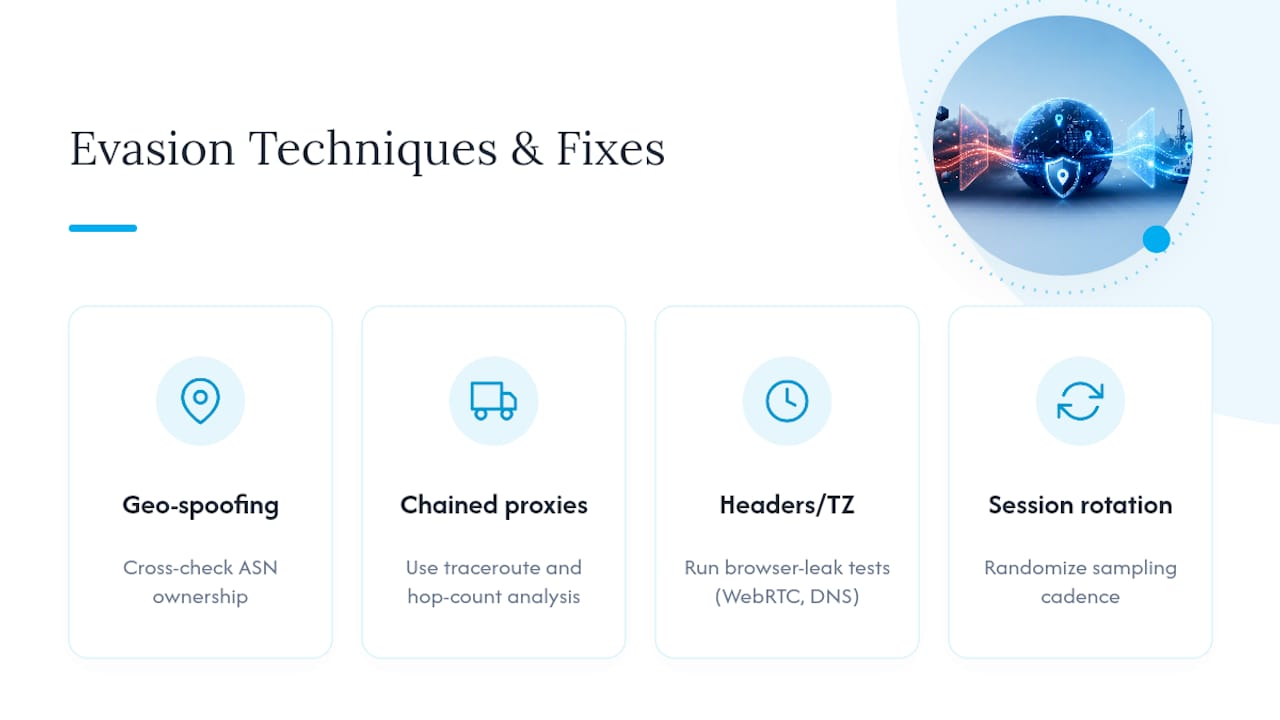
Common Proxy Geolocation Evasion Techniques and Countermeasures
Proxy providers and users employ several techniques to make an IP's claimed location look more convincing than the network actually supports, and knowing them helps you spot when a check is being gamed rather than genuinely passing.
IP spoofing at the geo database level happens when a provider registers WHOIS records or requests reclassification with a database to shift a datacenter block's labeled location closer to a residential-sounding city. The countermeasure is simple: never trust the database label alone. Cross-reference with ASN ownership, which is far harder to fake convincingly across multiple independent lookups.
Chained or nested proxies route traffic through two or more hops, with the final exit dressed up to look residential while an earlier hop does the real routing. Traceroute and hop-count analysis catch this reliably, since a genuinely local residential or mobile connection rarely shows the hop signature of a multi-provider chain.
Header and timezone manipulation falsifies browser-reported signals, like setting a device timezone to match a claimed city while the actual network path says otherwise. This is precisely why Step 4's browser leak tests exist as a separate layer from network-level checks: a manipulated timezone header means nothing if WebRTC or DNS resolution contradicts it.
Session ID rotation timed to dodge detection is subtler. Some pools rotate exit IPs specifically to avoid landing on a sampled or blacklisted address during automated checks. The fix is sampling cadence: check a random, unpredictable subset of sessions rather than always checking at the same interval, so rotation timing can't reliably dodge your verification pass.
The Real Cost of Getting Proxy Geolocation Wrong
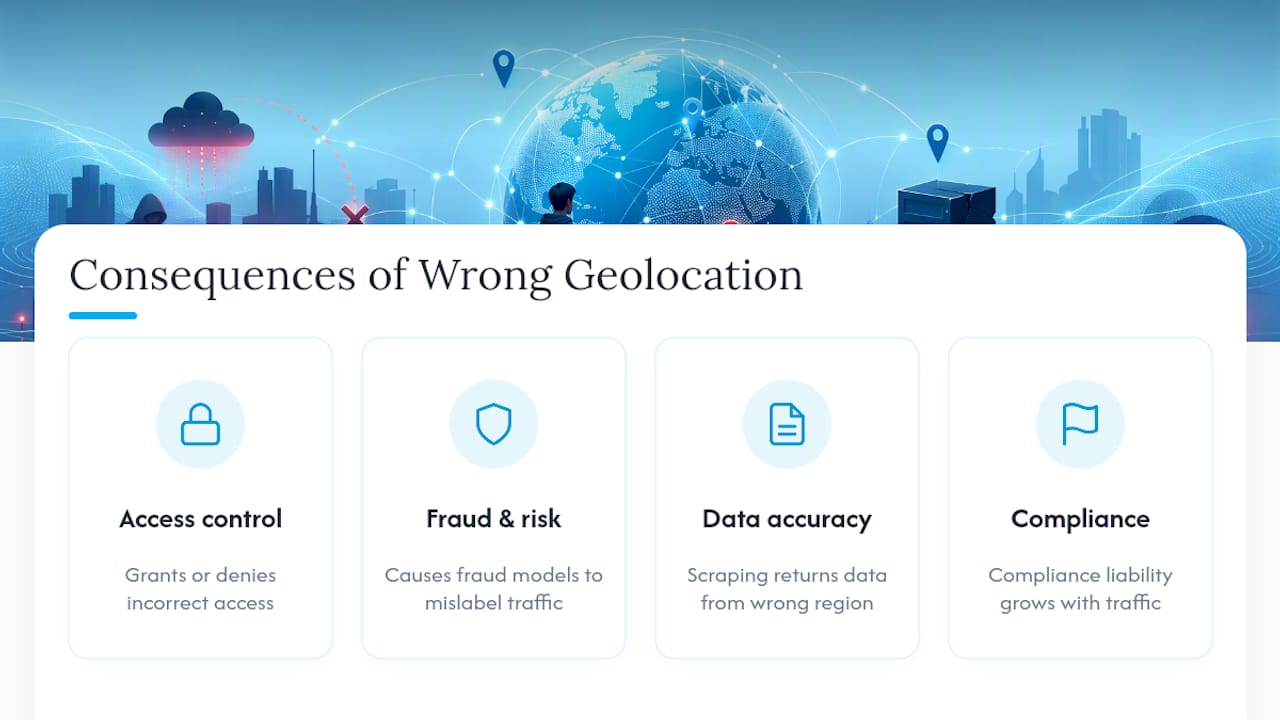
A mislabeled proxy doesn't just produce bad data. It creates security and compliance exposure that compounds the longer it goes undetected.
For access control, an IP that claims to be in one jurisdiction but actually routes through another can let a system grant access it should have denied, or deny access it should have granted. Geo-fenced content, region-locked pricing, and jurisdiction-specific compliance rules all depend on that IP claim being accurate. When it isn't, you're not just serving wrong data, you're potentially violating the access rules your own system was built to enforce.
For fraud and risk systems, a datacenter IP dressed as residential is a classic signature of automated abuse. If your verification pipeline doesn't catch that mismatch, downstream fraud models inherit the bad label and make decisions on false premises: approving transactions that should have been flagged, or worse, systematically flagging legitimate mobile carrier traffic as suspicious because it superficially resembles a known abuse pattern.
For data accuracy in scraping and market research, a geolocation error doesn't announce itself. You get clean-looking data that's simply wrong: pricing pulled from the wrong region, search rankings that don't reflect the market you're actually studying, ad verification results tied to the wrong city. Nobody flags the error because nothing crashes. The mistake just sits quietly in your dataset until someone downstream notices the numbers don't match reality.
Compliance frameworks that reference IP-based location, whether for age verification, sanctions screening, or regional licensing, treat geolocation accuracy as a control, not a convenience. An unverified proxy claim used to satisfy one of those controls is a liability that scales with how much traffic runs through that unverified IP.
Integrating Proxy Geolocation Verification With Fraud Detection
Fraud detection systems weight IP geolocation as one input among several, but it's a high-leverage one because it's cheap to check and hard to fake convincingly across multiple signals at once. Integrating the verification workflow above into an existing fraud stack usually means feeding your confidence score, not just the raw IP, into the decision engine.
The practical integration point is the ASN and rDNS layer from Step 2. Most fraud systems already ingest IP reputation lists and datacenter block lists. Extending that ingestion to include your own scored ASN mismatches, rather than relying solely on third-party blacklists, catches proxies that are new enough to have not yet been flagged externally. This matters because provider IP pools rotate constantly, and a blacklist update cycle can lag behind a newly deployed datacenter range by days or weeks.
Latency and browser-leak signals add a second layer that pure IP reputation lists miss entirely. A fraud system that only checks whether an IP appears on a known bad list will miss a legitimately new proxy that fails the latency triangle or leaks its real location through WebRTC. Feeding those signals into the same scoring model closes that gap.
The operational pattern that works best is treating the confidence score as a modifier rather than a binary gate. An IP scoring below 50 doesn't have to trigger an automatic block. It can trigger a step-up verification (a secondary challenge, manual review, or additional identity signal) while an IP scoring above 90 sails through with standard friction. That keeps false positives down while still catching the mislabeled exits that matter most.
When to Trust the Score vs. Check It Yourself
Automation earns its keep once your proxy pool is stable and scoring consistently above 90. At that point, weekly re-checks and alert thresholds do the job a human reviewer would, faster and without fatigue.
Manual inspection still matters below that line, especially for any IP tied to compliance or access decisions, where I'd rather see a person confirm an ASN mismatch than trust a script's best guess. For cost-conscious teams, sample 5 to 10 percent of a stable pool weekly and escalate anything scoring under 70 immediately.
— Jon
How Masklabs Fits Into Your Verification Workflow
Some mobile proxy providers offer real carrier mobile IPs across multiple US cities, instead of datacenter ranges dressed up to look residential.

That matters because Step 2 of the workflow above, the ASN and reverse DNS check, is exactly where datacenter proxies fail and mobile carrier IPs pass cleanly. When you're building a verification pipeline, starting with infrastructure that already clears the hardest check saves your team from constantly retiring flagged IPs and rebuilding pools. Some providers support both sticky sessions for holding one IP through a verification pass and rotating sessions for continuous sampling, plus API access so verification pipelines can run without manual intervention. If you're scraping location-specific data, training AI models on geographically diverse traffic, or running ad verification across US markets, start with a trial account on the Masklabs mobile proxy platform and run your own scoring model against a sample pool before committing to a plan.
Sources
- IP geolocation accuracy | MaxMind
- Geolocation · Cloudflare Privacy Proxy docs
- Latency-based geolocation triangulation (arXiv)
FAQ
How do I check my proxy's location?
Run parallel lookups on at least two geo databases, then confirm with an ASN and WHOIS check. A single lookup tool without cross-referencing isn't reliable enough to trust for production use.
How do I fix incorrect IP geolocation?
You typically can't correct a database's record yourself, but you can route around it by choosing a proxy provider whose IPs already carry accurate carrier or ISP labels, then re-verify with a fresh multi-database check.
How do you unmask a proxy IP address?
Combine ASN ownership lookups, reverse DNS, and traceroute hop analysis. Datacenter-hosted exits almost always reveal themselves through ASN names and routing patterns that don't match genuine residential or mobile paths.
How do I verify a VPN's claimed location?
Use the same multi-signal approach as any proxy: cross-check geo databases, confirm ASN ownership, run a latency triangle, and test for WebRTC or DNS leaks that can expose your real location despite a correct-looking IP label.
Is city-level IP geolocation ever fully accurate?
No. City-level accuracy typically runs between 50 and 75 percent even with well-maintained databases, so always treat city results as a probability, not a fact.