3 Copy-Ready Configs for Java Proxy Scraping: Fix 407s & Pool Throttling
The fastest reliable path is routing requests through authenticated rotating or sticky proxies while matching your Java client to the target: Jsoup, HttpClient, OkHttp, or Apache HttpClient for static pages, Playwright or Selenium for JavaScript-heavy ones. Skip credentials in proxy URLs and use each client's native auth mechanism instead. Then clear jdk.http.auth.tunneling.disabledSchemes for HTTPS tunneling and tune your connection pool so it doesn't silently throttle you.
TL;DR:
- Proxies become necessary when scraping more than a few pages from the same domain, especially for bypassing rate limits, avoiding IP bans, or accessing geo-specific content.
- Residential and mobile carrier proxies offer higher trust levels than datacenter proxies, but they cost more and may have varying session stability, making them ideal for high-volume or geo-targeted scraping.
- Use the native proxy authentication mechanisms of your Java libraries, such as Authenticator in HttpClient or proxyAuthenticator in OkHttp, and avoid embedding credentials in proxy URLs to prevent 407 errors.
- Always validate your proxy setup with IP-echo and geolocation checks before scaling, and monitor response codes and latency to detect blocking or proxy degradation early.
- When scraping sites that heavily rely on JavaScript, use browser-driven tools like Playwright or Selenium, and reserve simpler HTTP clients like Jsoup for static content to optimize speed and resource usage.
Table of Contents
- When Do You Actually Need Proxies for Java Web Scraping?
- Which Java Libraries Work Best With Proxies?
- How Does Java Represent Proxies Internally?
- Copy-Ready Proxy Configuration Patterns
- Why Do Proxy Authentication (407) Errors Keep Happening?
- How Do You Rotate Proxies and Manage Sticky Sessions in Java?
- Why Are Your Proxy-Backed Requests Silently Throttled?
- How Do You Test and Validate a Java Proxy Setup?
- What Are the Legal and Ethical Limits of Proxy Scraping?
- When Do Mobile Carrier IPs Actually Move the Needle?
- Why Masklabs Fits Java Scraping Projects That Keep Getting Blocked
- Sources
- FAQ
When Do You Actually Need Proxies for Java Web Scraping?
Not every Java scraper needs proxies. A script hitting a public API once a day probably doesn't. But the moment you're pulling more than a handful of pages from the same domain, or the target site cares who's asking, proxies stop being optional.
Here's what proxies actually solve in a Java web scraping setup:
- Rate limits. Sites throttle or block a single IP hammering the same endpoint repeatedly.
- Geo-restricted content. Product pricing, ad creatives, and search results often vary by country or even city, and you need a local IP to see what a local user sees.
- IP bans. Once a datacenter IP range gets flagged, every request from it inherits the reputation hit, sometimes for weeks.
- Ad verification and localized SERP checking. You can't verify what a Chicago user sees in a search result or an ad slot from a server in Virginia.
Your library choice depends on what the target page actually renders. If the HTML you need is present in the initial server response, Jsoup or a plain HTTP client will get you there faster and cheaper than a browser. If the content only appears after JavaScript execution, client-side hydration, or a login flow with dynamic tokens, you need Playwright or Selenium driving a real browser engine.
Proxy type matters just as much as the library. Datacenter proxies are cheap and fast but carry a reputation problem, most anti-bot systems maintain lists of known datacenter ranges and flag them on sight. Residential proxies look more like real users but add latency and cost. Mobile carrier proxies sit at the top of the trust hierarchy because carrier-grade NAT means thousands of real phones share the same IP pool, making a single IP far less suspicious even under moderate request volume. The tradeoff is usually price per gigabyte and, depending on the provider, session stability.
Which Java Libraries Work Best With Proxies?
Each library handles proxy wiring differently, and picking the wrong one for the job means fighting the framework instead of the target site.
- Jsoup is built for static HTML parsing. It implements the WHATWG HTML5 spec and handles malformed markup gracefully, which matters more than people expect when scraping real-world pages full of broken tags. Proxy wiring is a single
.proxy(host, port)call on theConnectionobject, making it the fastest option to get running for simple, low-complexity targets. Check the jsoup documentation for the full connection API. - java.net.http.HttpClient (Java 11+) ships a built-in
ProxySelectorandAuthenticator, so you don't need a third-party dependency for basic proxy routing. It's a solid default for modern JVM projects that want to avoid extra jars, and the HttpClient API documents both the proxy and authenticator hooks directly. - OkHttp is lightweight and popular outside pure-Java shops (it's a mainstay in Android and Kotlin projects too). It exposes a
proxyAuthenticatorspecifically for handling 407 responses, and you can callclient.newBuilder()to spin up variant clients that still share the underlying connection pool. - Apache HttpClient gives you the most granular connection-manager controls of any option here: per-route limits, custom credential providers, and fine-grained timeout configuration. It's the right choice when you're running high concurrency against many hosts and need to tune behavior per route.
- Playwright and Selenium handle proxies at a different layer entirely. Instead of a client-level property, you pass proxy configuration as a browser launch argument (Playwright) or through browser capabilities and, sometimes, a proxy authentication extension (Selenium with Chrome or Firefox). These are your tools when the target page needs a real rendering engine to produce the data you want.
Mixing tools inside one project is common and often the right call: use Jsoup or HttpClient for the 80% of pages that are static, and reserve Playwright for the subset that genuinely requires a browser. Running everything through a browser because a few pages need it wastes CPU and memory on the rest.
How Does Java Represent Proxies Internally?
Java's networking stack gives you two very different ways to control proxy behavior, and mixing them up causes more confusion than almost any other part of the setup.
The Proxy class represents a single proxy as a type (HTTP, SOCKS, or DIRECT) paired with a SocketAddress. You construct one directly when you know exactly which proxy a connection should use:
Proxy proxy = new Proxy(Proxy.Type.HTTP,
    new InetSocketAddress("proxy.example.com", 8080));
ProxySelector sits a layer above that. It lets you implement dynamic, per-request proxy logic instead of hardcoding one address. Subclass it, override select(URI), and you can rotate proxies, pick a proxy based on target domain, or fall back to a direct connection on failure. According to Java's networking documentation, ProxySelector.select(URI) returns a list of candidate proxies for a given request, which is exactly the hook you want for rotation logic.
The other option, system properties like http.proxyHost and http.proxyPort, sets a proxy globally for the entire JVM. That's fine for a one-off script, but it's the wrong tool for anything running concurrent requests against different targets or rotating identities per request. Here's the practical breakdown:
- Use system properties for quick scripts, single-target jobs, or when you genuinely want every connection in the JVM to share one proxy.
- Use
Proxyobjects passed directly to a client builder when you need one proxy per client instance, which is the common case for a dedicated scraping service. - Use a custom
ProxySelectorwhen you need per-request logic, like rotating through a pool or picking a proxy based on the URI's host.
Global properties also create a nasty debugging trap in multi-threaded scrapers: change the property mid-run and every in-flight connection sees it, which makes intermittent failures nearly impossible to reproduce.
Copy-Ready Proxy Configuration Patterns
Here's what each client's proxy setup actually looks like in production code, not simplified tutorial snippets.
HttpClient (Java 11+):
HttpClient client = HttpClient.newBuilder()
    .proxy(ProxySelector.of(new InetSocketAddress("proxy.example.com", 8080)))
    .authenticator(new Authenticator() {
        protected PasswordAuthentication getPasswordAuthentication() {
            return new PasswordAuthentication("user", "pass".toCharArray());
        }
    })
    .connectTimeout(Duration.ofSeconds(10))
    .build();
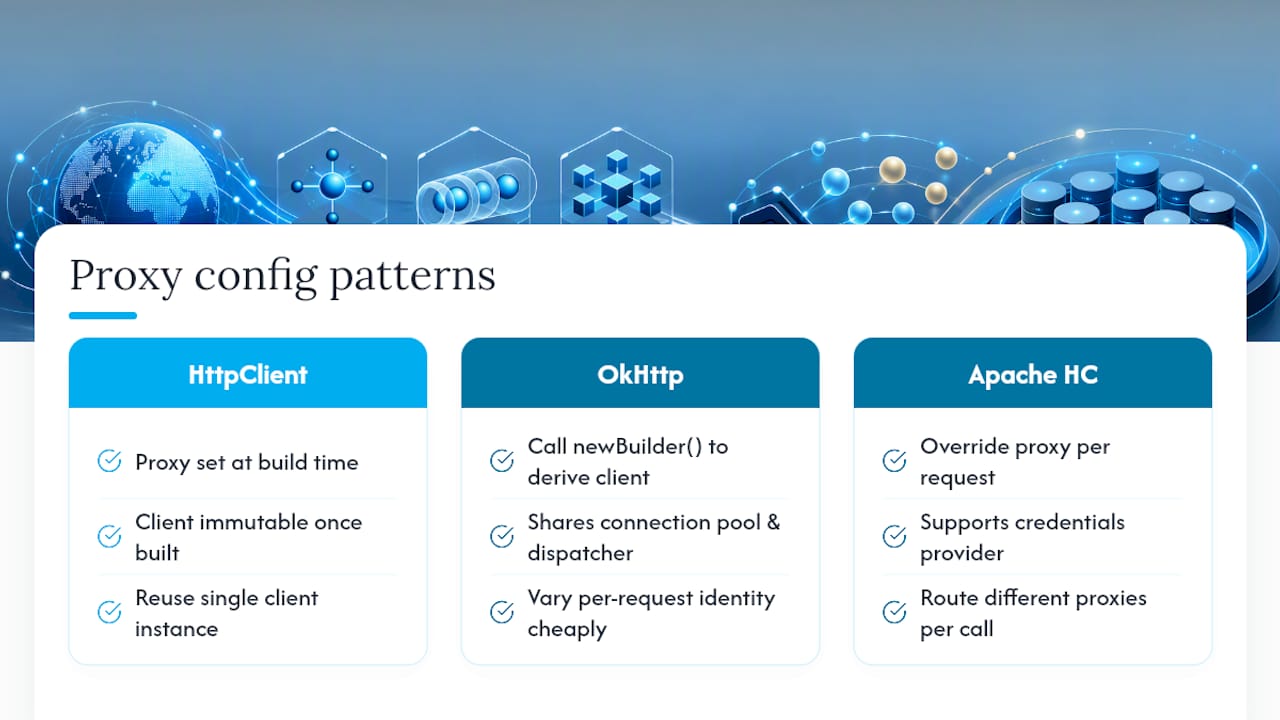
Note the separation between connectTimeout, set at client build time, and per-request response timeouts, set on the HttpRequest.Builder. HttpClient is immutable once built, so Oracle's documentation recommends building it once and reusing the instance across your whole scraping run rather than constructing a fresh client per request.
OkHttp:
OkHttpClient baseClient = new OkHttpClient.Builder()
    .proxy(new Proxy(Proxy.Type.HTTP, new InetSocketAddress("proxy.example.com", 8080)))
    .proxyAuthenticator((route, response) -> {
        String credential = Credentials.basic("user", "pass");
        return response.request().newBuilder()
            .header("Proxy-Authorization", credential)
            .build();
    })
    .build();

OkHttpClient identityVariant = baseClient.newBuilder().build();
Calling newBuilder() on an existing client is the key move here. It derives a new client that shares the same connection pool and dispatcher as the original, so you can vary per-request identity (headers, cookies) without paying for a fresh TCP and TLS handshake on every call.
Apache HttpClient:
PoolingHttpClientConnectionManager cm = new PoolingHttpClientConnectionManager();
cm.setMaxTotal(100);
cm.setDefaultMaxPerRoute(20);

CredentialsProvider credsProvider = new BasicCredentialsProvider();
credsProvider.setCredentials(
    new AuthScope("proxy.example.com", 8080),
    new UsernamePasswordCredentials("user", "pass"));

CloseableHttpClient client = HttpClients.custom()
    .setConnectionManager(cm)
    .setDefaultCredentialsProvider(credsProvider)
    .build();
RequestConfig.custom().setProxy(...) lets you override the proxy on a per-request basis when a single client needs to route through different proxies for different calls.
The pattern all three share: never embed credentials in a proxy URL like user:pass@host. Several clients silently ignore that format, according to a proxy integration guide from Shifter, and it's a common reason developers see repeated 407 errors even though their credentials are technically correct. Put credentials in the authenticator, the proxy authenticator callback, or the credentials provider, never in the URL string.
Pro Tip: Build one heavyweight client per proxy provider at startup, then derive lightweight identity variants from it for each scraping thread. Rebuilding a full client (and its TLS handshake) on every request is one of the most common reasons Java scrapers run far slower than the proxy provider's actual latency would suggest.
Why Do Proxy Authentication (407) Errors Keep Happening?
If your Java scraper works fine over HTTP but throws 407 errors the moment you switch to HTTPS through the same proxy, you've hit one of the most common gotchas in Java networking: since Java 8u111, the JVM disables Basic authentication for HTTPS tunneling by default.
Here's the sequence that causes it and how to fix it:
- Diagnose it. If your proxy accepts credentials over plain HTTP but rejects the same credentials on an HTTPS
CONNECTrequest, this property is almost always the cause. - Clear the disabled schemes property. Add
System.setProperty("jdk.http.auth.tunneling.disabledSchemes", "");before making any HTTPS proxy requests, according to a Java web scraping walkthrough that documents this fix directly. - Pair it with an
Authenticator. Clearing the property alone does nothing withoutAuthenticator.setDefault(...)also configured, since the JVM still needs somewhere to pull the Basic credentials from during the CONNECT handshake.
This single property is responsible for a disproportionate share of "my proxy credentials are correct but I still get 407" support threads across Java scraping forums, precisely because the failure looks like a credentials problem rather than a JVM security default.
Once auth works, decide between credential-based auth and IP allowlisting. Allowlisting your server's outbound IP with the proxy provider sidesteps the tunneling property entirely, since there's no CONNECT authentication handshake to fail. It's the simpler option for a fixed-IP production server; credential-based auth remains the better choice for dynamic environments like containerized deployments or CI pipelines where the outbound IP changes.
How Do You Rotate Proxies and Manage Sticky Sessions in Java?
Rotation strategy splits into two models, and picking the wrong one for your use case creates unnecessary complexity.
Provider-side rotation puts a gateway in front of the proxy pool: your Java code connects to one endpoint, and the provider rotates the exit IP behind the scenes on a schedule or per connection. This drastically simplifies your client code, but according to ProxiesThatWork's integration guide, it sacrifices per-request geo control unless the provider supports geo-targeting flags baked into the proxy username.
Client-side rotation means your Java code picks the next proxy explicitly, usually by cycling through a list inside a custom ProxySelector, or by appending a session flag to the username sent to the provider. This gives you exact control over identity, at the cost of maintaining that rotation logic yourself.
Practical patterns for varying identity per request:
- Append a session ID to the proxy username (many providers read a
session-<id>orsid-<id>suffix directly from the auth username field). - In Apache HttpClient, attach a per-request
HttpClientContextcarrying distinct cookie stores so concurrent threads don't cross-contaminate session state. - In OkHttp, derive identity variants with
client.newBuilder()so each logical "identity" gets its own cookie jar while still sharing the parent's connection pool.
Sticky sessions matter most for multi-step flows: login, then a paginated search, then a detail page. If the IP changes mid-flow, many sites invalidate the session cookie and kick you back to a login page. Pin one IP for the duration of that flow, then release it and rotate for the next task.
Pro Tip: Match your session TTL to how long the actual user flow takes, not to a round number. A five-minute sticky session on a checkout flow that takes ninety seconds just wastes IP allocation time you could be rotating elsewhere. For deeper patterns on cookie handling and session pinning, see this guide on stable proxy session management.
Why Are Your Proxy-Backed Requests Silently Throttled?
A scraper that looks slow through a proxy often isn't experiencing proxy latency at all. It's hitting a connection pool ceiling inside your own Java client.
Apache HttpClient's PoolingHttpClientConnectionManager defaults to a low per-route connection cap, meaning requests to the same host queue up waiting for a free connection even though the proxy itself has plenty of capacity. This is a documented behavior in the Apache HttpClient connection manager, and it's one of the most common causes of scrapers that mysteriously slow down under concurrency.
Fix it with two settings:
cm.setMaxTotal(100)raises the overall connection ceiling across all routes.cm.setDefaultMaxPerRoute(20)raises the per-host limit specifically, matching it to how many concurrent requests you're actually sending to each target domain.
The second, and arguably more damaging, cause is unconsumed response entities. If you open a response and never read or close its body, Apache HttpClient keeps that connection checked out of the pool indefinitely. Wrap every response in try-with-resources, or explicitly call response.close() after reading the entity, every single time.
Add a semaphore per host on top of your pool settings if you're running many threads against a handful of domains. It gives you graceful concurrency control independent of the raw connection limit, so you can back off a specific target without starving the rest of your scraper.
How Do You Test and Validate a Java Proxy Setup?
Before scaling any scraper, run through a short validation sequence rather than discovering configuration mistakes at production volume.
- Confirm routing with an IP-echo check. Hit an endpoint like
https://httpbin.org/ipthrough your configured client and confirm the returned address matches the proxy, not your own machine, a step recommended in ProxiesThatWork's Java integration guide. - Verify geolocation. If you're targeting a specific city or region, pair the IP-echo check with a geolocation lookup to confirm the exit IP actually resolves to where you expect.
- Track status code distribution. Log the split between 200, 403, 407, and 429 responses across a test run; a rising 429 or 403 rate signals you're being flagged, not just rate limited.
- Measure latency and CAPTCHA rate at small scale first. Run a few hundred requests before committing to thousands, and record average response time alongside how often you're served a CAPTCHA challenge.
- Instrument before you scale. Wire up basic metrics and logging (request count, error rate, latency percentiles) and set an alert threshold, so a proxy pool degrading in production shows up before your scrape fails silently overnight.
For a broader checklist of tools built specifically for this kind of validation, this roundup of proxy checker tools covers rotation and speed testing in more depth.
What Are the Legal and Ethical Limits of Proxy Scraping?
Scraping through proxies doesn't put you outside the reach of a site's terms of service or the law. Before you scale a Java scraper, check the target's robots.txt and terms of service, and respect any access controls or copyright notices on the content you're pulling.
A few practical guardrails worth building into your workflow:
- Prefer an official API when one exists, even if it's more limited than scraping the site directly. It's more stable and carries far less risk.
- Avoid aggressive evasion techniques aimed specifically at defeating a site's security measures rather than simply distributing normal request volume.
- Never collect or retain sensitive personal data (health information, financial details, government identifiers) without a clear legal basis and proper safeguards in place.
- Keep request rates reasonable. A scraper indistinguishable from a denial-of-service pattern invites both technical blocks and legal exposure.
None of this is legal advice, and rules vary by jurisdiction and by the specific site's terms. When a project touches regulated data or a gray area in a site's terms, loop in legal counsel before you scale it.
When Do Mobile Carrier IPs Actually Move the Needle?
Datacenter IPs get flagged fast because carrier-grade NAT doesn't apply to them: one flagged IP is just one flagged IP. Mobile carrier IPs sit behind thousands of real devices sharing the same address, which is why city-level targeting on a mobile network tends to survive detection systems that torch datacenter ranges within hours.
The tradeoff is real. Mobile IPs generally cost more per gigabyte and carry higher latency than datacenter proxies, and sticky sessions on a mobile network can drop when the underlying device changes cell towers. For scrapers where getting blocked costs more than the extra latency, that tradeoff usually favors mobile.
— Jon
Why Masklabs Fits Java Scraping Projects That Keep Getting Blocked
If your Java scraper keeps tripping IP bans on datacenter proxies, the fix isn't better retry logic, it's better IP reputation. Some providers route traffic through real US mobile carrier IPs across multiple cities, not datacenter ranges, so requests carry the same trust signal as an actual phone on that network.

The service supports HTTP, HTTPS, and SOCKS5, which means it drops into the exact client patterns covered above, whether you're wiring a ProxySelector into HttpClient, setting a proxyAuthenticator in OkHttp, or configuring a CredentialsProvider in Apache HttpClient. You can use both sticky sessions for multi-step flows like logins and paginated searches, and rotating sessions for high-volume collection, with city-level targeting when geo-specific data is needed. Full details on targeting and API access are on the Masklabs product page, and current plans, including Starter, Basic, Advanced, and Scale, are listed on the pricing page. It's recommended to start with a trial run against your own target site before committing to a plan, to confirm the exit IPs and success rate for your specific use case.
Sources
The core Java networking behavior covered here comes straight from primary documentation: Oracle's HttpClient API reference and its networking and proxies guide, along with the jsoup and Apache HttpClient project documentation. For proxy-specific integration patterns, Shifter's guide to residential proxies with OkHttp and Apache HttpClient and ProxiesThatWork's Java proxy integration guide cover credential handling and validation in more depth. For troubleshooting written specifically around proxy authentication and rotation, NatProxies' blog is a useful companion resource. Masklabs' own mobile proxy guides cover deeper rotation and authentication tutorials tailored to real carrier IPs.
FAQ
Is Web Scraping Illegal in the US?
Scraping publicly accessible data is generally legal in the US, but it's not unconditional. Violating a site's terms of service, bypassing access controls, or scraping copyrighted or personal data without authorization can create civil or, in some cases, criminal exposure. Always check robots.txt and the site's terms before scraping at scale, and treat this as a starting point, not a legal determination for your specific project.
What Is Proxy Scraping?
Proxy scraping refers to routing web scraping requests through intermediary IP addresses (proxies) instead of your server's own IP, so requests appear to originate from different locations or identities. It's used to avoid rate limits and IP bans, and to access geo-restricted content that varies by region. In Java, this means wiring a Proxy object or ProxySelector into your HTTP client of choice, whether that's Jsoup, HttpClient, OkHttp, or Apache HttpClient.
What Is a Proxy in Java and How Is It Used?
Java represents a proxy through the Proxy class, which pairs a type (HTTP, SOCKS, or DIRECT) with a socket address, and through ProxySelector, which lets you implement custom per-request proxy logic. You pass a Proxy object or a ProxySelector directly to your HTTP client's builder, as covered in Java's networking documentation, rather than relying on global system properties for anything beyond a simple script.
Can ChatGPT Do Web Scraping?
ChatGPT itself doesn't execute live web requests or scrape sites directly the way a Java scraper does. It can help you write, debug, and explain scraping code, including proxy configuration patterns, but the actual data extraction still requires running code, whether in Java with a proxy-backed client, or another language, against the live target.
Which Java Client Should I Use With Masklabs Proxies?
Masklabs supports HTTP, HTTPS, and SOCKS5, so it works with any of the standard Java clients covered here, HttpClient, OkHttp, Apache HttpClient, and Jsoup for static targets, or Playwright and Selenium when the page needs a real browser. Credentials and city-level targeting flags are configured through your client's authenticator or credentials provider, the same pattern used for any authenticated proxy setup.