Fix TLS First to Avoid IP Blocks When Scraping for Engineers
Fix the cheapest failing detection layer first, not the most expensive one. Check your TLS fingerprint and headers before you touch a proxy budget, throttle your request rate, and only add residential or mobile IPs once you've confirmed IP reputation is the actual bottleneck. That order matters: sticky sessions and clean IP pools solve problems that header fixes can't, but jumping straight to residential proxies wastes money when TLS fingerprinting is the real culprit.
TL;DR:
- Fix TLS fingerprint mismatches with a browser-impersonating library before altering proxy types or addressing header issues, as early TLS checks often cause blocks.
- Diagnose failures through detailed status codes and response bodies before rotating proxies; a 403 from a bad TLS handshake looks identical to one from a burned IP.
- Rebuild IP reputation gradually with low-volume, human-like traffic, and retire IPs after repeated failures instead of recycling them to avoid quick bans.
- Address common causes of unexpected blocks by focusing on TLS/Fingerprint fixes first, then mid-tier defenses before escalating to residential or mobile proxies.
- Use mobile proxies when persistent filtering occurs despite fixing TLS, headers, and rate limits, especially for geo-sensitive or high-sensitivity targets.
Table of Contents
- How Do You Avoid IP Blocks While Scraping?
- Why Does IP Reputation Determine Whether You Get Blocked?
- What Causes TLS Fingerprint Blocks Before Headers Even Matter?
- How Should You Throttle Requests and Manage Sessions?
- What's the Right Order to Escalate Fixes When Scraping Gets Blocked?
- Should You Use Headless Browsers or Anti-Detection Frameworks?
- How Do You Warm Up New IPs to Build Reputation?
- What Should You Monitor to Catch Blocks Before They Escalate?
- How Do You Handle CAPTCHAs Without Getting Stuck?
- Publisher Notes on Mobile Proxy Operations
- When Mobile IPs Are the Right Next Step
- Sources
- FAQ
How Do You Avoid IP Blocks While Scraping?
Most teams reach for a new proxy the moment a request fails. That's backwards. The fastest way to avoid IP blocks when scraping is to triage the failure first, because a 403 caused by a bad TLS handshake looks identical to a 403 caused by a burned IP, and rotating proxies won't fix the former.
Here's the triage sequence we recommend running every time, in order:
- Read the status code and body carefully. A 403 with a challenge page means bot detection flagged you. A 429 means you tripped a rate limit. A 200 with an empty or truncated body often means you passed the network check but failed a JavaScript render or got served a decoy page.
- Stop hammering the domain. Pause that specific queue, not your entire scraper. If the response includes a
Retry-Afterheader, honor it exactly, whether it's expressed in seconds or an HTTP date. - Preserve the session state. Save the cookies, headers, and IP that triggered the block before you touch anything. You need that evidence to diagnose the cause.
- Apply backoff with jitter. Exponential backoff with randomized delay, capped concurrency, and no mid-session IP swaps buys you time to diagnose without making the block worse.
Pro Tip: Never rotate to a fresh IP the instant you see a 403. That's exactly how clean proxies get burned. Techradar's guidance on IP blocks is blunt about this: pause and diagnose first, and only retire an address after it fails a defined threshold of attempts.
Why Does IP Reputation Determine Whether You Get Blocked?
Every IP address carries a reputation score before your scraper sends a single byte. Anti-bot systems check the ASN (autonomous system number), whether the range belongs to a known hosting provider, and whether that IP has a history of abuse, and they do this before they even look at your browser fingerprint. That's why a brand-new AWS or DigitalOcean IP can get flagged on request one: datacenter ranges carry inherently lower trust scores than residential or mobile ranges, regardless of your behavior.
That reordering of checks matters for how you choose a proxy type:
- Datacenter proxies are cheap and fast, but they sit on known hosting ASNs. Fine for low-sensitivity targets, risky for anything with real anti-bot infrastructure.
- Residential proxies route through real home internet connections, so they inherit consumer ISP trust. They cost more and are slower, but they clear far more mid-tier defenses.
- Mobile proxies run on carrier IP space shared by thousands of real phones. Carrier-grade NAT means many users share one IP, which makes individual addresses far harder for a target to blacklist without also blocking legitimate customers.
Pool sizing follows request volume, not guesswork: a low-volume monitoring job might get by with a few dozen residential IPs, while a high-volume scrape needs hundreds rotated by session rather than by request. Retire burned addresses instead of recycling them into future runs, and match your proxy's geography to the ASN and locale you're claiming in your headers. A pool that mixes IPs from five countries while your Accept-Language says English tells the target something is off.
What Causes TLS Fingerprint Blocks Before Headers Even Matter?
Your headers might be perfect and you'll still get blocked, because the block happened before the server read them. Modern anti-bot systems inspect the TLS ClientHello, the specific handshake your HTTP client sends when it opens a connection, and they fingerprint it using methods like JA3 or JA4. A default requests call in Python, a raw Go HTTP client, or a stock cURL invocation each produce a distinct, recognizable fingerprint that no real browser generates. According to Webscraping, this TLS mismatch is one of the most commonly missed causes of early 403s, especially in the confusing case where code runs fine locally but fails the moment it's deployed to a cloud host with a different network stack.
Fixing this requires more than swapping a User-Agent string:
- Use a browser-impersonating TLS library like
curl_cffiortls-clientthat replicates Chrome's or Firefox's actual handshake. - Replay a full, correctly ordered set of browser headers, not just User-Agent. Real browsers send headers in a specific sequence that naive scripts skip.
- Align
Accept-Languageand apparent timezone with your proxy's geography, since mismatched locale signals are an easy tell.
Header swaps alone won't save you if the TLS layer beneath them is still shouting "automated script."
How Should You Throttle Requests and Manage Sessions?
Behavioral signals catch what network fixes can't. A scraper that fires 200 requests per second from one IP looks nothing like a human, no matter how clean that IP's reputation is.
Build your rate limiting around a few concrete rules:
- Run a domain-level token bucket or central queue so every worker respects one shared rate limit per target, not per thread.
- Add jitter to every delay. A fixed 2-second gap between requests is as detectable as no gap at all; randomize it within a range.
- Parse
Retry-Afterin both formats. Some servers send seconds, others send a full HTTP date. Handle both or you'll ignore the instruction entirely. - Keep stateful workflows on sticky sessions. If your scraper logs in, adds items to a cart, or pages through search results, keep the same IP and cookies for the entire workflow. Rotating mid-session breaks continuity in a way that looks exactly like account takeover fraud.
- Set hard stop rules. Three consecutive 403s or a 429 rate above a defined threshold should halt the worker automatically, not trigger a retry loop.
Pro Tip: Log enough to diagnose without logging anything sensitive. Store status codes, response times, and which mitigation rung was active, but strip request bodies and cookies from your persistent logs once a session closes.
Sticky sessions versus rotating sessions isn't a stylistic choice. Our session management guide covers how to decide which workflows need which pattern.
What's the Right Order to Escalate Fixes When Scraping Gets Blocked?
Escalation should follow cost, not panic. Jumping to residential proxies because of a single 403 is like replacing an engine because a dashboard light came on: expensive, and probably not the fix you needed.
| Detection symptom | Likely cause | Mitigation rung |
|---|---|---|
| Works locally, 403 on cloud host | TLS/header fingerprint mismatch | Browser-like TLS stack + full header replay |
| 200 with empty or partial body | JavaScript rendering or hidden API | Check for a hidden JSON/XHR endpoint first |
| Rising 429 rate | Rate limit tripped | Backoff, jitter, lower concurrency |
| 403 regardless of headers/TLS fixes | IP reputation flagged | Residential proxies |
| Blocked even on residential IPs | High-sensitivity target, carrier trust needed | Mobile proxies |
| Persistent CAPTCHA walls, multi-layer WAS | Layered defense (Cloudflare, DataDome, Akamai) | Managed unblocking service |
Fix headers and TLS first because it's nearly free. Check for a hidden JSON API before reaching for a full browser automation stack, since it often replaces rendering entirely and shrinks your detection surface. Move to residential IPs only once you've confirmed the block persists across clean TLS and reasonable pacing. Reach for mobile proxies when the target treats even residential ranges with suspicion, which happens often with geo-sensitive retail, ticketing, and financial data. Consider a managed unblocker only when the target runs multiple overlapping defenses and DIY maintenance costs more engineering time than the subscription.
Should You Use Headless Browsers or Anti-Detection Frameworks?
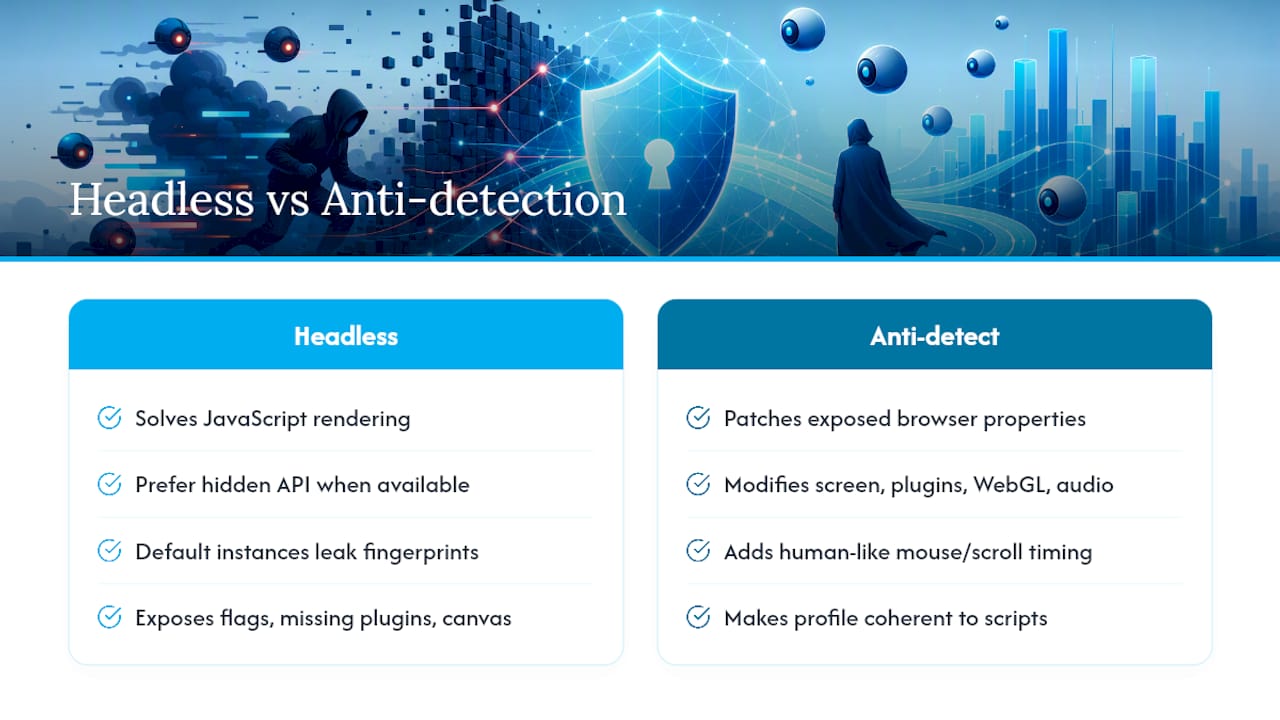
Headless browsers solve the JavaScript rendering problem, but they introduce their own fingerprint if left in a default configuration. Stock Puppeteer or Playwright instances expose telltale signs, like navigator.webdriver set to true, missing plugins, or unusual canvas rendering, that detection scripts check for specifically.
Anti-detection frameworks patch these gaps by modifying the browser's exposed properties to match a real consumer machine: realistic screen resolution, populated plugin lists, consistent WebGL and audio fingerprints, and human-like mouse movement or scroll timing. The goal isn't to fool a human reviewer. It's to make automated inspection scripts see a coherent, ordinary browser profile instead of a patchwork of default values that only a script would produce.
Reach for a headless browser only when you've confirmed you actually need rendered JavaScript output. Many teams skip straight to browser automation when a hidden API endpoint would have returned the same data with far less overhead and a smaller detection surface. When you do need full rendering, pair the browser with a proxy whose geography matches the browser's spoofed locale and timezone, because a fingerprinting script that sees a Chicago IP paired with a browser reporting Berlin's timezone has an easy, immediate signal to flag.
Run headless instances at realistic concurrency too. A single machine spinning up fifty simultaneous browser contexts against one target is a pattern no real user population produces, regardless of how well each individual context is disguised.
How Do You Warm Up New IPs to Build Reputation?
A brand-new proxy IP, even a residential or mobile one, doesn't carry instant trust. IP reputation builds over time through consistent, low-volume, human-plausible traffic, and skipping that warmup is why some teams see fresh proxies get flagged almost immediately.
Warming an IP means starting it on low-value, low-frequency requests, such as browsing a target's homepage or category pages, before pointing it at the specific endpoints you actually need. Ramp request volume gradually across days rather than launching at full throughput the moment the proxy comes online. Mixing in occasional non-scraping traffic patterns, like a normal page load sequence with images and stylesheets fetched, reinforces that the IP behaves like an ordinary connection rather than a script hitting only API endpoints.
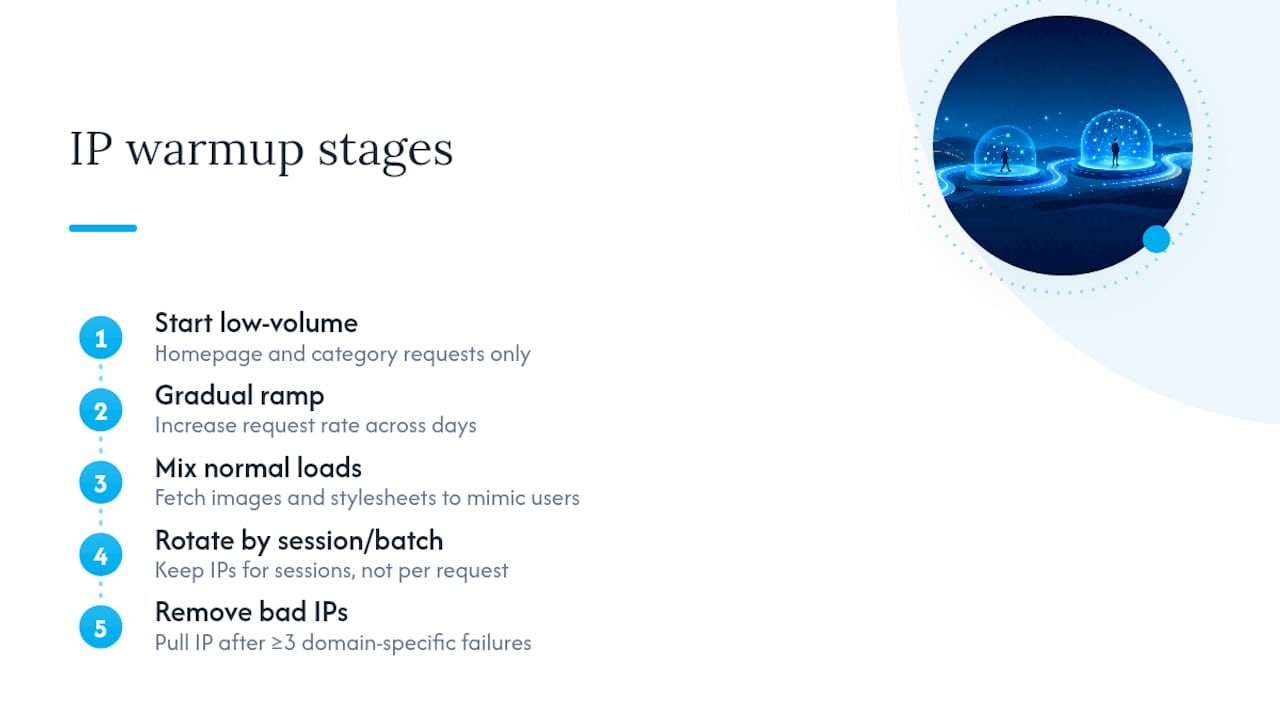
Rotation frequency affects reputation too. Cycling to a new IP after every single request increases DNS, TCP, and TLS handshake overhead, and it can actually burn through a pool faster because each new connection resets any trust the previous one had started building. Rotating by session or by batch, rather than by request, lets each IP accumulate a longer, more coherent activity history before it's retired.
Reputation management also means tracking which IPs have already taken a hit. An address that returned a 403 once isn't necessarily dead, but one that's failed three or more times against the same target should be pulled from rotation for that domain rather than reused hoping for a different result.
What Should You Monitor to Catch Blocks Before They Escalate?
Blocks rarely arrive without warning signs. A rising 429 rate, a creeping average response time, or a slow uptick in empty response bodies usually precedes a full block by hours, sometimes days, and teams that only check for hard failures miss that window entirely.
Track a few metrics per domain, per proxy pool, and per worker:
- Success rate over rolling time windows, not just cumulative totals.
- Status code distribution, watching specifically for a shift from 200s toward 403s or 429s.
- Response time drift, since a target ramping up bot defenses often slows responses before it starts blocking outright.
- CAPTCHA or challenge-page frequency, even when the request technically "succeeds."
Centralize these logs so a spike on one worker doesn't hide inside an average across your whole fleet. A dashboard that shows per-proxy and per-domain breakdowns will surface a failing IP or a newly defensive target long before your overall success rate visibly drops. Our piece on rate limiting in large-scale automation goes deeper into building that kind of monitoring layer.
Log enough detail to diagnose root cause (status code, response time, which proxy and session were active) but avoid retaining full response bodies or cookies longer than needed for that diagnosis. Treat your logs as a diagnostic tool, not a permanent archive.
How Do You Handle CAPTCHAs Without Getting Stuck?
A CAPTCHA is a signal, not just an obstacle. It tells you the target already suspects automated traffic, which means the fix usually isn't a CAPTCHA-solving service alone. It's whatever upstream signal triggered the challenge in the first place.
Start by checking whether the CAPTCHA appears consistently or only under specific conditions, like high request rates, particular proxy types, or missing headers. If it only shows up on datacenter IPs, that's your IP reputation problem announcing itself clearly. If it appears regardless of IP quality, the trigger is more likely behavioral, tied to request timing or navigation patterns, or fingerprint-based.
For workflows that must get past a CAPTCHA occasionally, third-party solving services exist and can work for lower-volume needs. But treat frequent CAPTCHA walls as a sign you're on the wrong rung of the escalation ladder rather than a problem to solve with more solving capacity. Reducing request frequency, improving TLS and header fidelity, or moving to higher-trust IP types often eliminates the CAPTCHA entirely rather than just working around it. A target that shows you a challenge every tenth request isn't a solving problem; it's a detection problem wearing a CAPTCHA disguise.
Publisher Notes on Mobile Proxy Operations
We build Masklabs around carrier-grade mobile IPs specifically because IP reputation checks happen before anything else in the detection stack. In geo-sensitive testing across different city-level targets, mobile carrier IPs held up against blocks noticeably better than residential-only pools, likely because carrier NAT shares addresses across thousands of real phone users, making a single IP a poor target for a blanket ban.
Sticky sessions matter as much as IP type. A workflow that needs continuity, like a multi-step checkout flow or a paginated search, should stay on one IP until it's done. Geo-matching your proxy city to your claimed locale isn't optional polish; it closes a mismatch that detection systems check specifically. None of this replaces responsible scraping practices: respect robots.txt where it applies, avoid hammering targets that clearly don't want automated traffic, and treat blocks as information, not just an inconvenience to route around.
— Jon
When Mobile IPs Are the Right Next Step
If you've worked through the escalation ladder, fixed your TLS stack, tuned your rate limits, and you're still getting flagged, the problem is very likely IP reputation. That's the exact scenario Masklabs is built for.

The platform provides real carrier mobile IP addresses across various US cities, not datacenter ranges dressed up to look legitimate. That distinction is why requests routed through Masklabs tend to clear the reputation checks that flag rented server IPs before your headers or TLS stack even get evaluated. The platform supports both sticky sessions for stateful workflows and rotating sessions for high-volume collection, with API access compatible with common programming languages.
Running DIY proxy infrastructure makes sense until the maintenance, sourcing clean IPs, tracking burn rates, matching geography, starts costing more engineering time than a managed pool would. If you've hit that point, start with Masklabs's mobile proxy platform and test a city-targeted pool against your specific use case before committing to a larger data plan.
Sources
- Bot detection: how it works and how to bypass it
- How to Scrape a Website Without Getting Blocked (2026 Playbook)
- How to avoid IP blocks during web scraping
FAQ
How Do You Avoid Getting Blocked While Scraping?
Diagnose the exact failure first (status code, TLS fingerprint, or rate limit), fix the cheapest layer causing it, then throttle requests with jittered delays before ever adding new proxies.
How Do You Bypass an IP Address Block?
You generally can't "bypass" a block safely. Instead, diagnose why the IP got flagged, retire it after a defined failure threshold, and route future requests through a higher-trust IP type like residential or mobile proxies if reputation was the cause.
Is AI Scraping Illegal?
Using AI to scrape doesn't change the underlying legal analysis; what matters is what data you collect, from where, and under what terms of service, and those rules vary by jurisdiction and by whether the data is public or behind authentication.
Is Web Scraping Illegal in the US?
Scraping publicly accessible data is generally permitted under US law, but violating a site's terms of service, scraping copyrighted content, or accessing data behind authentication can create legal exposure, so specifics matter more than a blanket answer.
When Should You Switch From Residential to Mobile Proxies?
Switch to mobile proxies when a target keeps flagging residential IPs, since carrier-grade NAT shares each mobile address across many real users, making individual IPs harder to blacklist without also blocking legitimate customers.