Fix 407s: HTTP Proxy Authentication for Engineers With curl & RFCs

HTTP proxy authentication runs on two headers: Proxy-Authenticate, which a proxy sends back with a 407 status to name the scheme it wants, and Proxy-Authorization, which the client sends on retry with credentials formatted for that scheme. The flow is a challenge and response, not a one-shot login. Basic, Digest, Negotiate/NTLM, and Bearer tokens all fit into this exchange, but Basic without TLS hands your credentials to anyone watching the wire.
TL;DR:
- Proxy authentication schemes like Basic, Digest, NTLM, and Bearer serve different security and integration needs, with Basic requiring TLS due to its simplicity.
- Clients and libraries like curl manage proxy credentials automatically, but browsers restrict direct JavaScript access to proxy headers, making debugging more challenging.
- NTLM and Negotiate tie authentication to TCP connections, which can cause significant scaling issues under high load and load balancing, especially for repeated handshake costs.
- Troubleshooting 407 errors involves checking the
Proxy-Authenticateheader, ensuring scheme support, verifying encoding, and inspecting redirect behavior to prevent header stripping.- Using TLS and token-based schemes, rotating credentials regularly, and logging proxy exchanges are key best practices to secure and maintain proxy authentication reliably.
Table of Contents
- What Is HTTP Proxy Authentication and How Does the Header Exchange Work?
- Which Proxy Authentication Schemes Should You Use?
- How Do Clients and Libraries Actually Handle Proxy Authorization?
- Proxy Authentication Security Checklist
- How Do You Fix a 407 Proxy Authentication Error?
- Does Proxy Authentication Slow Down Connections?
- How Does Proxy Authentication Work Across Multiple Proxy Hops?
- How Do You Configure Proxy Authentication in Squid, Nginx, and Client Tools?
- Does Proxy Authentication Work Differently Under HTTP/2?
- Author's Take: Where Teams Actually Get Proxy Auth Wrong
- Managed Authenticated Proxy Sessions With Masklabs
- Sources
- FAQ
What Is HTTP Proxy Authentication and How Does the Header Exchange Work?
The Proxy-Authenticate header defines the protection space, or "realm," and the schemes a proxy will accept. A typical challenge looks like this:
HTTP/1.1 407 Proxy Authentication Required
Proxy-Authenticate: Basic realm="proxy-realm"
The client parses that, builds credentials for the named scheme, and resends the request with Proxy-Authorization: Basic dXNlcjpwYXNz. Once the proxy validates it, the request proceeds. The Proxy-Authenticate header from MDN confirms this is strictly a proxy-to-client challenge, separate from origin authentication. That distinction matters for two reasons:
- Proxy-Authenticate / Proxy-Authorization govern access to the proxy itself and are hop-by-hop, meaning the proxy consumes them and never forwards them upstream.
- WWW-Authenticate / Authorization govern access to the origin server and travel end-to-end.
- A
407always signals a proxy-layer failure. A401means the origin server rejected you, even though your proxy connection was fine. RFC 2617 treats these as separate status codes with separate obligations, and clients that conflate them tend to retry against the wrong layer entirely.
Realm strings let a client reuse cached credentials for requests that share the same protection space, which cuts down on repeated challenge round trips during a session.
Which Proxy Authentication Schemes Should You Use?
Basic, Digest, Negotiate/NTLM, and Bearer each solve a different problem, and picking the wrong one usually shows up as either a security gap or an integration headache.
Basic sends username:password as base64 in the header, and base64 is trivially reversible; it carries zero cryptographic protection on its own. The MDN documentation on Proxy-Authorization is direct about this: Basic auth must run over TLS, full stop. Digest improves on that by having the client hash credentials against a server-issued nonce, so the raw password never crosses the wire, but it still depends on the proxy correctly managing qop and nonce freshness. Negotiate/NTLM exists mostly for enterprise single sign-on, where Windows domain credentials authenticate transparently, but it ties the session to a specific TCP connection rather than to individual requests. Bearer tokens, common with OAuth-based proxy setups, skip passwords entirely and rely on token expiry and refresh cycles instead.
Proxy platforms like Squid support several of these schemes simultaneously, and the Squid authentication documentation notes that scheme ordering in the challenge matters, because some older clients only understand the first scheme offered and ignore the rest.
| Scheme | Example header | Best fit |
|---|---|---|
| Basic | Proxy-Authorization: Basic dXNlcjpwYXNz | Simple setups, TLS mandatory |
| Digest | Proxy-Authorization: Digest username="u", realm="r", nonce="...", response="..." | Password safety without full TLS dependency |
| Negotiate/NTLM | Proxy-Authorization: Negotiate YIIF... | Enterprise SSO, Windows domains |
| Bearer | Proxy-Authorization: Bearer eyJhbGciOi... | Token/OAuth-based proxy access |
How Do Clients and Libraries Actually Handle Proxy Authorization?
Most developers overthink this. Modern HTTP clients handle the header mechanics for you, and manual header construction is usually a sign you're fighting the tooling instead of using it.
- curl and libcurl manage
Proxy-Authorizationautomatically once you supply credentials through--proxy-useror the equivalent library option. Everything curl's proxy authentication guide confirms this removes the need to hand-encode base64 strings in your own code. - Browsers block JavaScript from setting
Proxy-Authorizationdirectly. A failed proxy auth attempt infetchorXHRtypically surfaces as a generic network error rather than a readable407, according to HTTP Explained's breakdown of the header. You'll need the browser's network devtools, or a curl reproduction, to see what's actually happening. - In CONNECT tunnels for HTTPS, the proxy consumes credentials on the initial
CONNECTrequest. After that handshake, the proxy relays encrypted bytes, and the origin server never sees any proxy auth header at all. - Never pass proxy credentials as command-line arguments in production scripts. They show up in process listings on shared systems. Read them from a secrets manager or a permissions-restricted file instead, a precaution curl's own documentation calls out explicitly.
Pro Tip: If a proxied fetch call fails silently in the browser console, reproduce the exact request with curl -v --proxy-user user:pass. You'll get the real status code and header exchange that the browser is hiding from you.
Proxy Authentication Security Checklist
A short list of non-negotiables keeps most proxy auth incidents from happening in the first place.
- Encrypt the client-to-proxy channel. Run Basic, Digest, or anything else over TLS. An unencrypted Basic exchange is functionally the same as sending a password in plain text.
- Offer strong schemes first. Configure your proxy to challenge with Digest, Negotiate, or Bearer before falling back to Basic, and only allow Basic when TLS is already guaranteed.
- Keep credentials out of logs and process arguments. Access logs and shell history are common leak points that teams forget to audit.
- Rotate credentials on a schedule. Static proxy passwords that never expire are a long-tail risk, especially in shared team environments.
- Understand caching differences between schemes. Basic and Digest credentials are typically cached per realm and can be reused across requests, while NTLM binds authentication to a single TCP connection, which affects how session pooling behaves under load.
Enterprise NTLM and Negotiate deployments carry a real cost here: because Negotiate/NTLM ties authentication to the TCP connection rather than the request, connection pooling and load balancing have to account for that stickiness or users get re-challenged constantly.
How Do You Fix a 407 Proxy Authentication Error?
Work through this in order rather than guessing at credentials first.
- Read the
Proxy-Authenticateheader on the 407 response. It tells you exactly which scheme and realm the proxy expects. Skipping this step is the single most common cause of wasted debugging time. - Confirm your client actually supports the offered scheme. A client configured for Basic will fail silently against a proxy that only offers Negotiate.
- Check encoding. Basic needs correct base64 of
username:password; Digest needs a fresh nonce and correctly computed response hash. - Watch for header stripping on redirects. Some HTTP clients drop
Proxy-Authorizationwhen following a redirect to a different host, which reintroduces the 407 on the next hop. - Use verbose logging at every layer.
curl -vshows you the client side, proxy access logs show you what the proxy received, and a packet trace shows you what actually crossed the wire. When in doubt, NatProxies' breakdown of common 407 causes is a useful second reference for distinguishing proxy-layer failures from origin server issues.
Does Proxy Authentication Slow Down Connections?
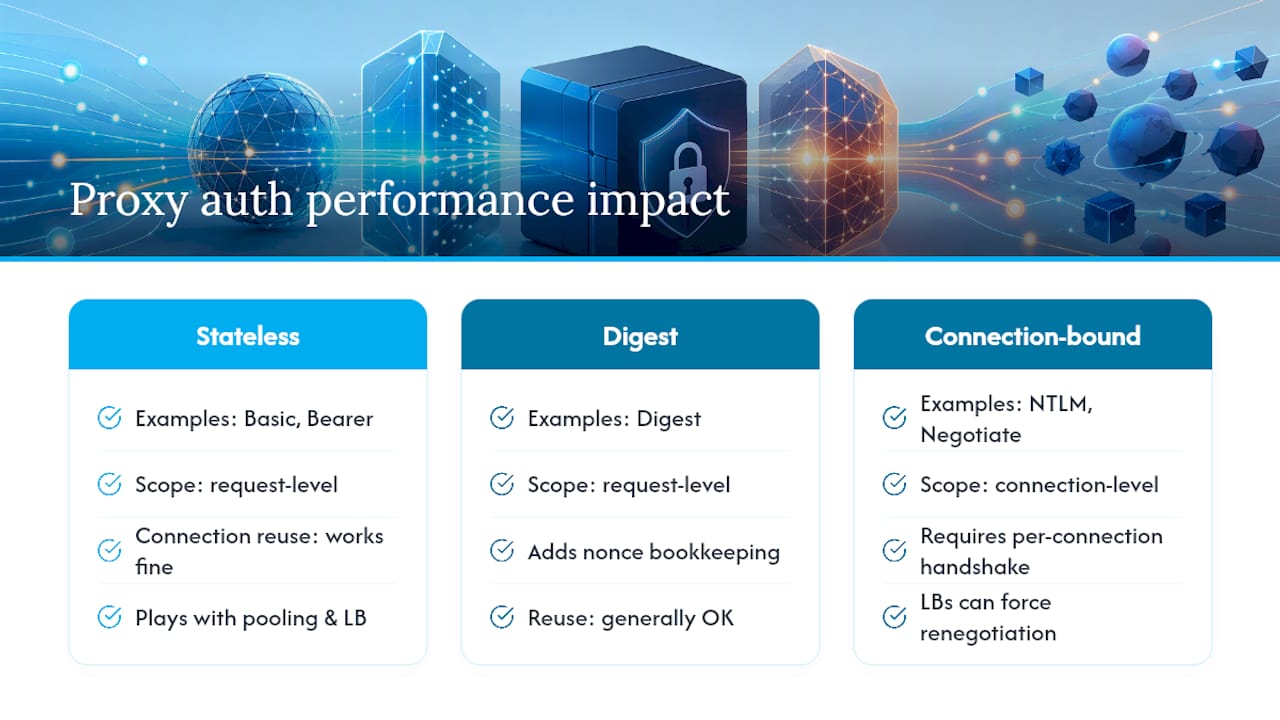
Proxy authentication adds one round trip the first time a client hits an unauthenticated connection: the request, the 407 challenge, then the authenticated retry. After that, the cost mostly disappears, because both HTTP/1.1 and HTTP/2 are built to reuse the same authenticated connection for subsequent requests rather than re-challenging every time.
The real performance variable is how the scheme handles connection reuse. Basic and Bearer are stateless from the proxy's point of view. Once a request carries valid credentials, the proxy can authenticate it on any connection, which plays nicely with connection pooling, keep-alive, and load balancers that route requests across a pool of proxy instances. Digest is a bit heavier because nonce management adds bookkeeping, but it's still request-level rather than connection-level.
NTLM and Negotiate are where things get expensive at scale. Because that handshake is bound to a specific TCP connection, every new connection in a pool has to renegotiate authentication from scratch. A load balancer that spreads requests across multiple backend connections can force repeated NTLM handshakes even for the same client, which shows up as latency spikes under concurrent load. Teams running high-throughput scraping or automation pipelines feel this directly: if your proxy layer authenticates per-connection rather than per-session, you pay that handshake cost far more often than the traffic volume alone would suggest. Sticky sessions, where a client is pinned to the same upstream IP and connection for a defined window, exist partly to avoid this exact problem.
How Does Proxy Authentication Work Across Multiple Proxy Hops?
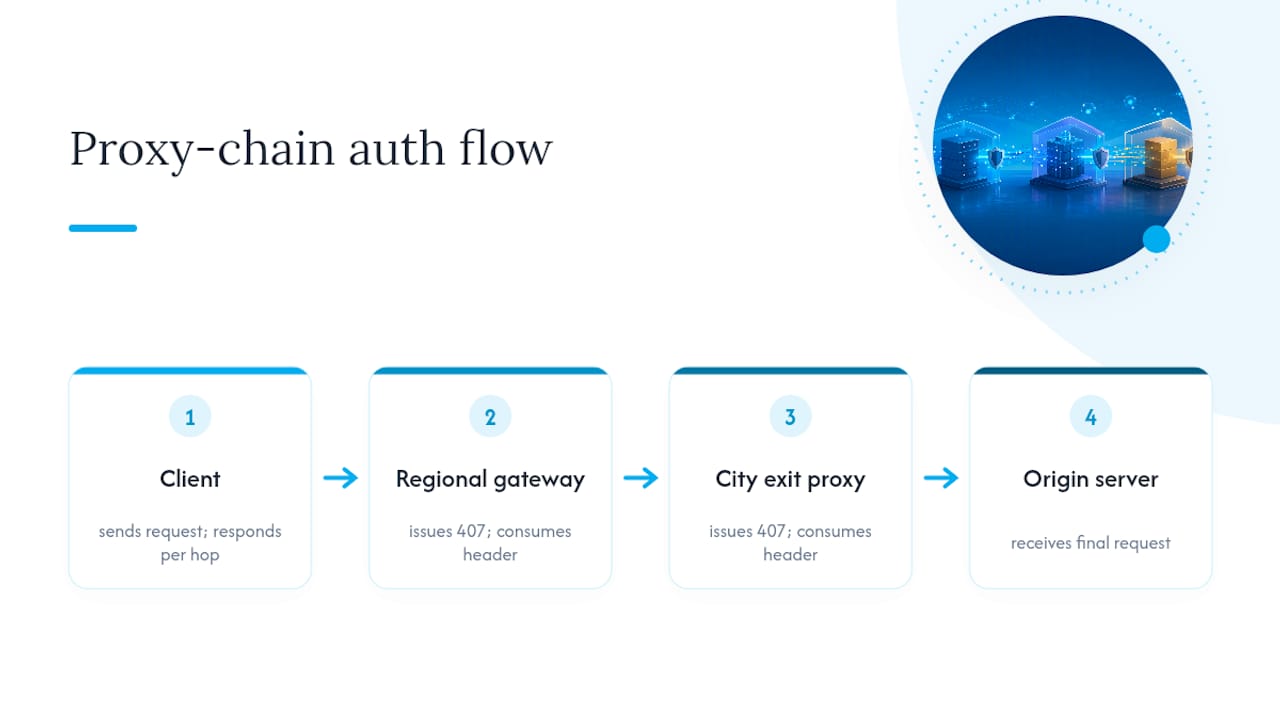
Chained proxy setups, where traffic passes through more than one proxy before reaching the origin, complicate the simple challenge and response model. Each proxy in the chain can independently require its own credentials, and there's no automatic mechanism that relays authentication from one hop to the next.
The first proxy that issues a challenge is the one that consumes the corresponding Proxy-Authorization header. If a second proxy downstream also requires authentication, it issues its own separate 407 with its own Proxy-Authenticate challenge, and the client has to respond to that independently. RFC 2617 treats this as expected behavior rather than a bug: credentials are scoped to the specific proxy that challenged for them, not propagated automatically through a chain.
Some deployments configure cooperative credential relay between trusted internal proxies, but that's an explicit server-side configuration choice, not something HTTP does by default. If you're building a chain where a client-facing proxy forwards to an internal upstream proxy, you generally need to configure authentication separately at each hop, or design the internal hop to trust the outer proxy's network origin instead of demanding its own credentials.
This matters most for teams running geolocation-aware proxy chains, where a request might pass through a regional gateway before reaching a city-specific exit node. Each layer needs its own auth story, and debugging a chain failure means checking which hop actually issued the 407, not assuming it was the last one in the path.
How Do You Configure Proxy Authentication in Squid, Nginx, and Client Tools?
Squid is the most common open-source forward proxy, and its authentication setup runs through helper programs rather than baked-in logic. You configure an auth_param directive pointing at a helper (basic_ncsa_auth, digest_file_auth, or an NTLM/Negotiate helper for domain environments), then reference that scheme in an acl and http_access rule. The Squid authentication wiki documents each helper's configuration syntax and notes that scheme order in the config file determines which challenge the proxy offers first.
Nginx, when used as a forward proxy, typically handles authentication differently: since Nginx doesn't ship a native forward-proxy auth module the way Squid does, most deployments front it with a custom auth_request module hitting an internal auth service, or handle credential checks at the application layer before proxying the connection. That makes Nginx setups more flexible for token-based (Bearer) auth but more work to wire up for classic Basic or Digest challenges.
On the client side, curl remains the fastest way to validate any proxy auth setup before wiring it into application code. curl -x http://proxyhost:3128 --proxy-user user:pass https://example.com Exercises the full challenge and response cycle in one command, and -v shows you every header exchanged. Most HTTP libraries in Python, Node.js, and Java expose an equivalent proxy-credentials option rather than requiring manual header construction, which is the pattern worth defaulting to regardless of language.
Does Proxy Authentication Work Differently Under HTTP/2?
The header semantics don't change between versions. Proxy-Authenticate and Proxy-Authorization mean the same thing whether the underlying connection is HTTP/1.1 or HTTP/2. What changes is how the connection itself is structured, and that has real consequences for proxy auth in practice.
HTTP/1.1 forward proxying for HTTPS traffic relies on the CONNECT method to establish a tunnel, and proxy authentication happens on that CONNECT request before the tunnel opens. HTTP/2 also uses CONNECT for tunneling, but it multiplexes many logical streams over a single physical connection, which means a proxy that authenticates per-connection (like NTLM) only pays that cost once for potentially dozens of concurrent requests sharing the tunnel, rather than once per request. That's a meaningful efficiency gain for high-concurrency workloads.
The catch is that not every proxy or client fully supports HTTP/2 CONNECT semantics yet, and mixed environments, where a client speaks HTTP/2 but an intermediate proxy only understands HTTP/1.1, will silently downgrade the connection. When that happens, you can end up with authentication behavior you didn't expect, particularly around connection reuse and how many times a client gets re-challenged. If your stack depends on HTTP/2 multiplexing for performance, confirm your proxy layer actually advertises and negotiates HTTP/2 rather than transparently falling back, because the fallback is easy to miss until latency numbers look wrong.
Author's Take: Where Teams Actually Get Proxy Auth Wrong
Most proxy authentication failures I see aren't scheme problems. They're operational ones: credentials stored in plaintext scripts, no rotation policy, and nobody instrumenting the 407 responses until something breaks in production at 2 a.m.
If you're setting this up today, default to TLS everywhere and token-based auth wherever the proxy supports it. Reserve NTLM and Negotiate strictly for SSO requirements you actually have, not because they seemed more "enterprise." Automate credential rotation instead of treating it as a quarterly chore, and log every 407 and successful Proxy-Authorization exchange with enough detail that a debugging session takes minutes, not hours. The schemes themselves are well specified. The failures come from treating authentication as a one-time setup task instead of something you monitor continuously.
— Jon
Managed Authenticated Proxy Sessions With Masklabs
Some providers offer real carrier mobile IPs with authenticated session control built in, instead of forcing you to manage credential rotation and scheme configuration on your own proxy stack. Sessions can support both sticky and rotating modes, allowing you to pin a credential to one IP for a stable workflow or rotate automatically across various locations for distributed scraping and AI training runs.

API-based credentialing allows programmatic authentication rather than manual header management across scripts, and metered billing can help avoid paying for idle capacity between runs. If you're building the kind of authenticated proxy workflow this article just walked through, the quickstart guide from credential to first request shows exactly how to configure API access and make your first authenticated call. For workflows needing session affinity, the sticky session guide for account workflows covers how to keep a single IP pinned across a multistep task. Check Masklabs directly to see current plan tiers and start a trial with your own data pool.
Sources
FAQ
Should I Turn the HTTP Proxy On?
Turn it on only when your traffic actually needs to route through it, since an active proxy that requires authentication will reject every request until credentials are configured correctly.
How Do I Fix a Proxy Authentication Error?
Read the Proxy-Authenticate header on the 407 response to identify the required scheme, confirm your client sends Proxy-Authorization in that exact format, and check whether a redirect stripped the header along the way.
How Do I Enable an HTTP Proxy?
Configure your operating system, browser, or HTTP client with the proxy host, port, and credentials; most modern clients, including curl and standard HTTP libraries, handle the authentication handshake automatically once credentials are set.
How Do I Find My HTTP Proxy Settings?
Check your operating system's network settings panel or your browser's connection settings, where proxy host, port, and any required authentication scheme are usually listed together; command-line tools can also read proxy environment variables like HTTP_PROXY and HTTPS_PROXY.
Does Masklabs Support Authenticated Proxy Sessions?
Some services support authenticated sticky and rotating sessions through API credentialing, letting teams manage programmatic access without building custom credential handling from scratch.