Avoid DNS Leaks: 5 Tests to Pick SOCKS5 or HTTP Proxy for Engineers

For anything that lives entirely in a browser or a REST client, an HTTP proxy with CONNECT support is the fastest path and the easiest to debug. Once your workload touches UDP, WebRTC, gaming traffic, or anything outside plain HTTP/HTTPS, SOCKS5 is the protocol that will actually work. If you need the proxy itself to resolve DNS instead of leaking lookups to your local network, socks5h is the setting that closes that gap.
TL;DR:
- SOCKS5 supports UDP and remote DNS resolution, making it essential for WebRTC, gaming, and other non-HTTP protocols, unlike HTTP proxies.
- HTTP proxies only handle HTTP/HTTPS traffic and see full request details for HTTP, but limit visibility to host and port for HTTPS connections using CONNECT.
- Support and configuration complexity for SOCKS5 vary across tools and libraries, requiring validation during setup to avoid silent fallback to direct connections.
- Both protocols lack built-in encryption; TLS is necessary for traffic confidentiality, and SOCKS5 with socks5h prevents DNS leaks by resolving hostnames remotely.
- For mobile carrier IP work, SOCKS5 is generally preferred due to its remote DNS and UDP handling, but the choice depends on specific workload requirements and library support.
Table of Contents
- SOCKS5 vs HTTP Proxy: What an HTTP Proxy Actually Does
- What Is SOCKS5 and How Does It Handle Traffic?
- HTTP vs SOCKS5: Side-by-Side Technical Differences
- How Do You Choose the Right Protocol for Your Workload?
- Which Tools and Libraries Support SOCKS5 vs HTTP?
- Do SOCKS5 or HTTP Proxies Protect Your Privacy?
- MaskLabs' Take on Protocol Choice for Mobile Proxy Workflows
- The Real Trade-Off Nobody Talks About Enough
- Getting Mobile Carrier IPs Working With Either Protocol
- Sources
- FAQ
SOCKS5 vs HTTP Proxy: What an HTTP Proxy Actually Does
An HTTP proxy operates at the application layer. For plain HTTP requests, it reads and forwards the full request, including headers, which means it can cache responses, rewrite content, or filter by URL. For HTTPS, it can't read that traffic because the client sends a CONNECT request to open a raw TCP tunnel to the destination, then TLS runs end-to-end inside that tunnel. The proxy only sees the destination host and port, not the encrypted payload.
That visibility gap matters for setup decisions:
- Plain HTTP: proxy sees headers, URL, and body.
- HTTPS via CONNECT: proxy sees only host:port, the rest is opaque.
- HTTPS-to-proxy (TLS between client and proxy) protects your proxy credentials when the client-to-proxy hop itself runs over an untrusted network, like public Wi-Fi or a monitored corporate link.
- Best fits: browsers, REST API clients, scraping scripts that only need HTTP/HTTPS, and caching proxies.
HTTP proxies are the default in almost every browser and HTTP library for a reason: setup usually means one config line and nothing else.
What Is SOCKS5 and How Does It Handle Traffic?
SOCKS5 works at the transport/session layer, which is a fancier way of saying it doesn't care what's inside the connection. It forwards raw TCP or UDP, so it works for HTTP, SSH, database connections, game traffic, or anything else with a socket. The client negotiates a handshake with the proxy, optionally authenticates with a username and password under RFC 1929, and the proxy then relays bytes without interpreting them.
Three things make SOCKS5 the answer when HTTP proxies fall short:
- UDP ASSOCIATE support, which HTTP proxies don't have at all. That matters for WebRTC media streams and QUIC-based traffic.
- Remote DNS resolution through socks5h, so hostnames resolve on the proxy side instead of leaking to your local resolver.
- Protocol agnosticism, useful for SSH dynamic port forwarding, tunneling into a remote database, or routing any non-HTTP application through a single exit point.
If your stack includes anything beyond a browser tab or a REST call, SOCKS5 is usually the protocol that keeps working when HTTP proxies quietly fail.
HTTP vs SOCKS5: Side-by-Side Technical Differences
The two protocols solve different problems, and conflating them causes real production bugs. A common misunderstanding is that "SOCKS5 means encrypted." It doesn't. Once a TLS tunnel is running inside either a SOCKS5 connection or an HTTP CONNECT tunnel, both protocols are equally blind to the payload. Neither one encrypts your traffic by default; TLS is what does that, and it runs independently of which proxy protocol you chose.
| Dimension | HTTP Proxy | SOCKS5 Proxy |
|---|---|---|
| Protocol layer | Application layer | Transport/session (Layer 4/5) |
| Supported traffic | HTTP/HTTPS only (via CONNECT) | Any TCP, optional UDP |
| DNS resolution | Client resolves locally by default | Remote resolution via socks5h |
| Client-to-proxy encryption | Optional HTTPS-to-proxy | Not built in; wrap in TLS separately |
| Native tool/browser support | Nearly universal | Common but sometimes needs an extra library or agent |
| Typical use cases | Browsers, REST clients, scraping, caching | SSH tunnels, UDP apps, non-HTTP traffic, mobile/residential IP workflows |
Performance differences are usually small. Some high-concurrency tests show SOCKS5 handshakes shaving off a bit of latency, but for typical scraping or browsing volumes the gap won't show up in your metrics. Pick based on what the traffic needs, not on a marginal speed claim.
Pro Tip: Don't assume your library defaults to the protocol you think it does. Some HTTP clients silently ignore a SOCKS5 setting and fall back to direct connection, which looks like a working proxy until you check the exit IP.
How Do You Choose the Right Protocol for Your Workload?
Run through this checklist before committing to either protocol at scale:
- What is the client? Browser or REST-only tool: HTTP proxy is simplest. Custom app, SSH, or database client: SOCKS5.
- Do you need UDP? WebRTC, VoIP, or QUIC traffic requires SOCKS5's UDP ASSOCIATE. HTTP proxies can't touch it.
- Does DNS privacy matter? If DNS queries leaking to your local network is a concern, use socks5h for remote resolution.
- How trusted is the network between you and the proxy? On public or monitored networks, add HTTPS-to-proxy or wrap SOCKS5 traffic in TLS separately.
- How many concurrent sessions do you need? Both protocols scale, but SOCKS5's session model tends to be a better fit for tunneling many distinct app connections through one exit point.
Watch for red flags during testing: a connection that "succeeds" but resolves DNS locally instead of remotely, a library that silently drops your SOCKS5 config, or requests that time out with no error message. Those usually point to a protocol mismatch, not a bad proxy.
For web scraping and browser automation, SOCKS5 is generally preferred when you're working with residential or mobile IPs, mainly for the remote DNS and UDP support. For simple API clients hitting HTTPS endpoints, an HTTP proxy with CONNECT is often the lower-friction choice.
Pro Tip: Run the same request through both protocols during your proof-of-concept phase and compare the resolved IP, response headers, and latency. A five-minute test here saves a debugging session later.
Which Tools and Libraries Support SOCKS5 vs HTTP?
Support isn't universal, and this is where teams get burned in production.
- curl supports both natively with
-x http://or-x socks5h://. - Browsers (Chrome, Firefox) support both through system or extension-level proxy settings.
- Python
requestsneeds therequests[socks]extra to use SOCKS5;httpxsupports it withhttpx[socks]. - Node.js typically requires a dedicated agent package for SOCKS5, since fetch and some HTTP clients don't include it by default.
- Playwright and Puppeteer support both protocols at launch time, though SOCKS5 auth sometimes needs an extra config flag.
- SSH dynamic forwarding (
ssh -D) creates a local SOCKS5 proxy by design, useful for tunneling arbitrary traffic through a remote host.
Before scaling any of these, run a quick proxy checker test to confirm the library is actually using the protocol you configured, not silently falling back.
Do SOCKS5 or HTTP Proxies Protect Your Privacy?
Neither protocol encrypts traffic on its own, and neither hides your activity from the proxy operator, who always sees the destination and, for plain HTTP, the request content. The real privacy differences come down to DNS and credential handling.
- HTTP proxies typically resolve DNS on the client side, which means your local resolver, and anyone watching that network segment, sees every hostname you visit even while your HTTP traffic tunnels through the proxy.
- SOCKS5 with socks5h resolves DNS on the proxy side instead, closing that leak entirely.
- Use HTTPS-to-proxy when your credentials travel over networks you don't control, such as shipping proxy credentials inside a client SDK or running from a coffee shop connection.
- Check for WebRTC leaks separately. Browsers can expose your real IP through WebRTC even when your HTTP traffic is fully proxied, so disable it or route it through SOCKS5's UDP support if your use case allows.
Pro Tip: If you're debugging a suspected DNS leak, run dig or nslookup against a test domain while your proxy is active and compare the resolver IP against your proxy provider's location.
MaskLabs' Take on Protocol Choice for Mobile Proxy Workflows
When you're routing traffic through real carrier IPs instead of datacenter ranges, we generally recommend SOCKS5 as the default, mainly for the DNS and UDP safety it provides. Mobile networks already introduce enough variability; you don't want local DNS leakage adding another point of failure on top of that.
For session strategy, sticky sessions make sense for checkout flows or multi-step logins where the destination expects a consistent IP across a short window. Rotating sessions fit high-volume scraping where distributing requests across many IPs matters more than continuity. Before scaling either pattern, run a small proof-of-concept confirming DNS resolution, UDP behavior if relevant, and library compatibility.
The Real Trade-Off Nobody Talks About Enough
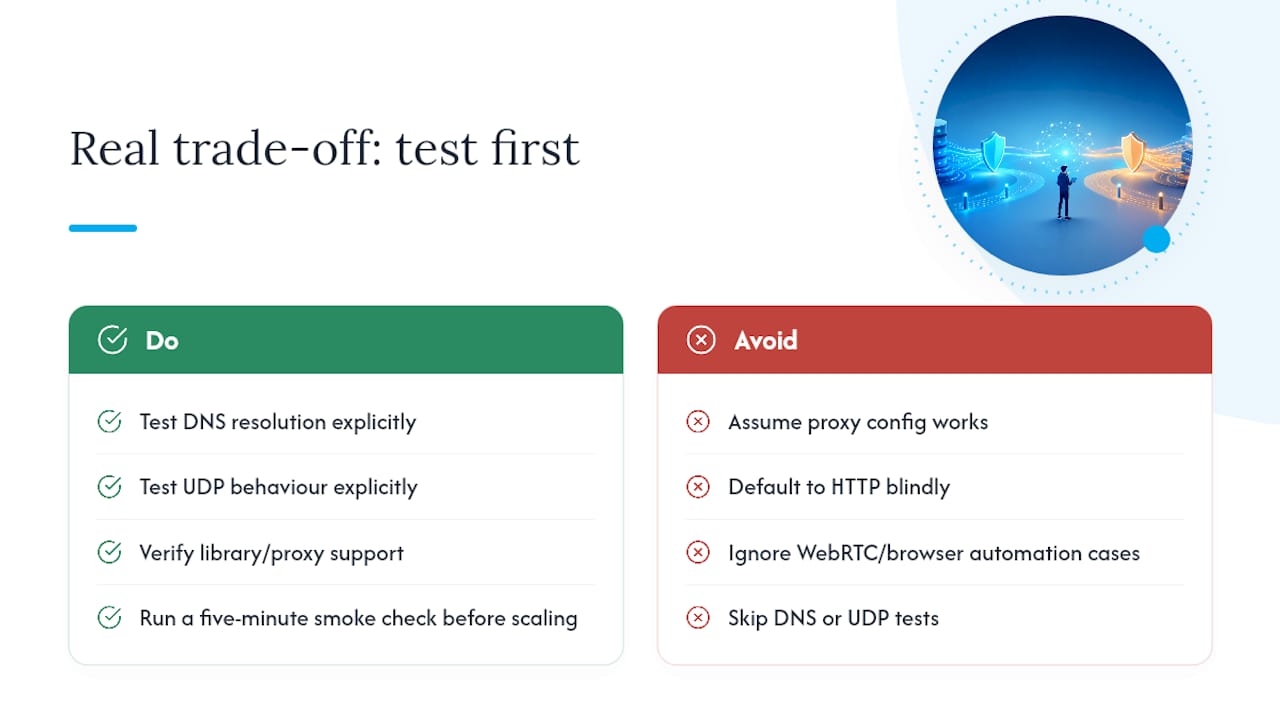
Most comparisons treat this as a binary choice, and that framing misses the point. The actual decision isn't "SOCKS5 or HTTP," it's "what does my traffic actually need, and does my current library stack even support it?" I've seen more production issues caused by a silent protocol mismatch, a Node client that ignored a SOCKS5 config and connected directly, than by picking the "wrong" protocol outright.
The conventional advice to just default to HTTP for simplicity works fine until you add browser automation, WebRTC, or mobile carrier IPs into the mix. At that point, DNS leakage and missing UDP support turn into real operational problems, not theoretical ones. If there's one thing worth prioritizing first, it's testing DNS resolution and UDP behavior explicitly before you scale anything, rather than assuming your proxy config does what the documentation implies. That five-minute check catches more silent failures than any protocol debate does.
— Jon
Getting Mobile Carrier IPs Working With Either Protocol
If your workload needs authentic mobile IPs with HTTP and SOCKS5 support built into the same API, so you're not locked into one protocol before you've even tested your setup.

You get session options for flows that need IP continuity and rotating sessions for high-volume scraping or AI training data collection, with geotargeting down to the city level when location specificity matters. Whether your stack calls for HTTP CONNECT simplicity or SOCKS5's UDP and remote DNS support, the same account handles both, so you can run the proof-of-concept from the checklist above without switching providers mid-test. Start with a free trial and check the API docs to confirm both protocols behave the way your workload needs before committing to a larger data plan.
Sources
- HTTP vs SOCKS5 vs HTTPS — which proxy protocol should you pick? — Nodetonet
- SOCKS5 vs HTTP Proxy in 2026: Which One You Actually Need
FAQ
Is HTTP Better Than SOCKS5?
Neither is universally better. HTTP proxies are simpler for browser and REST-only traffic, while SOCKS5 handles UDP, non-HTTP protocols, and remote DNS resolution that HTTP proxies can't.
Is SOCKS5 Better Than a Regular Proxy?
SOCKS5 is more flexible than a standard HTTP proxy because it forwards any TCP or UDP traffic rather than being limited to HTTP/HTTPS, which is why it's the common choice for mobile and residential IP workflows.
What Is the Difference Between an HTTP Proxy and a SOCKS Proxy?
An HTTP proxy works at the application layer and only understands HTTP/HTTPS traffic, using CONNECT to tunnel HTTPS. A SOCKS proxy works at the transport layer and forwards any TCP or UDP connection without interpreting the content.
What Are the Disadvantages of SOCKS5?
SOCKS5 doesn't encrypt traffic on its own, so you still need TLS for confidentiality, and some HTTP libraries require an extra package or agent to support it, which adds a setup step compared to a plain HTTP proxy.
Does SOCKS5 Prevent DNS Leaks?
Yes, when configured with remote resolution (socks5h), SOCKS5 resolves hostnames on the proxy side instead of your local resolver, which closes the DNS leak that standard HTTP proxy setups often have.